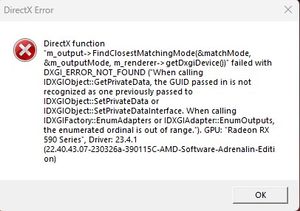
DirectX Error - PGA Tour PC


 Community Manager
Get either a fresh download of your current video drivers or an update if available.
Install those and then perform a 'clean boot' and retry playing.
Clean Boot: http://support.microsoft.com/kb/929135 or http://help.ea.com/en/article/how-to-clean-boot-your-pc/
Thanks.

Same problem here. Installation/refreshing and making sure that latest updates of GPU Driver, Windows etc. didn't fix the problem.IN addition I have tied far more light graphic option, but no results. I'm sure I'm not the only one with this problem. Instead of providing such simple not really helpful suggestion by EA I hope they will acknowledge this issue and come up with a real solution and a patch. Thanks

I have this same issue. I was able to temporarily resolve it prior to todays patch by going into the EA App/Settings/Application Settings/Disable In-Game Overlay. It used to occur frequently and upon disabling the overlay, I was able to play over 300 holes without issue. After todays patch (5/16/23), this issue has occurred twice within 20 holes.
Have tried all of the suggestions without success.
You are not alone very aggravating!


