Forum Discussion

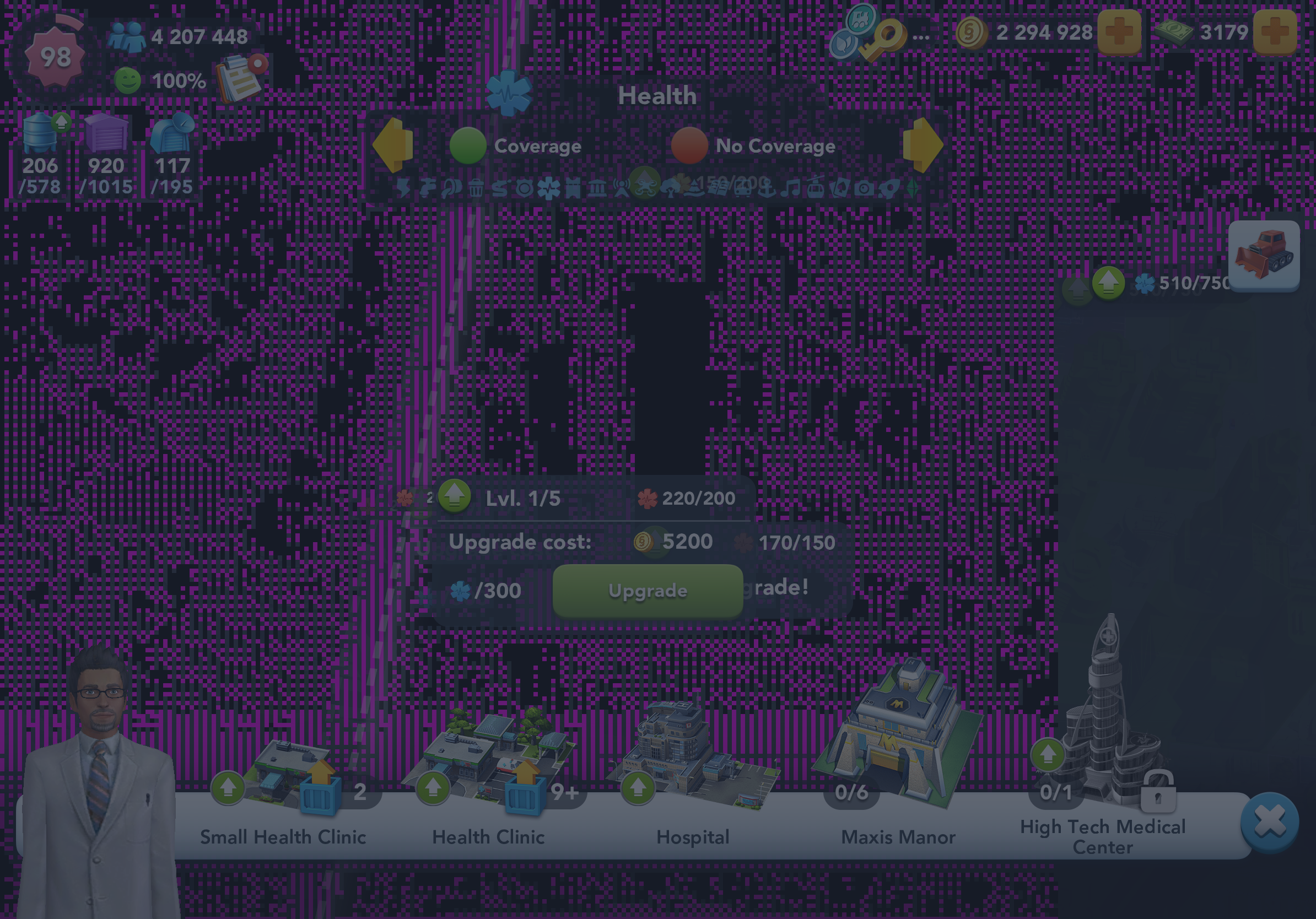
Re: Graphical glitches in SCBI - Pink Pixelated Frozen Screen

I’ve got the same problem that multiple others are experiencing with the game crashing when trying to move or add a services building into the capital city. EA support said log it on here. Only happens in capital city. I can’t complete the services update until this is resolved as the game crashes all the time. 

  • Device iPad Pro 11” 2nd gen
  • iOS version 26.2.1
  • Game version 1.74.2.150717
  • What you were doing when it happened adding a services building into capital city
  • Whether it happens every time or every now and again every time
  • Does troubleshooting help to resolve it temporarily, or not at all? No. Fault only in capital city.

20 Replies

  • 5hmgce589k0c's avatar
    5hmgce589k0c
    Rising Vanguard
    1 month ago

    I have the same problem and EA will do absolutely nothing!

  • 0i1zv1zk44uf's avatar
    0i1zv1zk44uf
    Seasoned Newcomer
    1 month ago

    I was advised exactly the same by EA Tech Support! I just posted here and I do not know how the Forum can resolve this issue if their own Tech Support are incapable of bug fixes.

    Did I miss something that we are now resolving this via Forum, rather than their software engineers?

  • f67e72038549a3ae's avatar
    f67e72038549a3ae
    New Rookie
    1 month ago

    This problem has been around for months. The new opportunities to spend your money keep flooding in, but EA are unable (or unwilling) to fix an issue which restricts your ability to actually do what the game is about: Build It.

  • Mikeyhoughton's avatar
    Mikeyhoughton
    Rising Traveler
    1 month ago

    Still not fixed. Comms from EA support is amazing.

  • Vernissa's avatar
    Vernissa
    Seasoned Ace
    1 month ago

    EA tell me that they cannot duplicated the problem which was reported months ago. They are probably trying on an Android machine rather than IOS! But rest assured, they are looking into it! Don’t hold your breath.

  • Mikeyhoughton's avatar
    Mikeyhoughton
    Rising Traveler
    1 month ago

    Nearly a week and still not fixed. Comms from EA is fantastic.

  • GiftedRere1986's avatar
    GiftedRere1986
    Rising Scout
    1 month ago

    I don't how this is not getting through to players...

    This is an Apple problem. With many devices becoming obsolete, performance is becoming increasingly poor. A number of factors involved, but iOS devices are experiencing recurring issues involving "Game Mode" since last year.

    It would be difficult to troubleshoot for every player's device to find the specific cause, but until people start listening, you'll keep getting upset with people who can't do anything about it because it's not on their end.

  • Vernissa's avatar
    Vernissa
    Seasoned Ace
    1 month ago

    I don’t consider my iPad 10th generation as obsolete! I have all the problems that everyone else has. Screen going black, freezing, error 17, constantly having to restart to mention a few problems. 

  • Superion777's avatar
    Superion777
    New Scout
    1 month ago

    Same issue too for a long time. 
    pixelated screen when I look at menu then try to move around. I have to reload game but it keeps happening b

  • GiftedRere1986's avatar
    GiftedRere1986
    Rising Scout
    1 month ago

    Right,

    I said "many," I didn't say "all."

    Here's the thing I'm encountering with my research, this is a common problem with iOS devices. EA has repeatedly stated, as frustratedly shown by players, it is not on EA's end and EA can do nothing about it.

    Well, how can that be, it's your game? 

    There's also the factor of internet service providers and device manufacturers. 

    A surefire way to know if it's the server or the device is to switch internet. If playing on Wi-Fi, play on mobile data. If it improves, then it's the server. If it does not improve, then it's the device. Same thing from Wi-Fi to Wi-Fi networks.

    If it improves when changing networks, then that means something has interrupted the route between the server and your device.

    What is most striking, I don't know if you use game mode or not, but game mode despite its intent has been shown to cause these issues when playing for long periods of time and the device starts to overheat. Even without using game mode, the same

    Even a battery optimizer or low power mode can cause these issues. 

    A malfunctioning power cable/charger can do the same.

    I'm talking too much. I suspect the primary culprit to be the "Game Mode" and there is no way to disable it completely.

  • Vernissa's avatar
    Vernissa
    Seasoned Ace
    1 month ago

    I was interested in what you said about Game Mode so investigated how to turn it off. Having turned it off, so far I have not had the black screen of death but early days yet. I still get error 17 problems.

    For those that want to try turning off Game Mode, when starting the game you will get the message Game Mode On. You have to be quick as it only appears for seconds. Tap on it and you will get the option to turn it off. Give it a try.

  • e1627f4980eaef2c's avatar
    e1627f4980eaef2c
    New Rookie
    1 month ago

    Why doesn’t EA provide this information? Seems like a simple thing to say to a support ticket.
    Note: I turned off game mode and Buildit crashed the moment I tried to play

  • GiftedRere1986's avatar
    GiftedRere1986
    Rising Scout
    1 month ago

    I couldn't say 100% whether EA would be able to share it or if they know. Their responsibility is their systems.

    Myself, I haven't been aware of this until the latest update and decided to help troubleshoot. Until I started having these conversations, getting feedback and doing some research, I wouldn't have even known about game mode because I'm an Android guy with no issues (except the occasional lag because of location or weather).

    And BuildIt crashing when game mode turned off (horrible), but provides something to work with.

    How much of the troubleshooting have you done?

    • Updates
    • Empty cache
    • Clearing background apps etc. (this may be the big one, they tend to use a lot of resources that game mode blocks from using)
  • e1627f4980eaef2c's avatar
    e1627f4980eaef2c
    New Rookie
    1 month ago

    I’ve tried:

    • restart
    • uninstall/install
    • clear cache
    • remove unused programs
    • clear cache from other programs
    • remove large files
  • Vernissa's avatar
    Vernissa
    Seasoned Ace
    1 month ago

    Two other things to try.

    Turn off background app refresh in system, general 

    System, accessibility, turn on reduce motion.

    These have been suggested for other games. Although the problem of the black screen, which used to be pink pixels, still happens it doesn’t seem so often. Doesn’t help with other things not working after not doing anything for 2 minutes either