Forum Discussion


RogueZeroRendar
8 years agoSeasoned Ace
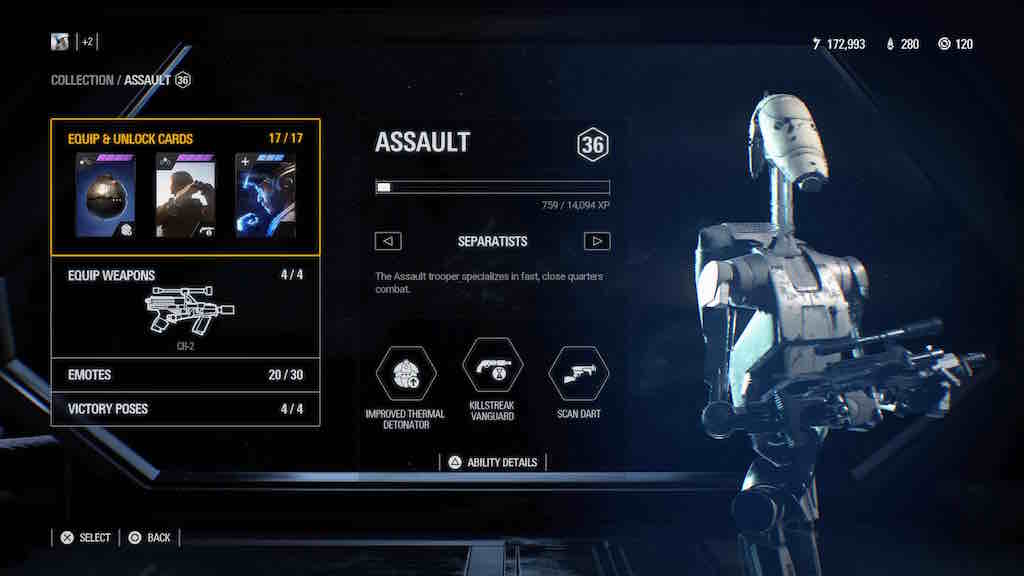
This happened to all my classes and heroes as soon as patch 2.0 was out. But I managed to fix it by entering each class/hero and then entering each menu option that had the yellow triangle and either changing the selected options (for weapons, appearance, and emotes) or just by clicking on another option (for star cards).
Every time I get a new emote/weapon/appearance I simply go there select the new option, and then select back the option I want and the triangle vanishes. And when I open a new Star Card with Skill Points, I simply click on any other Star Card that I haven't selected, and leave the menu and it's done.
Not sure if it'll work with everyone, but it did work for me. Next time I get anything new I'll record what I do and bring it here so you can see exactly how I do it. For now my game is clean of any yellow triangle.
 8 years ago
@RogueZeroRendar
That's how it's supposed to work. However, the problem is that it doesn't. They said they fixed it with 2.01, but that fix did not work, in fact - not for everyone, at least. For me, it partially worked, now when I actually had new things, the triangle disappeared. Problem is, with the remaining characters, this just can't happen, everything is unlocked at least on the lowest level, it's simply stuck. 8 years ago
Probably has to do with the new cosmetics. System probably was being prepped for the capability to have new appearances for classes/characters that previously did not have alt appearances. Standard appearance now looks "new" to the system but since there is no way to go in and look unless you actually have an alt appearance, we're stuck with the little yellow triangles. Most likely will be easily remedied once the second half of the progression update is released, since we'll then have the capability to buy/view alt appearances. I'm guessing starfighers don't have this issue because there will be no alt appearances, at least not at first.
Featured Places