Forum Discussion

nzt48sizwe's avatar
2 years ago

Stuck on Mantis, need latest update to proceed

Product: STAR WARS Jedi: Survivor
Platform:PlayStation 5
Summarize your bug Stuck on Mantis
How often does the bug occur? Every time (100%)
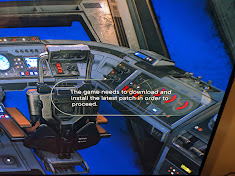
Steps: How can we find the bug ourselves? By playing from the beginning until you reach and broad the mantis. When you're on the mantis the R3 button that appears at the destination table doesn't appear and the cockpit when I click the R3 button it says: THE GAME NEEDS TO DOWNLOAD AND INSTALL THE LASTEST PATCH IN ORDER TO PROCEED.
What happens when the bug occurs? It says it can't proceed until the latest patch has been downloaded and installed
What do you expect to see? Expect to see a notification on the right of your screen about downloading and installing a patch

When I broad the mantis after playing the first part. I appear in the back of the mantis and when I go to the front there's no R3 button displayed or anything showing on the holocromb plus when I go to the cockpit and press the R3 button to land it says: THE GAME NEEDS TO DOWNLOAD AND INSTALL THE LATEST PATCH IN ORDER TO PROCEED.

edited title for visibility.  -puzzlezaddict

59 Replies

  • I am playing on PS5. I am at the part of the game that I have escaped and currently flying on a ship looking for my next destination however, the game says it needs to load and have the latest patch in order to proceed. I search and it says it has the latest update. I can not do anything else. I'm pretty much unable to play the game currently. Is anyone else experiencing this?

  • kandyj15's avatar
    kandyj15
    2 years ago

    Hey . Same for me. I uninstalled some games on my ps5 . Now its downloading something on my survivor game. The thing still says needs a patch. But i was googling and it said the rhey will be updating it in the weeks to come

  • The problem still on! All t he time Iam looking for a new update, and the console said I got alredy the latest version.

    What can I do now ?! 

  • Same here ! disgusting this , what the point bought this deluxe version and just play 1 hour of the game. And now ? Any solution EA ? 

  • kandyj15's avatar
    kandyj15
    2 years ago
    @wasterm591 Hey . Same thing for me . I uninstalled a couple games and now it seems to be working and downloading something.
  • I have the exact same problem. No download started. When i select "Check for available updates" it says that i am on the newest version. My version is 1.000.002
    And yes, i installed from a disk

  • EA_Leeuw's avatar
    EA_Leeuw
    Icon for Community Manager rankCommunity Manager
    2 years ago

    Hey @wasterm591,

    Is it possible that you have installed the game via a disc? If that is the case, you would indeed need to download the rest of the game in order to continue playing the game. The download should automatically start in the background once you put the disc in the disc drive of your PS5.

    Unfortunately, it is not possible to fit an almost 155GB game on one single Blu-ray disc, as they can only hold 50GB max, so an additional download is required.

    Alternatively, you can check if you have the full game installed and if there's a patch available for it by closing the game and pressing the Options button on your controller (while hovering over the game tile) > selecting "Check for available updates".

  • Jedi Survivor issues PS5 - The first level played great but I am now on the mantis traveling to the next planet and the game says it needs a patch before I can continue. I have checked repeatedly but am unable to get anywhere.  Any suggestions would be great. 

Featured Places

Node avatar for STAR WARS Jedi: Survivor™

STAR WARS Jedi: Survivor™

Join the community forums and talk with us about your experiences in STAR WARS Jedi: Survivor™.Latest Activity: 2 days ago
2,649 Posts