Forum Discussion

MTCason's avatar
MTCason
Seasoned Newcomer
10 years ago
Solved

Severe Server Lag Spikes

In Star Wars the Old republic I am getting fairly regular and sometimes severe server lag spikes, often going from full bars and around 80 ms latency to one red bar remaining and over 800 ms latency.  Attached, you'll find a graph made with PingPlotter.  In that five minute interval, I went first to Hoth, where there was no lag at all, then Odessen which was negligible, then to my Stronghold on Dromund Kaas where I had at least one noticeable spike and finally to the fleet where I charted one more.  I've noticed these seem to occur most often in my stronghold, and almost never on planet-side environments like Hoth.  I've run several speedtests on my computer to ensure my Internet connection isn't to blame and I'm running around 50Mbps up and 5Mbps down, no change there.  Any help you could provide or guidance into whether the server (Harbinger) may be having issues would be greatly appreciated.  I've never had issues of this nature before the last week or so.

  • @MTCason

    There is a connectivity issue occurring between the PC and Router according to that pingplot

    If wireless initially try a wired connection and see if it persists.

    Below is a pingplot  from australia , compare your asus modem/router (hop1) timings to mine

8 Replies

  • Anonymous's avatar
    Anonymous
    10 years ago
    Approved

    Sadly, that's just how the Internet works and as a end user you have limited control over it. Sometimes, certain routes on the Internet are busy and cause delays but usually this is just a temporary hickup and will get better a few days later.

    If it stays like that, you have the following options to force your computer to take a different route to the SWTOR servers, which may not have that high of a ping:

    • Use a VPN like WTFast or Pingzapper. Most programs have a free trial period which may be long enough for your normal connection to get better again, so you may not even have to pay for it.
    • Switch to a different Internet provider. But that's not too good of an idea since every provider can have problems like this.
  • @MTCason

    There is a connectivity issue occurring between the PC and Router according to that pingplot

    If wireless initially try a wired connection and see if it persists.

    Below is a pingplot  from australia , compare your asus modem/router (hop1) timings to mine

  • Anonymous's avatar
    Anonymous
    9 years ago
    Approved

    I was having the same problems after the 4.1 patch on the Shadowlands server. My game would constantly disconnect and have lags while playing. I tried all of the solutions above suggested by EA Tech Support. However none of those solutions worked. So I remembered I use Windows 10 and Windows 7 desktop themes. I tried to disable all parts of the themes, and discovered something unique. The custom cursors were causing problems in the game. Once I set those cursors back to the default settings, I no longer had server disconnects and lags. It sounds backwards, but just don't use any custom cursors in your Windows 10 or Windows 7 desktop themes and that should solve your problem!

  • Anonymous's avatar
    Anonymous
    8 years ago
    Approved

    I've much the same problem, my Ping tracker is a mess of red lines and my dvdiag is: https://hastebin.com/ifahoqaziw.tex

    sadly it's all Greek to me, some help would be much appreciated.

  • proxos666's avatar
    proxos666
    Hero+
    8 years ago

    @Danielmus_Prime

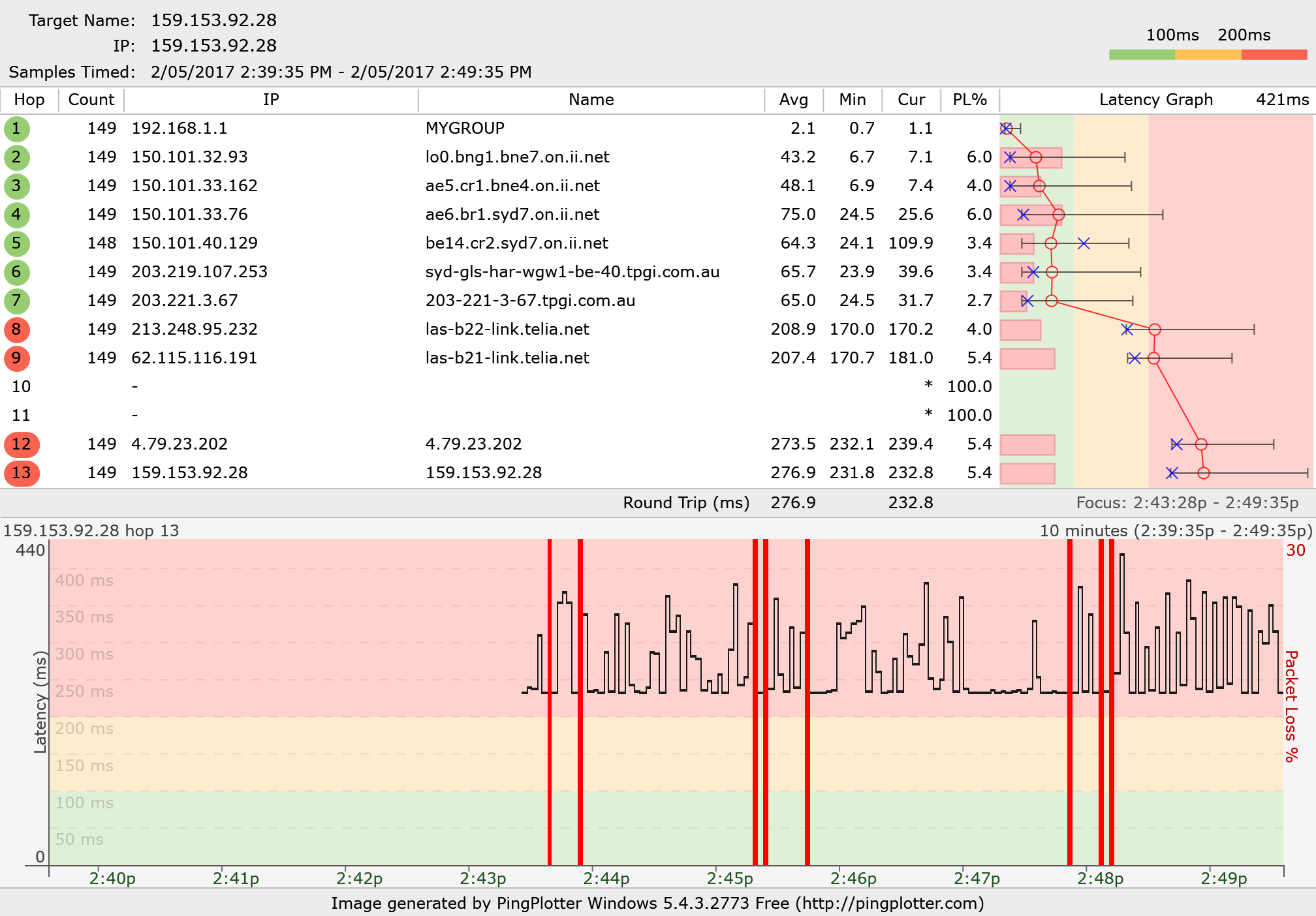
    Can you insert a pingplot image like below, the graph in pingplotter can be saved as a jpg and inserted into a post here

    Best to run the pingplot when the issue is occuring.

  • Anonymous's avatar
    Anonymous
    8 years ago
    Approved

    It's all Greek to me...

    Top one is today, I got a good 30 minutes of play in before the lag cascaded.

    second one is the other day, maybe 5 minutes of play

  • proxos666's avatar
    proxos666
    Hero+
    8 years ago

    @Danielmus_Prime

    Hey mate give these to iinet that looks like a link issue, compare your to mine in this thread both on iinet

    what is bad is the PL% appearing that is packet loss, and the plots suggests it is occurring across the link

  • Anonymous's avatar
    Anonymous
    8 years ago
    Approved

    Thanks, will do that 🙂

Featured Places

Node avatar for STAR WARS™: The Old Republic™

STAR WARS™: The Old Republic™

Check this forum for STAR WARS™: The Old Republic™ help, or to chat with other SWTOR players.Latest Activity: 17 hours ago
19,340 Posts