7 years ago
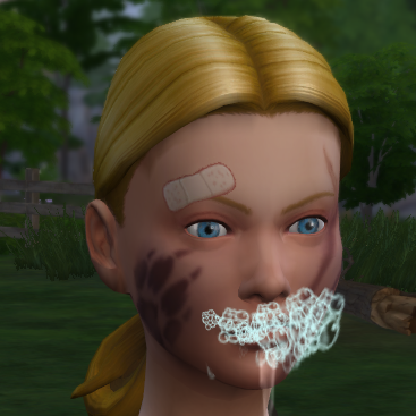
Custom skin?
So I downloaded a couple of default skin replacements for the first time ever (seeing the creativity of some sims in other threads here made my sims feel a little.. vanillaey lately :P) Put them in...

"Mikezumi;c-16815564" wrote:
I agree with @coco that you should keep clearing your caches and reloading the save. Even with a default replacement skin I have found that when I start a new save townies will often have EA skin on until the default replacement kicks in. Perhaps the blotchiness is because the skin is because it is still trying to cover the EA skin.
"coco;c-16815552" wrote:
@McTosh It's not you, I think it happens to everyone. Don't be disheartened, just keep clearing caches and restarting the game and eventually the skins will look normal I promise :smile:
"jillbg;c-16815651" wrote:
That happens sometimes with Navetsea's skins. They are very close to real life skins, so they might look blotchy. I use hairy4 for my main characters, as I think the faces are so natural looking, and navetsea adult hot as default. Then I use kursoberina's skins for my darker skinned and Asian sims, mangosmoothie for my oriental (Egyptian) sims. Those skins are beautiful, and less "blotchy", but also, in my opinion, not detailed enough.
Comparison navetsea and mangosmoothie:
https://greywitches.files.wordpress.com/2018/11/tgw01-29-119.jpg
Here's a link to a page on my blog where you can see a lot of the torso. The skin looks a little blotchy from the back, especially the spinal column...