[Current Issue] Sims 3 "serious error" when loading save

I have never had a problem plaing the sims 3 till now. I just dowloded the sims 3 on my new computer along with the 4 expansion packs that I have, but every time I go to load into the world I am hit with a very whited out screen and a message that says. " A serious error has occurred while loading sunset valley.sims3'. It is strongly recommended that you restart the application." This only happens when i have any of the expansion packs downloaded. It works fine when its just the sims 3 game its slef. Does anyone know why this is happing.
catgirl1776 Please see the first post of this master thread:
[Current Issue] Sims 3 "serious error" when loading save | EA Forums - 8322938

I hadn't played Sims 3 since mid January because of looming tendonitis. I tried to play yesterday and discovered that Origin no longer exists, so I started through EA App. And got the serious error message as soon as I tried to load my saved world. Without checking the forums first I have just reinstalled the whole game. I started up the vanilla game before putting in any of my backed up files and it ran perfectly. Then I added all my files and got the serious error. I can't even start a new game.
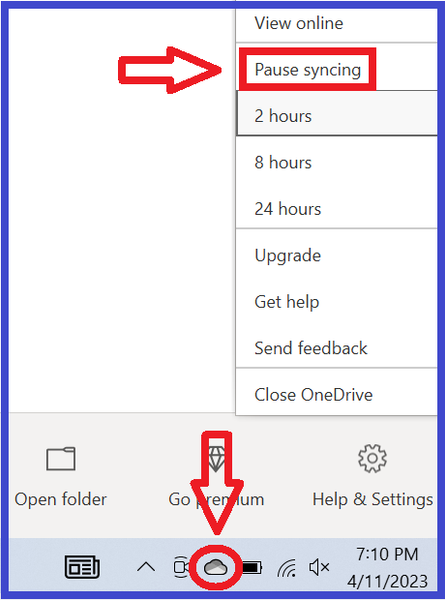
Then I checked this forum. I had noticed that One Drive was going mad while I was trying to play. I shut it down temporarily. I tried again. Still got the serious error. Now I can't even open the EA App.
I've been playing this game since June 2009 on three different pcs, transferring my game across. This looks to me like the end of playing. I had pretty much played out all the options and scenarios I wanted to, and this all seems like just too much trouble to fix to do more of the same playing. It was perfectly fine under Origin no issues whatsoever. I am not amused.
Hawkflight1066 Shutting down OneDrive isn't always sufficient to fix this error. You'd need to move your Documents directory out of the OneDrive folder, as described in the first post of the thread I linked above. The information is under the spoiler; start with the reg query command and go from there.
Basically I waited for about 4 hours or more for One Drive to upload everything it wanted to "back up", just to humour it. (I have a large game folder and only a medium speed internet so it took a while) So then I went to try to start the game. I had to "check" all the expansion packs as they had become "unchecked". Then I went to "downloads" on the launcher, being a bit suspicious. They were not showing on the launcher, as if I had none. Then I went to "installed content" Nada. So then I went to my EA Sims 3 folders on my laptop, in my documents folder and everything that I had installed there from my back up drive earlier today has vanished. It's not been simply "backed up". One Drive has actually emptied out all my EA folders from Saves to Cache, DC Cache, to downloads and removed the contents to One Drive. It has NOT made back ups, it has removed, taken away, made inaccessible the entire contents of my Sims folders including the Mods I had installed. Which it NEVER did when I was running Sims 3 through Origin, rather than EA. Something changed since I last played in January. One Drive has NEVER removed ANY EA files from my hard drive before, it simply creates back ups if I forget to turn it off. If I started using Steam instead of EA would that perhaps make a difference?
Testing testing- I have just put all my backed up Sims files back into the empty files wrecked by One Drive. The game started perfectly, my saved world loaded. I played for a couple of minutes and then saved, and all seems to be okay. I shall have to look up permanently disabling One Drive, so that it doesn't start wrecking again the instant I reboot.
Hawkflight1066 You should be able to tell OneDrive to stop syncing Documents, or barring that, unlink your PC and manually move the Documents directory out of the OneDrive folder. Everything is covered in the guide I linked.
When changing certain settings, OneDrive is supposed to remove the files from your computer and only store them in the cloud. That's why the guide says to make a manual backup. It will also store files only in the cloud when space on the system drive gets low, also by design.
Ahhhhh well I am very glad I had this problem with Sims after all, or I would not have thought about your very valid last point. And I would be panicking right now.
I went to process my latest batch of uploaded photographs. My entire over one year's worth of photographs had vanished from my pc. Hundreds of them. Thanks to this thread I immediately checked One Drive, and there they were. I have paid for extra One Drive storage to store paperwork for a church I work for. In the past my free One Drive storage capacity was inadequate for the Sims files, let alone months of photographs, so this problem would not have ocurred. So reading your latest reply above I then checked the remaining storage on my hard drive, and without the photos it is fine, but before - it was probably getting stretched. I suspect a hard drive overload triggered One Drive to remove everything from my pc that wasn't nailed down. My bad. Many thanks for your help which has turned out to be useful in more than one way.
Hawkflight1066 I'm glad I could help then. Let me know if you have any more trouble with the game, but hopefully this is the end of it.