Sims 3 Black Screen Error
Hello, I have been playing the sims 3 for years at this point and have never had this issue. I redownloaded the game last summer so my 3,000 plus hours are no longer there to prove it. However, I tried the Fullscreen set 0 in Options.ini and that still was unhelpful. I removed mods from the game, and am more confused than anything on what exactly seems to be the problem. If anyone here knows how to fix it that would be much appreciated.45Views1like1Comment
Now romantic interest Sim won't cuddle on couch or hot tub
So previously, I downloaded a bunch of mods that allow for teen-young adult relationships, but that I was having issues with the two sleeping in the same bed. Now I'm having issues with that same Sim couple not being able to cuddle on a couch and have the option to be able to do all the romatic interactions. And come to think of it, same goes for the hottub and the option to skinny dip. Literally, the option in the pie does not show up. Appreciate any help I can get 🙏43Views0likes2Comments
Sims 3 Launcher suddenly wont launch anymore
Hey, a few months ago i was playing Sims on my laptop (see specs below). The next day it wouldnt work anymore. When i click play or start the .exe the EA App briefly closes and reopens. I tried all of the stuff on the internet. I am not really a tech noob, so i really dont know what to do anymore. I dual boot with Linux/Fedora, i dont really use Windows 11 anymore, i just kept it for Sims, so me "destroying" something on windows feels unlikely. Thats what i did: 1. Reinstalled several times, now only trying to install base game. When i tried installing Expansions it failed. When i clicked on deinstall in the EA App it brought me to the Windows App manager where i couldnt find the sims, so i had to delete all the folders, and also... (see 2. ) 2. Cleaned Registry Entries 3) Reinstalled EA App several times 4) Tried Compatability Mode 5) Run as Administrator 6) Checked if all the MS C++ Redistributables and .NET are installed (They were and are) 7) Repaired Windows System Data with: sfc /scannow 8) Cleaned Cache in EA App, Sims 3 Cache (Did that before the first deinstall) 9) Deactivated Game Overlay 10) Repaired the Game I dont know what to do anymore. Two evenings i wanted to play the sims that are gone now. My poor weekend. Thank you for any help. Laptop specs: (It ran so smootly omg) Lenovo Thinkpad P16s, AMD Ryzen 7 PRO 7840U w/ Radeon 780M Graphics , 32 GB RAM with 6400 MT/s, More than enough SSD Space,59Views0likes1Comment[Current Issue] Sims 3 "serious error" when loading save
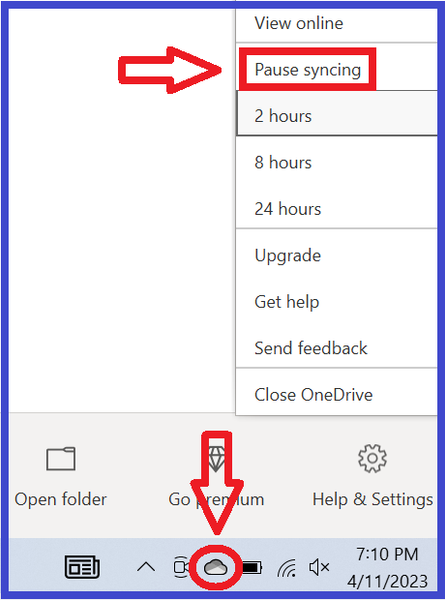
Overview "A serious error has occurred while loading [world name]. It is strongly recommended that you restart the application." This error happens when the game is unable to load the save. There are three known causes, the first more common than the others. The game can't write to the user folder The world the save takes place in isn't installed properly The save is too corrupt to load properly To distinguish among these types of errors, try to load a new save in the same world as the save that threw the error. If it works, you likely have the third issue. If the new save doesn't load, try starting a new save in Sunset Valley. If it works, you likely have the second issue. If it doesn't work, you likely have the first issue. The short version At the moment, this error is usually OneDrive-related, and pausing syncing doesn't help most players. So you may need to stop OneDrive from touching your files at all. Please see this section of the guide for further information, under the spoiler: How to get rid of OneDrive Workarounds 1. The game can't write to the user folder jump to: OneDrive-related issues jump to: antivirus-related issues jump to: other causes When loading a save, the game needs to copy the save data into Documents > Electronic Arts > The Sims 3 > CurrentGame. If it cannot, it typically throws the "serious error." Common causes of this block are OneDrive, an overly protective antivirus, and other assorted permissions issues. OneDrive Currently, the most common cause of the "serious error" is OneDrive blocking access to Documents and therefore preventing Sims 3 from writing to the user folder inside. This is only possible if your Windows account's Documents directory is inside the OneDrive folder. (Your computer will have several Documents folders, but only one is the directory.) To find the location, search in Windows for Command Prompt, open it, and enter this command: reg query "HKCU\Software\Microsoft\Windows\CurrentVersion\Explorer\Shell Folders" /v "Personal" If the file path includes OneDrive, that may be the problem. (Otherwise, see the Antivirus and Other sections below.) For possible OneDrive issues, try pausing syncing. This is not a proper fix, but it's a useful test and interim workaround. To see the option, right-click the cloud icon in the lower-right corner of the screen, or it may be hidden in the Tray (^ icon). If this doesn't help, or you'd like a permanent fix, you may need to move your Documents folder out of OneDrive. If you don't want to do this, or you'd rather test first, an alternative is to create a new admin Windows account and try playing there. Make it local—don't link it to your Microsoft account or any email address—and OneDrive will not be in the picture. If you can load a new save in the new account, it's fine to keep playing there. Or you can get rid of OneDrive entirely: If getting rid of OneDrive doesn't help, please create a new admin Windows account and try playing there, as described immediately above the spoiler. Antivirus An overly protective antivirus can block a program's access to Documents and everything inside. To find out whether this is the cause of the error, try disabling the antivirus, temporarily of course. If it fixes the issue, set an exception for TS3.exe (for an EA App install) or TS3W.exe (with the W, for a Steam install or a disc install that doesn't require the EA App). You may not see the .exe extension, but that's fine, it's the same file. The default location is one of these, depending on the install type: C:\Program Files\EA Games\The Sims 3\Game\Bin C:\Program Files (x86)\Steam\steamapps\common\The Sims 3\Game\Bin C:\Program Files (x86)\Electronic Arts\The Sims 3\Game\Bin If you don't know how to set an exception, google "set exception [antivirus name]" to find a guide. Or see this article for a few examples: https://crinrict.com/blog/2020/10/add-exceptions-to-anti-virus-programs.html Other Causes The Documents directory could be in an unusable location. Or permissions could be broken on the Documents directory, or a folder inside. For more information, expand the relevant spoiler below. Move Documents to a new location: Broken permissions: ↑ 2. The world the save uses isn't installed properly If you can load a new save in a different world, but not in the world in which your main save takes place, that world is probably not properly installed. For Sunset Valley or a world that comes with an expansion (e.g. Twinbrook, Bridgeport), please clear the EA App's cache: https://help.ea.com/en/help/faq/clear-cache-to-fix-problems-with-your-games/ and repair the game: open the EA App game library, and select Sims 3 > Manage > Repair. For a Store (e.g. Riverview, Dragon Valley) or custom (player-created) world, first uninstall it through the launcher's Installed Content tab. Then open Documents > Electronic Arts > The Sims 3 > InstalledWorlds and make sure the .world file for the world you removed is no longer present. If it is, delete it. Open Downloads, in the same Sims 3 folder, and delete the .Sims3Pack file for the world. You can reuse it if necessary, but installing with a new copy is more reliable. Finally, download a fresh copy of the world, install it, and try to start a new save in that world. If it works, the world is now installed correctly, and you can test your main save again. ↑ 3. The save is too corrupt to load properly If you can load a new save in the same world, but your main save throws the "serious error," that save may be too broken to use, but there are a couple of steps you can try. First, open Documents > Electronic Arts > The Sims 3 > Saves, and you'll see a folder with your save name plus another folder with the same name and a .backup extension. For example, you might see SunsetValley.sims3 and SunsetValley.sims3.backup. Rename the save and delete the .backup extension (e.g. SunsetValley1.sims3), and the save will be available to load from the Main Menu. If you can load the backup save, it could still be corrupt enough to be unusable later. So as soon as it loads, use "save as" to rename the save so that your backup is preserved in case you need it later. I would also strongly recommend seeking out mods, specifically NRaas ErrorTrap, Overwatch, and MasterController, to try to repair any corruption. ET and OW do their work in the background, with no need for player input; MC does nothing unless you use it to issue a command. Once the save loads, let the game clock run for a few sim-minutes, then click City Hall and select NRaas > MasterController > Town Options > Reset Everything. This may take a few minutes, depending on the speed of your computer and the complexity of the save. When it's done, wait a few more sim-minutes, then "save as," quit, reload the game, and continue playing. If you cannot load the backup save, start a new save in the same world, pick a premade household, play for a few sim-minutes, save your progress, and quit. Open the folder for your backup save, right-click the .nhd file for the world the save takes place in, and select Copy. Open the folder for the new save you just created and delete the .nhd file for that world. Right-click and Paste the .nhd file from your backup save. Then try to load the "new" save. The thumbnail at the Main Menu won't update, but if you can load the save, you'll see your previous save, not the new one. If your sims have traveled to other worlds in the previous save, and you would like to preserve that progress, you'll need to copy over the .nhd files from those worlds as well, and the TravelDB.package file. But please test first with only the homeworld's .nhd file. I would recommend the same mods as above in this case as well. Saves that are almost too corrupt to load won't last much longer without help. ↑ If you need further help with this issue, please post in this thread. State which of the three problems you have, from the list at the beginning of this guide, and what troubleshooting steps you've tried already. ↑20KViews8likes463Comments
Sims 3 DLC removed from account
Sims 3 Into The Future Expansion Pack doesn’t show up in the Sims 3 Launcher under expansion packs, despite being listed as owned and installed in the EA App. (It used to work fine). The base game and all the other expansion packs work/play without issue. I have had an open case with EA “Help” and have contacted them numerous times via email and chat over the last 3 weeks and they have been entirely useless. I have conducted extensive troubleshooting and have exhausted everything on my end including: Uninstalling, re-downloading and installing the Sims 3 and the addons/expansion packs I own, including installing to a different install location. Used the EA App repair function. Uninstalling and reinstalling the EA App. Clearing the EA App cache. Running a CCleaner to clean registry files. Running EA App in administrator mode, with background tasks and antivirus software disabled. Restarting my system (yes thanks (IT Crowd) EA Help). I have asked whether the game entitlement has been removed from my account. I provided EA Help with my product code and they seem to suggest that it is indeed in my account. So I assume I don't need to rebuy the expansion pack? In the latest chat with EA Help they have told me that they’d made some changes on my account and it should be fixed, it is not! They finished today by saying they have exhausted all the troubleshooting steps and have requested that I post this here so a community manager can have a look and help me further. I would appreciate any help you could give me. (Apologies if I've posted this in the wrong place).Solved3.6KViews0likes51CommentsSmooth patch is not working
I don't understand it at all, I've tried everything: adjusting settings, changing the numbers, and trying other versions... but nothing works... it started when my C drive got too full, then I got the tip: install The Sims 3 on D (another hard drive with more memory), so I did that and since then it hasn't worked anymore. When starting up I do get: game patching! So it does work.... only I don't notice it in CAS.... eventually I reinstalled The Sims 3 on C using a symbolic link, because we thought that if it's back on C, Smooth Patch would work again, but unfortunately not.... and Smooth Patch did work before, I discovered it in March 2026 and it worked fine, I'm really racking my brain over this...And I also don't understand why every time I reinstall my game, that Smooth Patch stops working... it's just weird and annoying, because I don't know what to do to get it working again...I do get a notification when starting the game: game patching! So it does work, only it doesn't do anything in CAS... I am using version 1.69 of the game.Solved270Views0likes15CommentsSims 3 won't open in Lenovo LOQ laptop
Hi everyone, I'm having a serious issue with The Sims 3 and I'm hoping someone can help me. My specs: - Lenovo LOQ laptop - Intel Core i5 (12th or 13th gen) - NVIDIA RTX 3050 - 16GB RAM - Windows 11 - Game installed via EA App The problem started when I tried to load any world (Sunset Valley, Bridgeport, etc.) and kept getting this error: "A serious error has occurred while loading [world name]. We recommend that you restart the application." While trying to fix it, I followed some advice and enabled Windows 7 compatibility mode on the TS3.exe file. After that, the game stopped opening entirely. I have since uninstalled and reinstalled the game, and also deleted the Documents/Electronic Arts/The Sims 3 folder, but the game still won't open at all. I also installed DXVK (d3d9.dll) and Ultimate ASI Loader (wininet.dll) in the Bin folder, and created a dxvk.conf file with custom device settings. Has anyone experienced this or know how to fix it? Any help would be greatly appreciated! Thank you!
URGENT!!! My sims 3 pets game has sort of crashed and i cant save because its on build mode
So the game has kind of frozen and crashed. its It is letting me click but it doesnt follow through with the comand, say i clicked 'live' mode it would select it but not actually go on it. I need to save this game as i have spent a LONG time making and furnishing this huge house. If i could add pictures or videos this could be easier to show you what has gone wrong. When i click on the land is says 'set front of lot'. Also when i click on any furnitre it comes up with four options, 1; 'Thumbnail camera...' 2; 'Delete it'. 3; 'clone' or 4; 'reset'. Im basicly stuck on build mode, which means i can't save my game. And its killing me. The only way i can get up the menu bar ('...') is by clicking F5. I am on an apple mac. The bar which actually contains the furniutre and objects has disapeared too. please help as i am completely stuck3.9KViews0likes14Comments
Connection to server lost
Hi, I recently got a new computer and installed all my Sims 3 on this new computer. Everything is find until I have to sign in on the game launcher. Says my connection to the server has been lost. Also, there is nothing on the welcome page...all blank. I went onto the old computer where the game is still there, and I got right in. I signed out of everything on the old computer and tried on the new one...same issue. Any suggestions?81Views0likes1CommentGraphics card not recognized
Hello there! Apologies this isn't my first rodeo with this issue but recently using a new pc and my graphics card isn't recognized. I'd be super grateful if someone could give me a hand! This is the info I was able to dig from my deviceconfig: === Graphics device info === Number: 0 Name (driver): NVIDIA GeForce RTX 3060 Ti Name (database): NVIDIA GeForce RTX 3060 Ti [Found: 0, Matched: 0] Vendor: NVIDIA Chipset: Vendor: 10de, Device: 2489, Board: 40771458, Chipset: 00a1Solved1.6KViews0likes5Comments