Poor graphics/low-resolution/graphics glitches (TS3 64-bit)


So I just installed the 64 bit and metal version of TS3 on my 2019 16" Macbook Pro and it runs great, I actually am not having any issues so far - Except some pretty terrible screen tearing. I've tried playing in windowed and fullscreen and neither work. Any suggestions on how I can fix this?
Thanks in advance!

@itsmikeee64 What resolution are you using in-game, and does it help to reduce it? In fullscreen mode, make sure that you choose a supported scaled res for your Mac (2048 by 1280, 1792 by 1120, 1344 by 840, 1152 by 720).
What kinds of framerates are you seeing in-game? Bring up the cheats console (it's cmd-shift-C now) and enter "fps on" without quotes. A number will appear in the upper right corner of your screen.
Please also test in Sunset Valley, if you haven't already.
@puzzlezaddict I have tried both fullscreen and windowed mode, and have tried just about every available resolution. Doesn't seem to change. And yes, I am testing in SV. FPS range from 55-60.
@nana35712 I'm pretty sure this is an issue with the 16" Macbook pros, and not a 64 bit issue, which is why I posted here. Please be educated before you try to patronize me by saying to be patient with a game I've spent >$500 on.
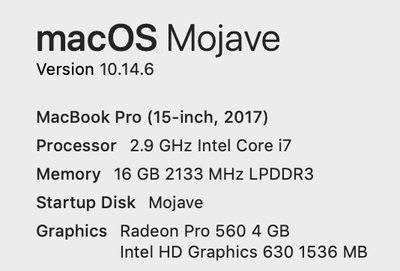
@itsmikeee64 I saw some screen tearing on my 15" MBP (2017) last night, so it's not exclusive to your particular model. But you're right that the 16" models have had quite a few issues with graphics performance, and what you're seeing could definitely be part of the larger problem.
It's very possible this won't get addressed, but in case there's something to be done, more information would be helpful. Please list the full specs of your Mac, including operating system, as described here:
Please also grab some information about your graphics drivers. Open Applications > Utilities, launch Terminal, and copy and paste this line:
kextstat | grep -E -i "(amd|intel|graph)" | awk '{printf "%-50s%-20s\n",$6,$7}'
Please paste the results here.

I just realized that I have this same issue! 2020 Macbook Air!
I think someone suggested making my graphics lower! And now my game works (yay!) With CC at that WOOHOO! There is grain in the hair though, which I will look past cause at least my game works!




