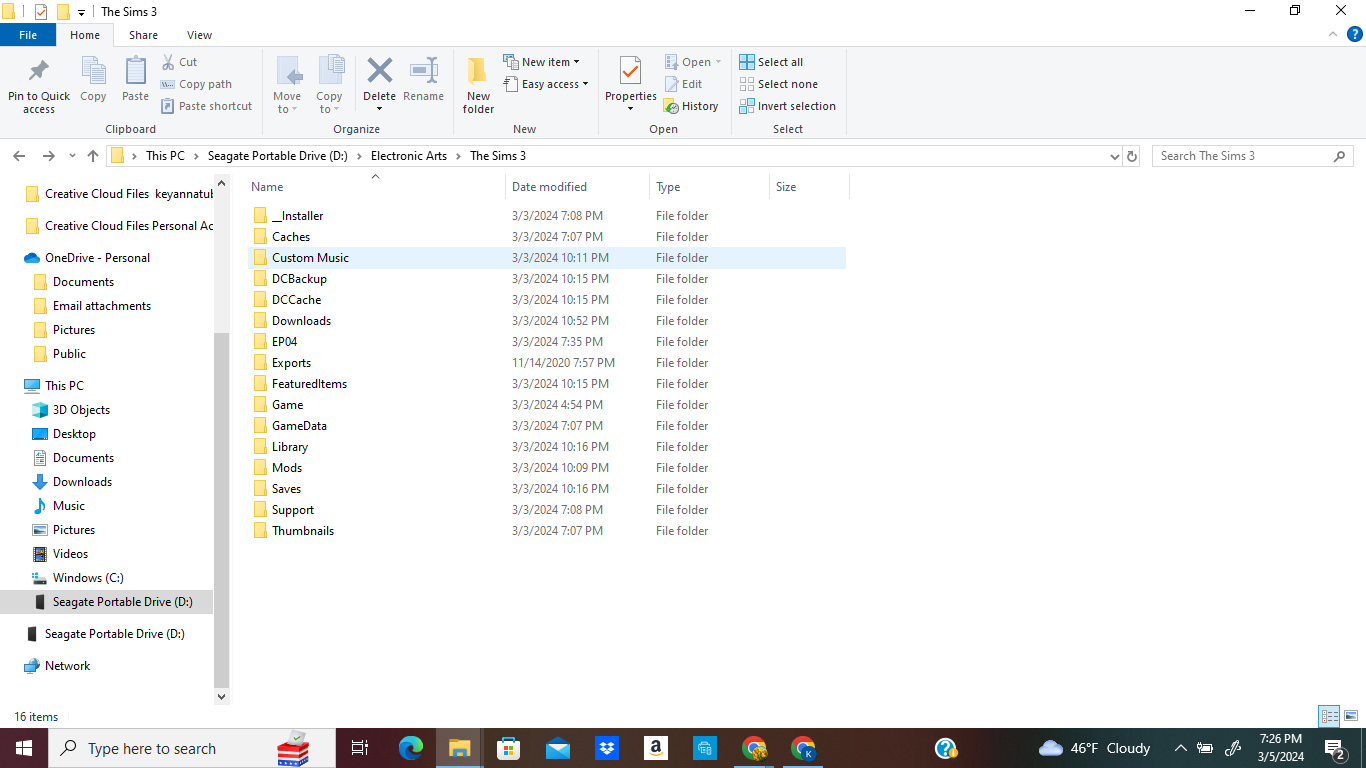
@puzzlezaddict - Thank you so much for getting back to me so quickly! Sorry if my explanation gets complicated so please bear with me.
About some of the files that you are seeing (if you're referring to the "\Electronic Arts\The Sims 3\" and not the "\Game\bin\" folder), this was when I transferred some of the backup (copied) files from my flash drive (PNY 1TB) to my external SSD drive (Seagate). So, originally (before I knew you can't just drag and drop a game folder from one drive to another because of registry entries) -- I was planning to transfer my game to a flash drive but learned that an external SSD drive would be better and that I would have to uninstall the game from my Windows PC drive and then reinstalling it directly to route to my external SSD drive.
Once I did that, the files that I did have in my "Seagate Portable Drive (D: )\Electronic Arts\The Sims 3\" folder were only ("_Installer", "Caches", "Game", "GameData", "Support", and "Thumbnails"). I looked and compared it with my flash drive "USB322FD (E: )\Electronic Arts\The Sims 3", and thought to drop in ("Custom Music", "DCBackup", "DCCache", "Downloads", "EP04", "FeaturedItems", "Library", and "Saves"). If these are the files you are referring to that should have been under User files, these would be the only files I transferred. The other files were there on their own upon reinstallation. I also left out some other files I saw under my flash drive but didn't think to transfer them in (PS: not an expert on these sorts of things). So, they might be the files that you said are missing.
I can share with you an attachment of what I do have in my flash drive. To see if you can help me understand. Then, I can transfer the necessary ones and you can tell me if they should be in another folder (User folder). One question: Would I have to create this User folder or should it already be somewhere in my external ssd drive? So that it won't have to be mixed/combined with "The Sims 3" folder.
Btw, I don't believe I properly transferred everything to my flash drive either and because the method that I used was the "copy and paste" method, none of the game launch files work on there if I click on them in there. So I have some files that were manually transferred from Windows to there but not all files.
I also followed what you said about looking through the Documents folder and luckily I did find it! (I was afraid I would not be able to find it because I thought that I already deleted most of the sims-related files from Windows) but I see them there. I also noticed I have the copied version in my flash drive "The Sims 3" folder too.
Okay - I have attached the photos for the first 40 lines of the DeviceConfig file after the "--Options--" line. Let me know what are my next steps. Thanks!
https://imgur.com/a/guglkk9

 2 years ago