Forum Discussion
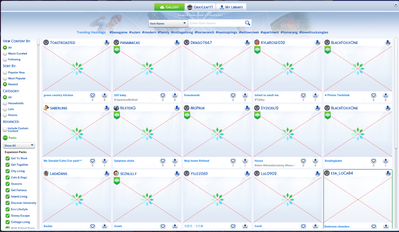
This has been happening before the recent update and I've tried every fix I can find online. When I open the gallery it shows as if it's loading then all of the images are crossed out with red crosses. I can't save or download any new content. I've done everything I can find on google; I've removed mods/cc, repaired the game, moved the tray folder out, signed out, gone offline, refreshed the app. Nothing is working and I haven't seen others with the same issue. Can anyone help???
Have you tried uninstalling and reinstalling the game, deleting the localthumbcache.package file, or renamed your current folder to "The Sims 4 (Old)" so the next time you launch it will generate a new folder as a clean launch to see if the issue is still there after any of that?
Do you use any tools or third-party applications for it like Tray Importer and/or Sims 4 Studio?
- abbieclairking7 months agoSeasoned Newcomer
Just tried all of those and it's still broken :(
I don't use any third-party apps
- Beerus-sama77 months agoSeasoned Novice
Strange... I remember having that issue once, but it kind of fixed its self. I still don't know why it happened though.
- abbieclairking7 months agoSeasoned Newcomer
So weird it seems like its fixed itself now, I've been trying everything for weeks!! Suddenly it's fine. No idea what the issue was either.