Forum Discussion

Re: Multiple Saves, CC, MODS, and More

@candiecoatediv At the load screen click "New Game", create or select a household (doesn't need to be one you'll use), after exiting the CAS to the worlds screen, go to the three dots at the top left of the screen and choose 'save as', give this game save a unique name you'll know, then save. Now when you enter your game, at the load screen if you hit the blue play triangle it'll fo the last game you were playing, or you can choose the 'load game' button and select which game you want to play.).

You should have separate 'Game Options' settings within each new game. All of the settings on your other game should remain separate. You can adjust the aging, weather, etc., in each game separately.

When you begin a new game it is a fresh, new one like you began with in the first place. If you want to move any of your households into it you can by first saving them into your library in the gallery, then add them to the new game. They will load into the new game with their skills, but lose their inventory and money. They will just have the base household money like others in the library.

You can save multiple games this way. Just name each one something different so you don't get them confused. 😉 The following should help to clarify this more.

Before you begin it's always good to save a backup of your current game save, though.

This video shows how to save a new game for different households, for example: https://youtu.be/zWuCxjTlJf0

This thread discusses 'save', 'save as' and 'new game' a bit, which may clarify a few more things: https://forums.thesims.com/en_us/discussion/808391/what-do-load-game-new-game-and-save-as-do

More info on new game saves: https://forums.thesims.com/en_us/discussion/870322/if-i-create-an-all-new-game-will-my-existing-game-delete

11 Replies

  • candiecoatediv's avatar
    candiecoatediv
    Seasoned Ace
    7 years ago

    @SheriGR Thank you! I will take a look at the links below. Now will the game options for CC and Mods work the same way. For example if I have them enabled in one save but not another it won’t effect the save without then enabled?

  • stbnchristine's avatar
    stbnchristine
    Not applicable
    7 years ago

    The mods will work in the other save(s). I always move the entire sims folder to a backup location and launch the game allowing it to creat a new The Sims 4 folder when I want a game without any or different mods.  Then from my backup folder I can copy whole games back into the Electronic Arts folder to play it. This is important because if you have any cc in a save and load it without the cc it will get broken and need to be reapplied. 

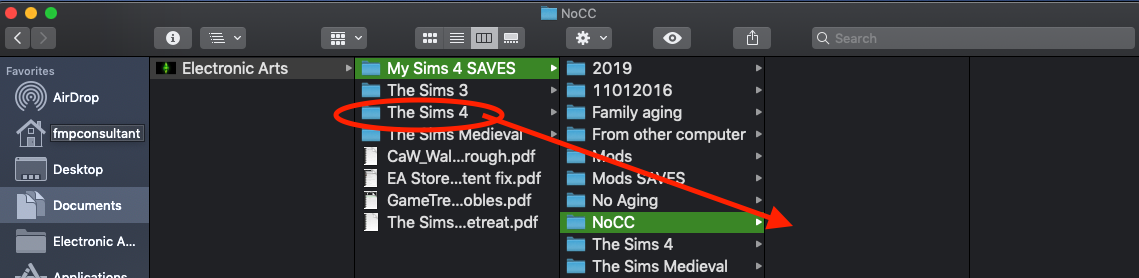
    The path to to where we are talking about is Documents/Electronic Arts/The Sims 4 inside this The Sims 4 folder are the folders Mods and Saves which are where these files are stored. 

  • SheriGR's avatar
    SheriGR
    Hero
    7 years ago

    @stbnchristine Thank you for the additional information. So to clarify, you are saying this is how you 'clear out' the mods folder from your games & from a new game you want to begin - you remove your 'The Sims 4' folder, let it regenerate a fresh folder, (with an empty mods folder), then just re-add your saves into the new game? (So there is an empty mods folder and all mods are gone for all games at that point.) If so, does this mean Mods not game/save-specific?

  • stbnchristine's avatar
    stbnchristine
    Not applicable
    7 years ago

    Hey @SheriGR I missed one point from your questions.  Yes I always let the game generate a completely new folder for me.  That way no odd file is missing or damaged and the game generated resource.cfg file is clean.  Then if I want no cc just play it... if I want to add limited cc I can.  Letting the game generate the new folder is important if you want to be as bug free as possible.

  • candiecoatediv's avatar
    candiecoatediv
    Seasoned Ace
    7 years ago

    @stbnchristine And @SheriGR

    thank you! Now let me see if I understand this correctly. 

    For the the game I want to play CC/MOD free I should remove it from the sims folder to a safe place and label it so I know it is the CC/MOD free game. This allows the game to generate a new dimes folder in which I can enable MODS/CC content. Then when I want to switch them move this folder to a safe location and label MODS to keep them separate. Then start the game to generate a clean game, then move the “clean” game back into the folder to ensure all cc and mod content has been cleared? 

  • stbnchristine's avatar
    stbnchristine
    Not applicable
    7 years ago

    @candiecoatedivThat is the idea.  Just make sure you move "The Sims 4" folder.  Check out the attached picture... a picture is worth a thousand words.

  • candiecoatediv's avatar
    candiecoatediv
    Seasoned Ace
    7 years ago

    Okay. I only have one folder The Sims 4. This is the folder I’m moving correct? 

  • stbnchristine's avatar
    stbnchristine
    Not applicable
    7 years ago

    Yes move it somewhere else and then launch the game from origin and the game will build a new The sims 4 folder.  Then click the three dots at the top and select game options. Choose the other tab and check enable custom content and mods.  Apply the changes and quit the game.  Add cc/mods to Mods folder and launch.  Now you have a Mods game to use and your old NoCC game is safe to use when you want.