[MOD RELATED] Sims disappeared from household/Blue flashing square on map
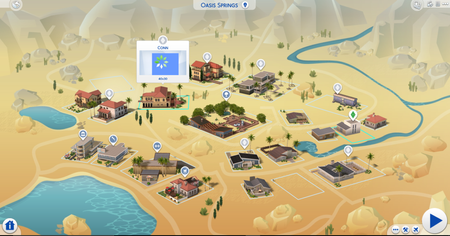


i got in my game and i tried to play with my household but when i clicked on it, the sims were missing and there was a blue flashing square instead. i don’t know how to fix it. i removed my mods folder to my desktop and tried to see if it would help, but my household remained the same. please help!!


@emmymaurice Please read this thread from the technical forum: [MOD RELATED] Sims disappeared from household/Blue flashing square on map - Answer HQ
Perhaps you can recover a backup for use, I hope.
I imagine you would like to find a permanent solution to the issue because I would, too. Since crinrict shows on the first page of this thread the issue seems to be usually caused by saving the game with an outdated mod in your folder, I would double check that all the mods you are using have been updated to work with the most recent game version. If any of them haven't, don't use them.
If I was in your shoes, I would move the mods folder to the desktop after checking for updates, delete localthumbcache, do a game repair and start a new mod/cc free game. If all was going well, I would then start adding mods in one at a time to find the culprit for causing the issue. Yes, time consuming I know, which is exactly why I weaned off mods/cc myself. If you find the culprit, please do post the name for crinrict, as requested on the first page of this thread.
I do wish you success in tracking this down and am glad that you had a backup that worked.