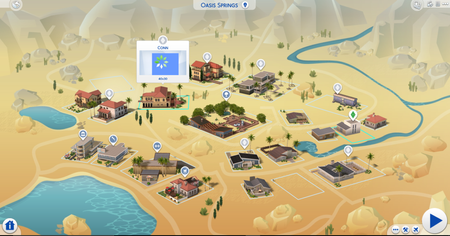
[MOD RELATED] Sims disappeared from household/Blue flashing square on map


Product: The Sims 4
Platform:PC
Which language are you playing the game in? English
How often does the bug occur? Every time (100%)
What is your current game version number? 1.71.86.1020
What expansions, game packs, and stuff packs do you have installed? All except for Backyard, Romantic Garden, Paranormal, Bowling, My First Pet and Spooky
Steps: How can we find the bug ourselves? I don't know how you can find it. I know that whenever I play University my sims household is almost never there when I come back to the game the next day. I can have one game play out of 10 that this would not happen to me. I played with mods and without Mods it still gives me the same results. I can play the game from home and nothing happens with or without mods sometimes
What happens when the bug occurs? So when this happens, I have the sims at the another dorm as my household. I have my household name, but it's not my sims that are present. I can't click the start button and when I go into Household edit screen. The screen is blank with the name and money amount. If I try to edit them inside CAS it's a completely different sim.
What do you expect to see? Well I would like to be able to play university without having to start over from the beginning. I don't think it's a mod thing since I done this with no mods at all and it still happen to me. It seems to work when I don't go to the university.
Have you installed any customization with the game, e.g. Custom Content or Mods? Yes
Did this issue appear after a specific patch or change you made to your system? Yes
Please describe the patch or change you made. I want to say the problem started to happen in or around of November of 2020. I thought it was a college mod that was out of date so I took it out, It worked fine than a few weeks or so later it did it again, so than I just got rid of all the mods, It worked fine than it did it again. I just tried to just do school from home and it worked fine no problems when I had that game file.
https://drive.google.com/file/d/14nJtnt38zYI6N1vtxEwba6cnDgQJqRHa/view?usp=sharing
https://drive.google.com/file/d/14qRqr9Mgltdbefn4_a5NbTU14Q8Fejmn/view?usp=sharing
https://drive.google.com/file/d/14x-RI5_HU7VuL5TrIaPrYI6T4atMxFoa/view?usp=sharing
https://drive.google.com/file/d/150o5kbzlWKGcRrSVyoabUROkHNXteBLM/view?usp=sharing
https://drive.google.com/file/d/153bDq6-B16CB1vnpAmVbQyVdsDe5oc7t/view?usp=sharing
I don't know if anybody else was or

I'm not exactly sure what is going on. But in one of the pics I see the little loading icon where the game is loading the thumbnails and they haven't appeared yet.
So since you've said that you have played with mods in the game and out of the game, did you try deleting the localthumbcache file. No worries as the game just creates a new one when you restart. That should fix what you are seeing.
That file holds all the thumbnails that you see in the game. Those thumbnails regenerate all the time while the game is running. But if you have made a lot of changes to your mods and cc, then it will cause some issues with icon display like portraits and in manage households.
So try deleting it. The only thing you should see is that is takes a few seconds and maybe a few minutes for the portraits, etc. to regenerate the next time you play the game. Just give it time to let them show again and all should be well.
Hope this helps.



