Mods didn't show up in game... now game wont open
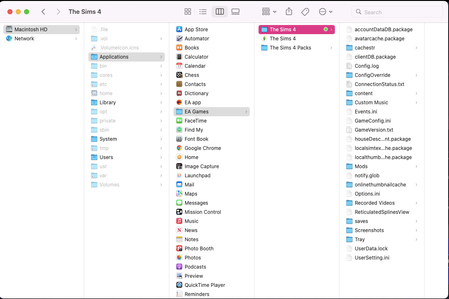


aambush_ This thread shows exactly where the Mods folder the game creates is: How to Use Mods and CC You want to be putting your files in that game-created folder. After making sure you have files only where they belong, test again. If nothing shows up at all, make sure that mods/CC didn't un-disable themselves in the Game Options.
These topics list known broken and recently updated mods/CC:
The How to Use Mods and CC post has a section on how to go through your Mods folder if you still have issues after dealing with known broken and recently updated content.
Thank you so much! Will this help the game open too?
aambush_ It's likely to, if you've put files where they don't belong. But there can be multiple reasons the game doesn't open. Getting rid of one can mean you hit a different one, which is likely to give you a different kind of error/appearance.
Ok so I put the files in the correct folder. I removed my folder and started the game up so it could generate a fresh folder. I put my saves and other files in the new folder. NOW its saying it can't load the game because its out of memory. I have space on my computer so that can't be the issue. It's like one issue after another with this game. UGHHHHHH.
aambush_ Can you screenshot both the message you're getting and your memory info please?