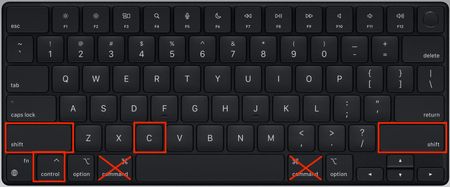
BluebellfloraHero+3 years ago🛠️ Opening the Sims 4 cheat console on Mac There always seems to be some confusion over how to open the cheat console on a Mac because Mac users normally substitute the CMD key for the CTRL key in everyday Mac usage (CMD + C, CMD + V for copy...Show More
little_tati8987 years agoWhen I try I press command then shift and then press c but all it does is take a screenshot
BluebellfloraHero+ to little_tati8987 years ago@little_tati898 It's not Command, it's CTRL, Shift and C.
Featured PlacesThe Sims 4 Technical Issues - Mac Do you have technical issues with The Sims 4 on Mac? Get help from the community here!Latest Activity: 46 minutes ago8,338 Posts
The Sims 4 Technical Issues - Mac Do you have technical issues with The Sims 4 on Mac? Get help from the community here!Latest Activity: 46 minutes ago8,338 Posts
Community Highlights[INSTRUCTIONS] How to troubleshoot and test a broken gameUnable to start: The Sims 4 is already running - Mac onlyGame Data Incomplete, grey llamas, red and white sims, broken textures
Recent Discussions[READ FIRST] Saves, CC/Mods or Library items disappeared? iCloud issues ISSUE Saves One minute your game is working fine. The next you go to play and the Load Game button has disappeared, there seems to be no way to play an existing save. CC/Mods Newly added ...🛠️ Creating a symlink in macOS to store the Sims 4 folder on an external drive ➡️ This is not to be confused with installing the actual Sims 4 game on an external drive. The game installation location is determined in EA App and there is no need to use a symlink for this. As ...Game keeps spinging! Need Help! I have tried everything I can think of. updated macbook repair game uninstall and reinstall uninstall and reinstall EA games app fixed some settings to decrease graphics removed all mods an...Glass wall blacking out Glass walls are causing other objects in the vicinity to black out Wall where cursor is a glass wall See without glass wall it fixes it And this is the glass wall used but also happe...TS4 stuck on "verifying" and doesn't open My game sometimes loads and allows me to play but mostly gets stuck on "Verifying 'The Sims 4'". I recently moved my game to an external hard drive to save storage on my Mac, and I think this is the ...