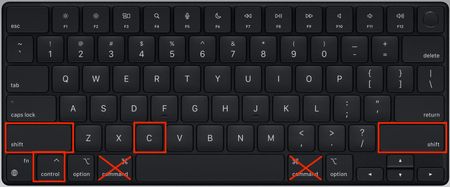
BluebellfloraHero+3 years ago🛠️ Opening the Sims 4 cheat console on Mac There always seems to be some confusion over how to open the cheat console on a Mac because Mac users normally substitute the CMD key for the CTRL key in everyday Mac usage (CMD + C, CMD + V for copy...Show More
Dag3Rising Traveler5 years agoMe too quit working with update. Control shift key quit working and no longer pulls up cheat window.
Featured PlacesThe Sims 4 Technical Issues - Mac Do you have technical issues with The Sims 4 on Mac? Get help from the community here!Latest Activity: 46 minutes ago8,321 Posts
The Sims 4 Technical Issues - Mac Do you have technical issues with The Sims 4 on Mac? Get help from the community here!Latest Activity: 46 minutes ago8,321 Posts
Community Highlights[INSTRUCTIONS] How to troubleshoot and test a broken gameUnable to start: The Sims 4 is already running - Mac onlyGame Data Incomplete, grey llamas, red and white sims, broken textures
Recent DiscussionsThe job tab appears empty and I have a job Hello community, fisrt of all, english is not my native language so I'll try my best. The job tab is empty in a lot of my sims, even when they have a job. I've tried: - Removing all mods - Repairi...Buggy mirrors in sims 4 on Mac!! Heyyy, I just wanted to play some sims and build some townhouses :) but every time I place mirrors all is getting laggy, even in build mode and also in play mode... Have anyone else experienced...My worlds are not visible I need help. I have did everything in the book to correct this issue and I still can not reactive my packs. I even reinstalled and it still says deactivated. I paid a lot of money and I can't not ge ...[READ FIRST] Saves, CC/Mods or Library items disappeared? iCloud issues ISSUE Saves One minute your game is working fine. The next you go to play and the Load Game button has disappeared, there seems to be no way to play an existing save. CC/Mods Newly added ...Unrecognised Video Card Error - fix for Mac This is a common error message which does not impact the game. You can easily fix this yourself by following these instructions: Right click on the Sims 4 base game, wherever you have it in...