🛠️ Opening the Sims 4 cheat console on Mac
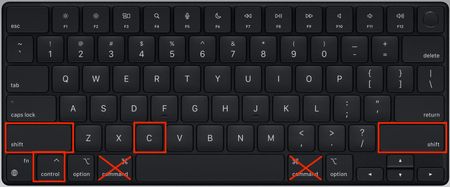


so everyone is saying Command + Shift + C, but mine just doesn't work. BECAUSE IT'S NOT FREAKING COMMAND YOU SHOULD PRESS!! try Control + Shift + C. mine works!

I've been pressing those commands and still not working

Control-shift-C *does* *not* bring up the cheat window. The only way to bring it up is to go into your Mac's system preferences, click "Keyboard" and then "Modifier Keys" and then select "control" from the pop-up menu beside the "command" key setting, then use shift-command-C in the game. I feel like I just wasted 30 minutes of my life downloading The Sims 4 onto my iMac.
I wonder if any of the people insisting control-shift-C works have ever actually sat in front of a Mac and tried to play the game. My control key works in other contexts. My keyboard is set to US English. There is nothing wrong or unusual with my keyboard setup.

Thank you, it's finally working :D

