Forum Discussion

SarahSpareCorne's avatar
1 year ago
Solved

Edge Smoothing Will Not Turn On

Hi! I have recently bought a pretty decent Mac silicon. The specs are sitting at: Mac mini, Apple M2: 24 GB of memory running Sonoma 14.4.1. 

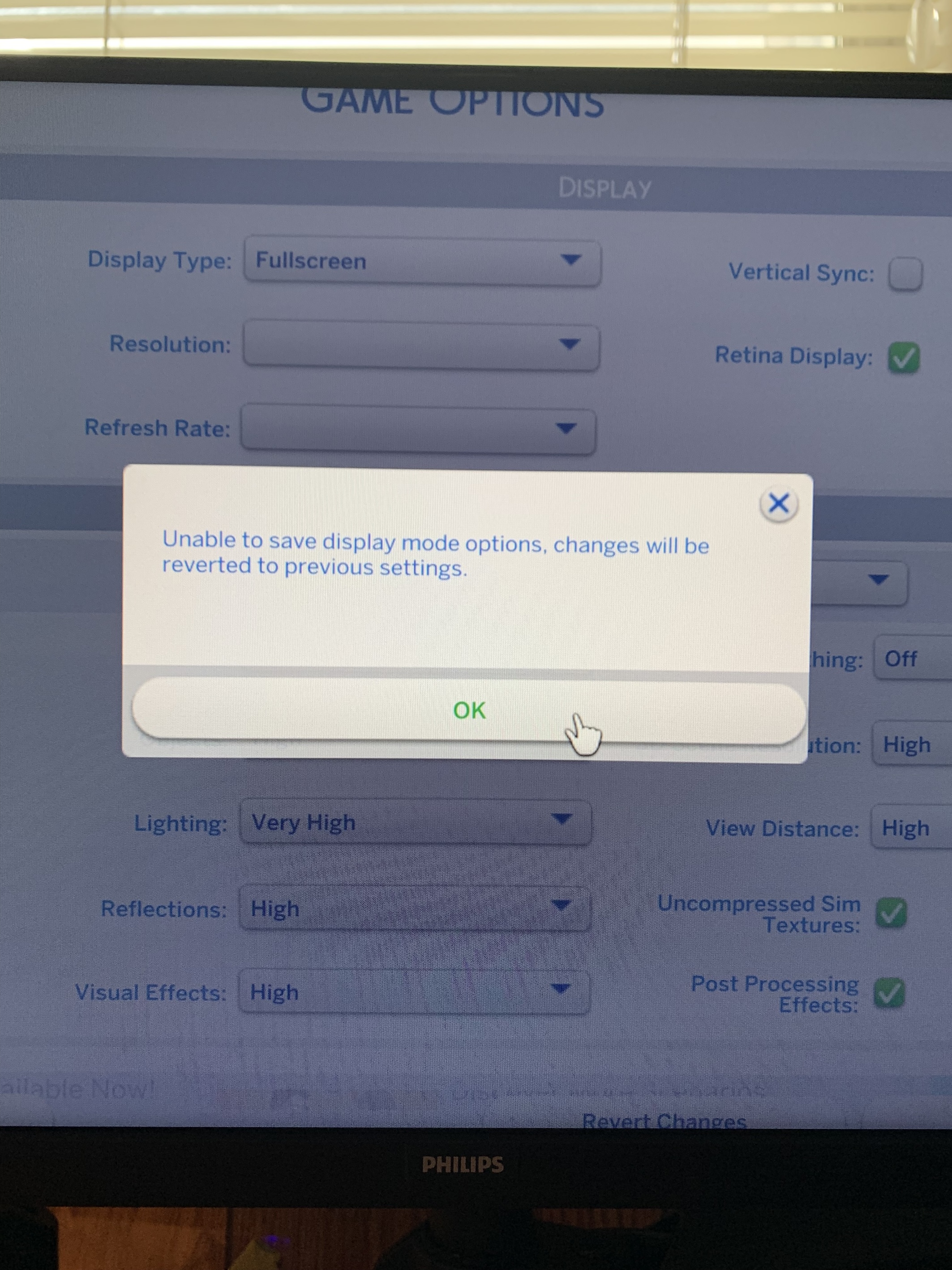
Despite this I noticed the edges of my buildings looked awful. I searched around and say that "Edge Smoothing" Is the issue. When I went to turn it on the response is that it couldn't be turned off and my settings were resorted back to being off on Edge Smoothing. I tried lowering some of the other graphics, removing all mods and clearing my cache... nothing is working.

What am I doing wrong?

  • SarahSpareCorne's avatar
    SarahSpareCorne
    1 year ago

    I have figured it out! 

    Something you said made me think about looking into specifically the display issue and I found this link:

    https://www.reddit.com/r/thesims/comments/31f5i6/sims_4_cant_play_the_game_because_my_monitor/

    The person mentioning the "-w" was 100% right. Although, I did prior switch to windowed mode, the game had already opened in fullscreen mode and therefore rendered the option of window mode useless concerning fixing the problem. Once I made the game open in window mode, the problem was fixed and now edge smoothing is on.

    Kind Regards

9 Replies

  • SarahSpareCorne's avatar
    SarahSpareCorne
    1 year ago

    Unfortunately, that did not work. When I clicked the Edge Smoothing button and than "apply" this came up (see attached photo)

  • SarahSpareCorne's avatar
    SarahSpareCorne
    1 year ago

    ugh, I plugged my computer into my tv and that did fix the problem. Is there anyway I can adjust my computer monitor screen for that issue, or would you know anything about that? I see no point in buying a whole new monitor just for edge smoothing on the sims 4.

  • SarahSpareCorne's avatar
    SarahSpareCorne
    1 year ago

    This is the computer I bought recently (see attached photo). I am at work right now, but I will look further when I get home. What kind of settings should I be looking for when I do?

  • Bluebellflora's avatar
    Bluebellflora
    Hero+
    1 year ago

    @SarahSpareCorner 

    Not sure really, you'd need to play around and test after changing each setting. There have been previous problems specifically with Mac minis and displays, not so much with Mac notebooks and iMacs. If there is a disconnect between your Mac mini and the Philips display it may be exacerbated in the game. Try the different resolution settings in-game too.

  • SarahSpareCorne's avatar
    SarahSpareCorne
    1 year ago

    I have figured it out! 

    Something you said made me think about looking into specifically the display issue and I found this link:

    https://www.reddit.com/r/thesims/comments/31f5i6/sims_4_cant_play_the_game_because_my_monitor/

    The person mentioning the "-w" was 100% right. Although, I did prior switch to windowed mode, the game had already opened in fullscreen mode and therefore rendered the option of window mode useless concerning fixing the problem. Once I made the game open in window mode, the problem was fixed and now edge smoothing is on.

    Kind Regards

  • Bluebellflora's avatar
    Bluebellflora
    Hero+
    1 year ago
    @SarahSpareCorner

    Great, nice simple fix! You should be able to switch between fullscreen and windowed mode in the in-game graphics options without having to enter the command in Origin though, or you can do this in the Options.ini file by changing the value of the fullscreen setting. Thanks for posting what worked for you, always helpful for others 🙂

Featured Places