Solved
[FIXED] Sims 4 Packs not showing as downloaded after April patch
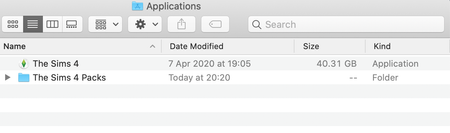

This issue has now been fixed in patch 1.62.69.1220 https://answers.ea.com/t5/Technical-Issues-Mac/Mac-April-14th-2020-Patch-Notes/m-p/8965382#M31601

@Bluebellflora , Correct! Everything is where it is suppose to be and looks identical to the pictures in the steps. When I click play origin shuts down and the repair option might be there or might not when I quit it and relaunch it. It's hit or miss. It's the weirdest thing. On the plus side, my packs are no longer showing download or finalizing underneath. When double click through applications, everything works as it should. I'm going to just re-downloaded origin and maybe that will take care of the issue. I'll report back if it does. I really appreciate all the help!
Do you think repairing just the base game will be enough to fix issues normally corrected by the repair function?

I've looked in every folder, in my disk space as well, i found the sims 4 application and the game packs folder and followed those steps like copying all the packs and placing them in a new folder and putting them back in where the sims 4 application is. I don't know what do from here at all, I feel like I've tried everything.

Here's what happened. For some reason, the packs were re-downloaded and I noticed a dramatic reduction in disc space. After some investigation, I noticed that there were identical copies of the EP, SP, and GPs subfolders in the new TS4 packs folder and the old bundle.

