Game crashing or not loading especially after updating? Post here.


For Reference (if needed):
MacOS: Sonoma 14.5
Memory: 16 GB
Year: 2024
Model: Macbook Air
Storage Available: 724.09 GB of 994.66 GB
Screenshots Below:
Another file screenshot (if needed)
I tried to see if I could send a DM, but couldn't, I'm so sorry, hopefully this works!
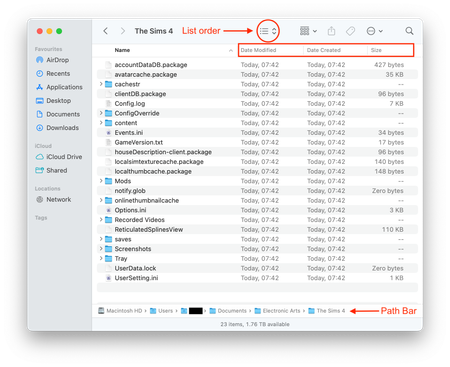
Thanks! Your Documents folder is on the Desktop (really needed the file path to be clearly visible as set up in the instructions above). Your game will not look there for any data, it looks directly in Macintosh HD > Users > Your User account > Documents > Electronic Arts > The Sims 4 and if it cannot find an EA > TS4 folder it creates one. That is where you need to look for the TS4 folder. In Finder click on Go in the menu bar then Go To Folder. In the popup box type ~/Documents and hit Enter. The Finder window will now show your Documents folder. Make sure you have the file path enabled before doing this so you can see the folder location. Please post a screenshot so I can see it all looks right (with the path bar visible).


