Game crashing or not loading especially after updating? Post here.
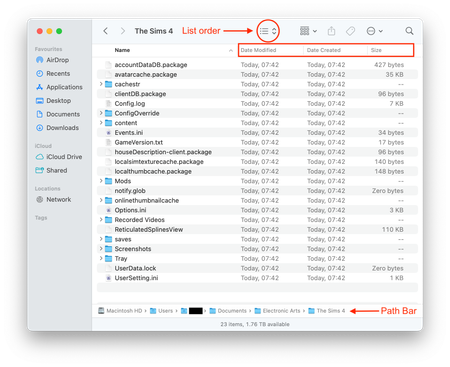

Follow the instructions in the opening post of this thread I've merged your post into and properly test a clean game.

Thank you for sharing that. I did get it working for about a week but then it went back to not working. Tried all the same steps and eventually still had to uninstall and reinstall and still it is not opening. When I try to open it, the game icon does a few bounces and EA app minimizes and usually at that point the game opens but then it stops bouncing and the EA app un-minimizes.
Please let me know if more info is needed
That's all really helpful info, thank you 🙂
There's a ~2 hour time difference in the data I can see the game created in the clean folder and the saves folder. Is that a new save you created or an existing one from the old TS4 folder? If existing does the game work with a clean folder and new save?
Could you copy/paste the contents of the lastCrash file in a post here?
I tried both without it first and then with it and neither would open.
Edit: that was before the reinstall, after the reinstall I opened the folder to ensure the existing saves were not there after it didn't open again just in case.
Last Crash file:
<?xml version="1.0" encoding="UTF-8"?><report><version>2</version><sessionid>179b4f8135007f369fc0964</sessionid><type>crash</type><sku>ea.maxis.sims4.15.macarm64</sku><createtime>2026-05-07 03:39:18</createtime><buildsignature>Local.Unknown.Unknown.1.123.85.1220-1.300.000.239.Release</buildsignature><systemconfig></systemconfig><categoryid> 0x15af3a0</categoryid><stack> 0x15af3a0 0xe824800000006c20 0xc127000000076a20 0xa277800000075d10 0x240f0000001741a4 0xac0a800000150dc0 0x666f000000146d20 0x6d14800000014440 0xb23b8000006b093c 0x374c0000019c3770 0x19a4694 0x1965cd4 0x1476e74 0x16bffa8 0x14986d4 0x1497d04 0x5c08 0x5f5c 0x4720 0x72b1c 0xc016000000106db8 0xdc2e000000106d00 0x9f62000000041648 0x65c000000009464</stack><threads></threads><screenshot></screenshot><memdump></memdump><contextdata>Client Session Time: 2.05<br />Num Save Errors: 0<br />Num Load Errors: 0<br />Current Game State: 0x0<br />LoadingScreenActiveFlag: 1<br />Origin Version: 13,700,0,6213<br />Modded: False<br />SystemInfo: Mac OS X Version 14.4.1 (Build 23E224) GPU: Apple M1 macOS Metal driver 0.0.0.0<br />Architecture: arm64<br />(baseaddr) 0x104c50000,'The Sims 4' 0x19c3cc000,'libsystem_pthread.dylib' 0x19c269000,'libsystem_c.dylib' 0x19c269000,'libsystem_c.dylib' 0x1a6715000,'Metal' 0x1a6715000,'Metal' 0x1a6715000,'Metal' 0x1a6715000,'Metal' 0x1f2e47000,'AGXMetal13_3' 0x104c50000,'The Sims 4' 0x104c50000,'The Sims 4' 0x104c50000,'The Sims 4' 0x104c50000,'The Sims 4' 0x104c50000,'The Sims 4' 0x104c50000,'The Sims 4' 0x104c50000,'The Sims 4' 0x104c50000,'The Sims 4' 0x104c50000,'The Sims 4' 0x104c50000,'The Sims 4' 0x19c434000,'CoreFoundation' 0x19c434000,'CoreFoundation' 0x19c434000,'CoreFoundation' 0x19c434000,'CoreFoundation' 0x19d588000,'Foundation'(/baseaddr)</contextdata></report>
How interesting, you both have the same Category IDs for your crashes on slightly different ARM64 equipped Macs and different versions of macOS. Only EA know what the Cat IDs mean but hopefully this will help. I looked up the Metal references, could you check your OS isn't trying to launch the game using Rosetta? Click on the base game once, wherever you have that installed, usually Applications > EA Games, so it is selected then click on File > Get Info. Is the little box next to Open using Rosetta checked or unchecked?

