Forum Discussion


Tremayne4260
7 years agoHero
@sametaflowers First of all what version of the Mac OS are you running? If you are running Yosemite, you need to update to no later than El Capitan to avoid issues.
Next, simply moving the Mods folder from the Sims 4 folder does not disable your Mods. You need to move the entire Sims 4 folder to your Desktop to allow for the game to regenerate a new folder. DO NOT DELETE IT! This is where your saved games are stored.
Next see if you can start up the game without Mods or CC. If you can, then create a new Sim and play for about an hour or so before saving and quitting to insure that no other issues occur.
I am guessing that one of your Mods or CC is out of date and is no longer compatible with the latest patch. Disable Automatic Updates to allow you time to check with your favorite Mod/CC creators to see if they had to update to work with the latest patch.
Please report back once you have completed these steps.
 7 years ago
I'm running Mojave, and I moved my whole sims 4 folder to the desktop and then tried to load up sims and it still froze my whole laptop. I can't load up the game, and I have tried without mods or cc. I even uninstalled and then reinstalled sims and all my packs and everything and the problem still persists. The only mods I have are clothing and hair mods so I don't know which would be causing a problem.
 puzzlezaddict7 years agoHero+
@sametaflowers It's best to take @Tremayne4260's advice and stick with a clean folder while troubleshooting. Since that alone didn't fix the issue, though, the next step is to run the Origin reset tool for macs, disable Origin in-game, and try to launch again.
https://help.ea.com/en-us/help/origin/origin/how-to-reset-origin-on-mac/
If these steps don't help, please post your computer's specs here as described in this post:
- 7 years ago
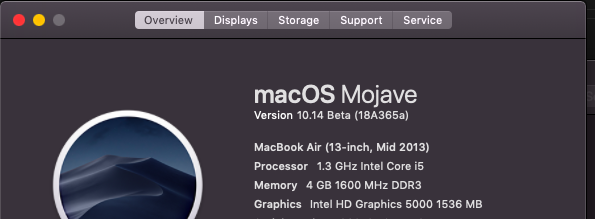
Those steps didn't help, here are my computer specs.
 Bluebellflora7 years agoHero+
Disable Origin in-game then try again.
However, Mojave is still in beta and not supported. Either try and play on a Mac running a supported version of macOS or roll back to High Sierra.
Running betas of operating systems is always a risk, there is never a guarantee that current apps will be supported.
Featured Places