Forum Discussion


7 years ago
I'm running Mojave, and I moved my whole sims 4 folder to the desktop and then tried to load up sims and it still froze my whole laptop. I can't load up the game, and I have tried without mods or cc. I even uninstalled and then reinstalled sims and all my packs and everything and the problem still persists. The only mods I have are clothing and hair mods so I don't know which would be causing a problem.

puzzlezaddict
7 years agoHero+
@sametaflowers It's best to take @Tremayne4260's advice and stick with a clean folder while troubleshooting. Since that alone didn't fix the issue, though, the next step is to run the Origin reset tool for macs, disable Origin in-game, and try to launch again.
https://help.ea.com/en-us/help/origin/origin/how-to-reset-origin-on-mac/
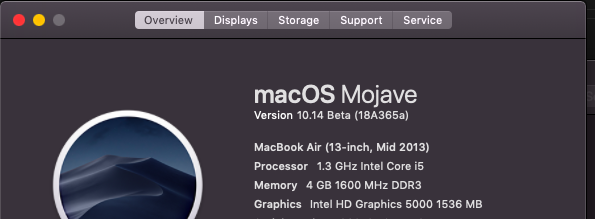
If these steps don't help, please post your computer's specs here as described in this post:
- 7 years ago
Those steps didn't help, here are my computer specs.
 Tremayne42607 years agoHero
So rolling back to High Sierra didn't help?
As was stated Mojave is still in Beta, so many games, apps and programs are very hit or miss at this time. Also please edit your screen shots to remove your serial number.
- 7 years agoI could load it up just fine before and I had mojave just the same so i dont think thats whats causing it
Featured Places