Forum Discussion

bludshawty's avatar
2 years ago
Solved

broken sims 4 document files

i have had nothing but problems, I've tried cleaning my mods, updating my mods, repairing the game, etc etc. its starting to get frustrating now because i cant even play the game, i cant build because nothing will physically place or delete, it overly lags, i am not sure if I've done something or its my PC? but i really need help i am so over this now. I've had the game for years, since around when cats and dogs came out, maybe a little bit before, and I've never had issues, its just recently, and i have no idea whats causing it. 

  • @bludshawty  Try pausing OneDrive syncing before you play.  Right-click the cloud icon in the lower-right corner of the screen to see the option.

    If that doesn't help, please leave syncing paused, and test a new save.  Let me know whether it has the same issues as your main saves.

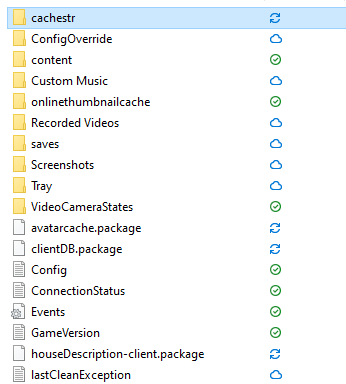
    The icons in your screenshot show OneDrive in the process of syncing some files and folders (blue arrows) and having already synced others (green check mark).  When it can't sync a file or folder, it shows a red X.  While the fact that OneDrive is syncing content isn't necessarily damaging by itself, it can cause all sorts of complications.  So if you'd like to get OneDrive out of the picture, or at least keep it from syncing Documents, let me know.

3 Replies

  • @bludshawty  Try pausing OneDrive syncing before you play.  Right-click the cloud icon in the lower-right corner of the screen to see the option.

    If that doesn't help, please leave syncing paused, and test a new save.  Let me know whether it has the same issues as your main saves.

    The icons in your screenshot show OneDrive in the process of syncing some files and folders (blue arrows) and having already synced others (green check mark).  When it can't sync a file or folder, it shows a red X.  While the fact that OneDrive is syncing content isn't necessarily damaging by itself, it can cause all sorts of complications.  So if you'd like to get OneDrive out of the picture, or at least keep it from syncing Documents, let me know.

  • bludshawty's avatar
    bludshawty
    2 years ago

    so i tried pausing my OneDrive, but all the files that were syncing were still continuing to sync, but i could play the game, i'm not sure if it was because of what you said or because i left it for a day, but i was able to play, also i would like to thank you because you made me realize that my OneDrive was full lol.

    also when i went onto the game after pausing my OneDrive, more files started syncing?? like the problem i had before but with more files.

  • puzzlezaddict's avatar
    puzzlezaddict
    Hero+
    2 years ago

    @bludshawty  The game may have created new versions of existing files it couldn't access because of OneDrive.  There's no reason to worry about it as long as Sims 4 is running properly.

    Longer term, I'd suggest either getting rid of OneDrive or exempting the Sims 4 user folder, or Documents overall, from syncing.  You can find instructions for all these options here:

    https://answers.ea.com/t5/Technical-Issues-PC/CURRENT-ISSUE-Sims-4-saves-user-content-disappearing-PC/td-p/12475370

    I would think that any of these is preferable to paying Microsoft for more online storage you don't actually need.