[CURRENT ISSUE] Several Issues after incomplete Installation


Product: The Sims 4
Platform:PC
Which language are you playing the game in? English
How often does the bug occur? Every time (100%)
What is your current game version number? 1.58.69.1010
What expansions, game packs, and stuff packs do you have installed? Discover University, Island Living, City Living, Get Famous, Seasons, Pets, Get to Work Vampires, Dine Out, Outdoor Retreat Toddler Stuff, Vintage Glamour Stuff
Steps: How can we find the bug ourselves? It's just every time I open CAS
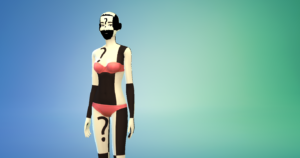
What happens when the bug occurs? Every time I open CAS, (whether it's to start a new game, edit existing sims, or load sims from the gallery) the sims are invisible. I can edit the traits, age, walk, name, gender, and the things on that side of the screen, but the rest of the screen is blank. There is nothing to click, no clothing, no sim, no arrows. I tried using story mode and not using it but nothing works. When I try to play the game, my sims are invisible. The floor is a series of rainbow question marks and all the furniture is glitching out. They are also invisible in their boxes in the bottom left corner of the screen.
What do you expect to see? I expect to see my sims in CAS so I can create/edit them. I expect to be able to play the game I paid for, it is currently unplayable.
Have you installed any customization with the game, e.g. Custom Content or Mods? Not now. I've removed them.
Did this issue appear after a specific patch or change you made to your system? Yes
Please describe the patch or change you made. After downloading University and deleting the MC command center mod
This is all so * up I don't know what to do.




.png)
.png)
.png)