Forum Discussion

CurioSims's avatar
1 year ago
Solved

Jagged shadows/edges

Hi all.

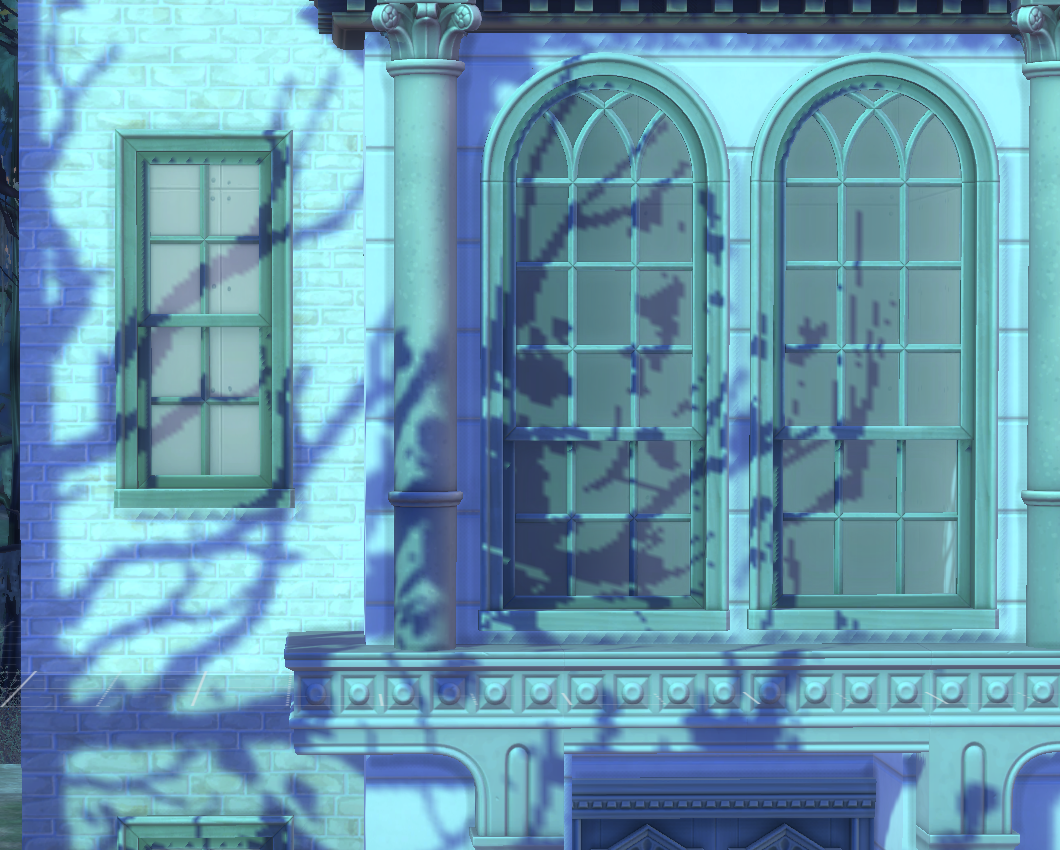
I recently built a personal gaming PC last month with a NVIDIA GEFORCE RTX 4070 SUPER card. Everything runs perfectly in the game as you would expect, but on ultra settings I get unsightly jagged shadows in direct sunlight in Build Mode (see attached photo).

I've done extensive research online on how to fix this problem with antialiasing, but to no avail. I've included my control panel settings and my in-game settings for reference. If you have any help that would be amazing, thank you in advance!

  • @CurioSims  Your dxdiag lists a number of serious crashes of the graphics driver, so I would suggest doing a clean uninstall and reinstall of the driver, as described here:

    https://crinrict.com/blog/2019/02/clean-re-install-of-graphics-drivers-with-display-driver-uninstaller-ddu.html

    This should be done independently of any Sims 4 issues.

    Having said that, I'm not entirely sure that this is fixable.  The game does have some weird and low-resoution shadows at times, for no apparent reason.  If you'd like, I can test on my own systems (Windows and macOS) to see whether the shadows look the same for me.  In that case, please upload your build to the Gallery and list its name here, as well as your username if it's not CurioSims.  Please also list the season and weather and the lot on which you've placed your build.

    Please post the screenshots you want to compare to mine, and do not zoom in or otherwise alter them.  (It would be normal for a zoomed-in screenshot to look pixellated.)  I can mimic the angles easily enough as long as I have the lot to work with.

3 Replies

  • CurioSims's avatar
    CurioSims
    1 year ago

    @puzzlezaddict thanks for your reply. I'm in the process of upgrading to a 1440p monitor. I tried your suggestions below and the shadows look just as jagged and pixelated with direct light. I've attached my dxdiag plus another in-game screenshot to show you a different pixelation of the light engine. Thanks!

  • puzzlezaddict's avatar
    puzzlezaddict
    Hero+
    1 year ago

    @CurioSims  Your dxdiag lists a number of serious crashes of the graphics driver, so I would suggest doing a clean uninstall and reinstall of the driver, as described here:

    https://crinrict.com/blog/2019/02/clean-re-install-of-graphics-drivers-with-display-driver-uninstaller-ddu.html

    This should be done independently of any Sims 4 issues.

    Having said that, I'm not entirely sure that this is fixable.  The game does have some weird and low-resoution shadows at times, for no apparent reason.  If you'd like, I can test on my own systems (Windows and macOS) to see whether the shadows look the same for me.  In that case, please upload your build to the Gallery and list its name here, as well as your username if it's not CurioSims.  Please also list the season and weather and the lot on which you've placed your build.

    Please post the screenshots you want to compare to mine, and do not zoom in or otherwise alter them.  (It would be normal for a zoomed-in screenshot to look pixellated.)  I can mimic the angles easily enough as long as I have the lot to work with.