Forum Discussion

12 Replies
@mja1991 and @TheBakedClouds Please let me know whether you've bought any of these packs through Steam, and if so, which ones. Please also let me know whether you have the Sims 4 CAS Demo installed.
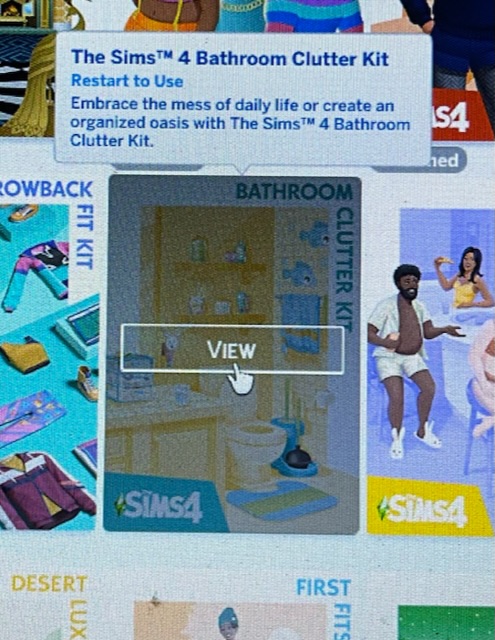
Thank you so much for replying. I downloaded my two kits from origin the same day before I downloaded the EA app everything transferred across. I don’t have the sims cas demo I had deleted it. Opened the game with EA app the two packs are not working. I’ve tried everything to get this work and reached out to ea support but I have no answers yet. I’m so disappointed because I won’t be able to purchase future packs as they won’t work in my game. I have picture below what the kit says in my game. Keep telling me to restart to use.
@mja1991 Please make sure the EA App is closed and the EABackgroundService isn't running in the Task Manager; it would be under background processes. Open each of these locations:
Program Files (x86)\Origin Games\The Sims 4
Program Files\EA Games\The Sims 4
And let me know if you see an SP38 or SP39 folder. If you've installed the game into a custom location, check that location too.
If you see either folder, delete it, clear the EA App's cache:
https://help.ea.com/en/help/faq/clear-cache-to-fix-problems-with-your-games/
Restart your computer, and download the kit(s) again.
If this doesn't help, repeat the process, but see whether you can install Origin and download the kits from there instead.
Once again, make sure the EA App and its background service are not running before trying to install Origin.
Hi, I've actually finally (after almost 3 weeks) managed to solve this issue by uninstalling the CAS demo! Can't believe the 5 support staff I've contacted haven't shared this fix lol
I just want to say thank you for taking your time to help all of us!! I was able to troubleshoot my issues following your instructions and the convos. People like you are truly a blessing and I hope you have a great day!!!! 🙂
- @TheBakedClouds Plss I need help I’m having issues as well
 Kaitlen182 years agoNew Rookie
I bought all my packs through EA play, How do I find out if I have the sims 4 cas demo installed?
@Kaitlen18 The first post on page one shows where the CAS Demo would be. If you don't see it, run the search the post describes and have a look at the results. You can see from the included screenshots what the results would look like if you did have the CAS Demo installed, but if you don't have it, or you're not sure what to make of the results, please take a screenshot and post it here. That way, I can look myself and let you know what the next step is.
Hey so I’ve also been having this issues I downloaded the my first pet stuff pack as it was free for me and I don’t have the cas demo I deleted it I have searched for the file on my computer it is not showing up anywhere. On the ea app it says that it is installed tho I’ve only ever had expansion packs and I used the disc to download those with orgin with no issues getting them to work. Pls help I’ve wanted this pack for a while and I saw it was free so I redeemed it and it’s not working..
@Hannah7168 Please run the search the first post of this thread describes, for SP14 , which is the folder for My First Pet Stuff. Post a screenshot of the search result here.
is it supposed to take really long to find the file I started it a while ago and it has very little left and hasn’t moved much in the past couple minutes
 likeweregonnadie11 months agoRising Rookie
Who still has the cas demo 6 years later, now 9 years later 🤯


Featured Places