Forum Discussion

7 Replies
Hi, I also have the same issue as them. However with my issue, I have removed the Create a Sim folder and all the packs are where they should be in the Sims 4 folder.
Unfortunately with my issue I have a handful of packs and kits. I bought the City Living pack a couple days ago and now I can't access any of my packs, they all say that Sims 4 need to restart but I have restarted multiple times, redownloaded Sims 4, cleared cache and so on.
Below are screenshots from in game, an example of a pack that is downloaded and also the City Living pack's route in folders (it's also the same as all the other packs I own.)
If you have any advice, please do let me know because I have tried so many things and I really don't want to have to delete all my progress, the EA app and everything that I have been doing for the past year- but I will if it comes down to it...
@MarvelGals There are two issues here. First of all, the Delta folder contains patch data, not your packs, so the fact that you have an EP07 folder inside Delta does not mean that Island Living is installed. You'd have that folder even if you didn't own IL at all.
The other issue is that your game shouldn't be installed into Documents as it appears to be now. This will only cause problems and complicate troubleshooting, so I think the best approach here is to completely uninstall Sims 4 and reinstall it in a more suitable location.
Before doing anything else, make a copy of the Sims 4 folder that's directly inside the Electronic Arts folder, not "Sims 4 Game" but just "The Sims 4." This folder contains your saves and other user data, and while it shouldn't be removed during the uninstall process, the fact that the game itself is also installed inside this folder puts that in doubt. Ideally, you'd copy this folder to an external drive or USB stick, but you can drop it in Downloads in a pinch.
Once you've made that backup, uninstall Sims 4 through the EA App. Then restart your computer and before doing anything else, open Documents\Electronic Arts and make sure that OneDrive is NOT redownloading the "Sims 4 Game" folder. If it is, delete this data, or if you can't, stop here and let me know.
Otherwise, clear the EA App's cache:
https://help.ea.com/en-us/help/faq/clear-cache-to-fix-problems-with-your-games/
Then login and download Sims 4 to the folder of your choice that is not inside Documents or Downloads. The default location of C:\Program Files\EA Games is fine, as is any other folder you want to create, again as long as it's not inside Documents. Once the game is installed, load it and see whether your owned packs are showing up.
Hi, @puzzlezaddict
So I did everything you asked, I copied over The Sims 4 folder (not the sims 4 game folder) and did everything else- placing the game into the Programmes and it thankfully didn't copy over anything from OneDrive. I did all the steps you asked for and unfortunately I still have the same results. It says I still need to restart. I did open and close Sims 4 and unfortunately it still doesn't register that I have the games.
Screenshots below to help with visuals.
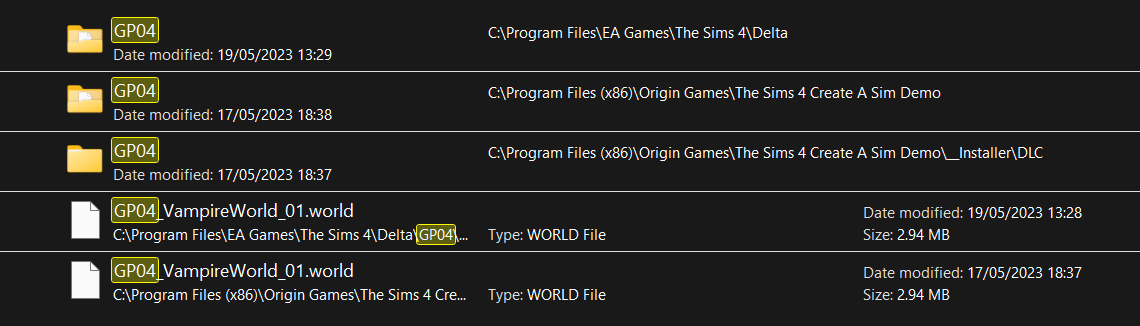
@MarvelGals Please run a new search for EP07 (Island Living) or one of your other missing packs, and post the full results. Please also let me know whether you originally bought these packs through Origin or the EA App, Steam, or Epic.
So I got all of my current packs from the EA App.
However I did buy the "Daring Lifestyle Bundle" from Epic Games this week. That's where the issues began I believe. I couldn't access the bundle's contents and after many attempts on trying to fix it, I removed Epic Games from my laptop and disconnected my EA account from Epic Games as well. Then a few days later I bought the new City Living pack but Sims 4 didn't let me play that pack either- came up saying it wasn't installed and needed to be restarted, from there I uninstalled Sims 4 and then redownloaded it. Now all my pack worlds and content from there are either not there or it says I need to install the packs and restart the game. Now I'm here, stressing out thinking I may have broken my game which I really hope I haven't.
@MarvelGals Your screenshots show that your packs are all being installed into this location:
C:\Program Files (x86)\Origin Games\The Sims 4 Create a Sim Demo
Please delete the CAS Demo folder, empty the Recycle Bin, restart your computer, and try again to install your missing packs.
It works! Thank you so much! It's been bugging me for 3-4 days now and I am just so thankful for the help! Hope you have an amazing day! x

Featured Places