Forum Discussion

Re: Game running horribly since Nov. 17 patch

@MayaMoon1397Have you checked your computer? It may need to have some of the graphic drivers updated. Or it could be that the update (which added a lot to basegame) made your specs not as good for the game as it used to be. Perhaps you need to turn down some of the options. (Or get your computer upgraded/failing components replaced. Look at the detailed version on your Task Manager to see if your CPU or RAM is working too hard.) Some people have also found that they needed to update their OS (Windows 10 especially) to make things work better. (It's not always a "game" problem. Sometimes it's a "computer" problem.)

Also, keep in mind that you don't have to lose a save when you make a new one. The old one is still there. But playing for a while in a new save will tell you if it is a save problem or a game problem.


6 Replies

  • MayaMoon1397's avatar
    MayaMoon1397
    Rising Vanguard
    5 years ago

    @KatAnubis 

    Thank you for the suggestions and info. I hadn't thought of my pc possibly being the issue. I'll try out the things you suggested.

    @puzzlezaddict 

    I don't have that exact problem. My time clock freezes sometimes, but it doesn't crash. It's more so that the game is very slow to respond and the frame rates constantly flucuate, which hasn't been an issue before this patch.

    Could you tell me how to fix my current save? For some reason the only older version of this save is from a long time ago, so I would lose a lot of progress on my current household.

  • MayaMoon1397's avatar
    MayaMoon1397
    Rising Vanguard
    5 years ago

    @KatAnubis

    I tried out a new save and that one does run smoothly, which makes sense as it had just my one sim and the premade townies in it as opposed to my other save which has a LOT of sims in it. 

    Turning down the graphic settings helped a little bit, but it still doesn't run well enough to properly play.

  • puzzlezaddict's avatar
    puzzlezaddict
    Hero+
    5 years ago

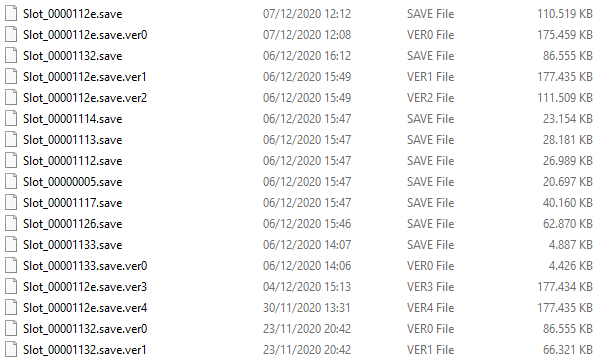
    @MayaMoon1397  How large is your current save file, and how large are the automatic backups the game makes?  They're all in Documents\Electronic Arts\The Sims 4\saves, and you can sort by modified date to tell them apart.  It would be easiest if you took a screenshot of the contents of the saves folder, so I can refer to individual files by name.  Make sure it's in details mode, so the file sizes and dates are showing.

    As a test, please load a different household within the same save, and let me know how it runs.  You don't have to save your progress; just see whether performance is any better.

  • MayaMoon1397's avatar
    MayaMoon1397
    Rising Vanguard
    5 years ago

    @puzzlezaddict 

    I've tried loading a different household and it runs just as bad. 

    Slot_00001123.save is my current save file that is running badly. The rest are mostly saves I tried to recover yesterday while testing, but I noticed that between November 23 and November 27 I'm missing saves. I played a little bit on those days and definitely saved, but those saves aren't showing up when I try to recover older saves in the game. 

    Hopefully you can use this info.

  • DJGeoRob's avatar
    DJGeoRob
    Seasoned Scout
    5 years ago

    I had the same problem but @puzzlezaddict 's solution helped me a lot. It's something to do with Winterfest. 

  • MayaMoon1397's avatar
    MayaMoon1397
    Rising Vanguard
    5 years ago

    @DJGeoRob 

    I didn't even realize until I saw your reply just now that it's the day after Winterfest in my game right now and Father Winter didn't show up. 

    I just went into my game and low and behold it's filled with Father Winters. I'll use the solution that @puzzlezaddict linked and hopefully that'll fix things!