Re: Initilization error at start up [135dec40:90f690cf:00000075:495f32a0]
@Liriel_N First I want to say thank you to @holger1405 , because this was his excellent idea, and I wouldn't have known where to look.
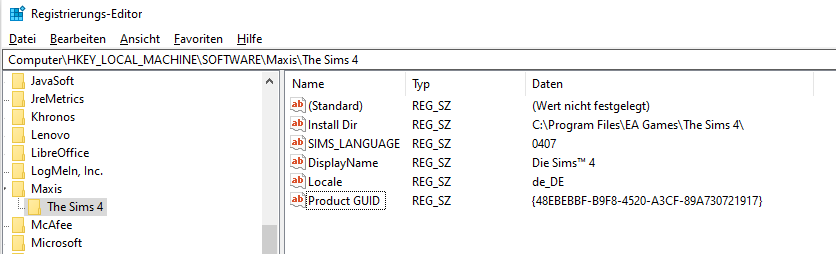
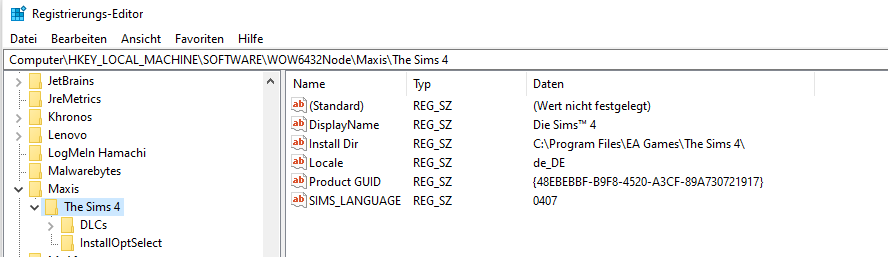
The two sets of Sims 4 entries, with WOW6432Node in the path and not, are identical when created properly. So you're going to duplicate the entries you have and import them to where they're missing.
Open the registry again, and in this location:
Computer\HKEY_LOCAL_MACHINE\SOFTWARE\WOW6432Node\Maxis
Click the "The Sims 4" folder, so it's highlighted. Click File > Export, and save the file to your desktop. Right-click the file and select Edit. You should see the file path to this Sims 4 entry at the top. Delete WOW6432Node, so the file path looks like this:
Computer\HKEY_LOCAL_MACHINE\SOFTWARE\Maxis\The Sims 4
Make absolutely sure there is no extra character in there, not even a \. If you see some junk below the last entry, delete it; the last line should start with "Install Dir" and then have two blank lines below it. When you're sure you've edited it correctly, save your work, close the file, and double-click it to import the entries to the new location you've specified. You can double-check the registry itself for the new entries.
I want to say that in general, editing your computer's registry is a dicey prospect, prone to serious errors if it's not done properly. But I tested this myself, twice, and it worked fine both times. I also reproduced the initialization error when I deleted the registry entries you're missing without replacing them. So the point is, be careful, and don't go editing or deleting other entries unless you know exactly what you're doing and why.
Please let me know whether this works, and because I want to triple-check, whether Windows and Revo now see Sims 4 as installed.