Forum Discussion

Re: Saves Files Not Reading In Game

Hello. I am having the same problem as these other people; I have all of my save files within the saves folder, but the saved games do not show up in game. It only gives me the option to start new game. I have tried suggestions such as deleting cache files and moving certain others, and I already have save files that end in .save, so that isn't the problem. I have no clue what's wrong, because these files worked perfectly fine a few days ago. My only explanation could be that OneDrive messed it up somehow. I have also checked onedrive online and it does not have the save files... please advise.

25 Replies

  • christinestyle's avatar
    christinestyle
    New Novice
    2 years ago

    Hello! Sorry to bother you, but I hope you can help me.

    I downloaded a save file, but it didn't show up in the game. Then I found this forum and read everything here. I checked my game file location to see if I put a save fule in the wrong folder, but the location was right. Then i deleted it and put it in saves folder again, making sure that it was the right one. Unfortunately, it still didn't show up. If you have any other reason why that might be the case, please tell me.

    Thank you a lot

  • puzzlezaddict's avatar
    puzzlezaddict
    Hero+
    2 years ago

    @christinestyle  Please post a screenshot of the contents of the saves folder that contains this save file, as in, I'd like to see the file  itself as well as any other saves.  Include the address bar, above the list of files, in the screenshot.  This will let me check for several potential problems at once.

    Please also go into the game and find the full file path to your user folder, as described here:

    https://sims4.crinrict.com/eng/2018/07/how-to-find-your-user-folder/

  • christinestyle's avatar
    christinestyle
    New Novice
    2 years ago

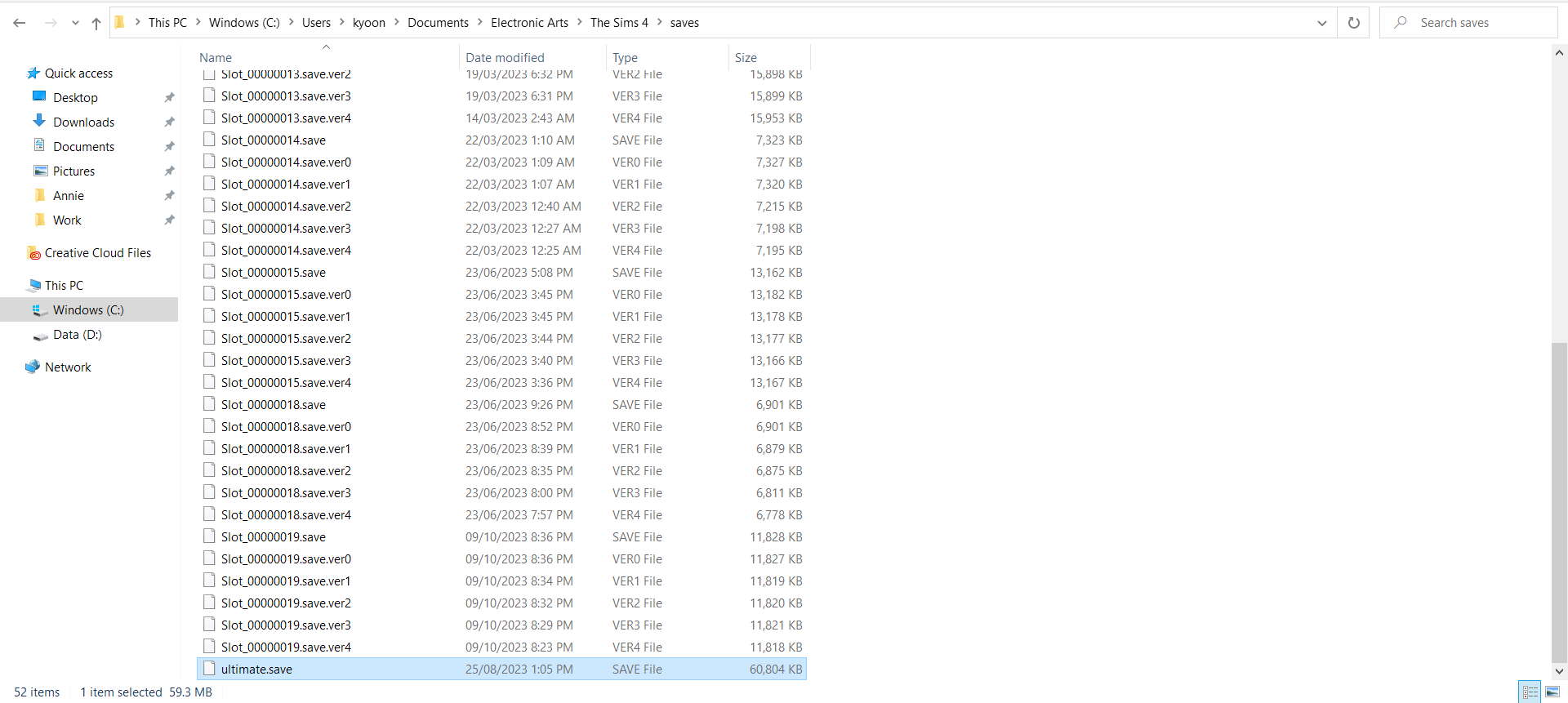
    Sorry for such a late reply!! Here is the screenshot of my saves folder. Hope you can figure out what is wrong and thank you a lot for your help!!!

    Here's also a file location text version in case you need it: C:\Users\kyoon\Documents\Electronic Arts\The Sims 4\saves

  • puzzlezaddict's avatar
    puzzlezaddict
    Hero+
    2 years ago

    @christinestyle  The problem here is that the save's name is in the wrong format.  The name must be Slot_ followed by an eight-digit hexidecimal number followed by .save , with nothing else, or Sims 4 won't read it.  (The .verx extension denotes a backup save.)  So you'll just need to rename this save and it should work.  Given the numbers your existing saves already use, I'd suggest this:

    Slot_00000020.save

    But you can choose whatever number you want, provided it's eight digits long and isn't the same number as another one of your saves is using.

  • christinestyle's avatar
    christinestyle
    New Novice
    2 years ago
    @puzzlezaddict Ahhh that’s why… I changed the name so that I won’t loose the file among others but I didn’t know it won’t work this way.
    Thank you very much for your time and help!!!! Hope you have a nice day hehe 😊
  • Manda2265's avatar
    Manda2265
    1 year ago

    Hi! I am very technically challenged and am really struggling on how to fix gthis same issue. I updated my sims 4 and none of my saves show up. it continues to prompt me to create a new game

  • zoster602's avatar
    zoster602
    1 year ago

    hello, I have the exact same problem as the other person- I don't think there was any follow up. could you please help?? 

    i just need to figure out how to get the game to read my saves again- all I did was removed my save folder from the sims folder, puit it on my desktop, and moved it back, in order to fix another problem. All my saves are in my saves folder but the game won't read them for whatever reason. thank you

  • zoster602's avatar
    zoster602
    1 year ago

    hello, here are my save files- I couldn't figure out how to see where Sims 4 was reading my game, it was unclear in the tutorial on where it was reading because the documents and cloud files lead to the same thing in my system. thanks for the reply!

  • puzzlezaddict's avatar
    puzzlezaddict
    Hero+
    1 year ago

    @zoster602  Your saves are in two nested saves folders, as in ...The Sims 4 > saves > saves > [save file].  That's why the game can't read them.  Move them into ...The Sims 4 > saves and they should be fine.

    If that doesn't help, please post a screenshot of the location you see in-game.

  • Shanti16015's avatar
    Shanti16015
    1 year ago

    Hello, I recently bought a new laptop, and I backed up my data. my saves are in the saves folder, but my Sims game is not reading them.

  • puzzlezaddict's avatar
    puzzlezaddict
    Hero+
    1 year ago

    @Shanti16015  Thanks for the screenshot, which shows your saves are here:

    C: > Users > your username > OneDrive > Documents > Electronic Arts > The Sims 4 > saves

    Is the game reading that folder too, specifically the OneDrive Documents folder?  Here's how to check:

    https://sims4.crinrict.com/eng/2018/07/how-to-find-your-user-folder/

    If the game is reading the OneDrive folder, and not the Documents folder that isn't in OneDrive, then the problem might be that OneDrive itself is syncing your files.  Your screenshot shows that most of your save files have been synced, but what I can't tell is whether the synced files have been removed from your computer and stored only in OneDrive.  The only files not synced are backups that won't show on their own, although they can be used if necessary.

    At any rate, if you want to change your OneDrive settings, here's how:

    https://answers.ea.com/t5/PC/CURRENT-ISSUE-Sims-4-saves-user-content-disappearing-PC/m-p/12475370

    Finally, the first save in your screenshot is Slot_00000001.save , which Sims 4 can't read.  (It starts counting with 2.)  If you'd like to use this particular save, renumber it to something not already used, for example 00000005.  It needs to have eight digits.

  • Shanti16015's avatar
    Shanti16015
    1 year ago

    I noticed that my game was accessing my OneDrive folder. The location of the saves was in C:\Users\ashan\OneDrive\Documents\Electronic Arts\The Sims 4\saves. When I started a new game, my previous saves appeared. However, my new sim was present, but my previous families were missing, and all the buildings had exclamation points above them.

  • puzzlezaddict's avatar
    puzzlezaddict
    Hero+
    1 year ago

    @Shanti16015  The exclamation points are a sign of serious corruption that is unfortunately not fixable most of the time.  Here's the master thread, if you want to post or just look for suggestions:

    https://answers.ea.com/t5/Bug-Reports/OPEN-Orange-Green-Exclamation-signs-over-lots-Houses-disappear/td-p/10533991

    You can also try recovering some of your old saves.  Your third screenshot shows that many of them are available but most are named in a way that the game won't ever read them.  Renaming them will make them available to load, although they may be corrupted too.  Still, you can try to see if any are viable.  Here's how:

    https://sims4.crinrict.com/eng/2014/09/recover-backup-save-game/

  • tainroxx's avatar
    tainroxx
    1 year ago

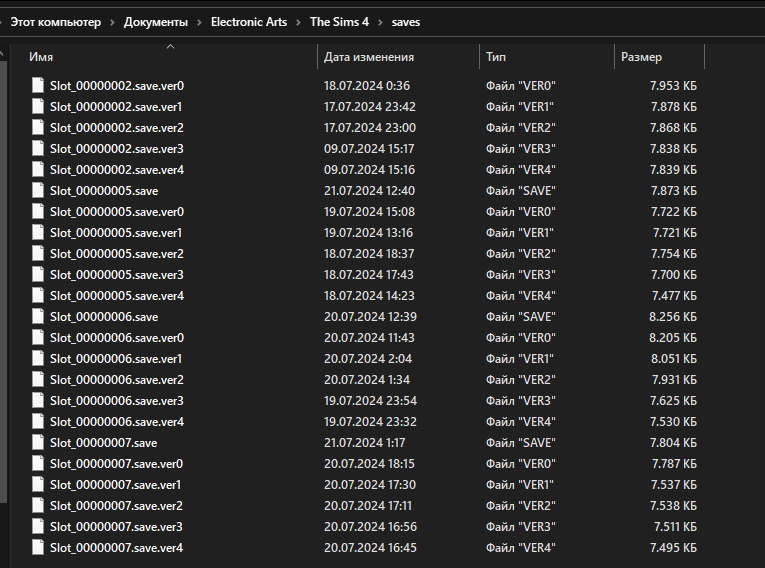
    Hello, i'm having this issue too. My game can't read the second savefile, what's wrong here?

  • puzzlezaddict's avatar
    puzzlezaddict
    Hero+
    1 year ago

    @tainroxx  Do you mean the game can't read Slot_00000002.save , any version?  If so, that's because all of these are backups, not the main save, at least as far as I can see.  (If there's another save hiding above the ones in your screenshot, then never mind.)  Delete the .verx from one of these saves, and it will be available to load at the Main Menu.  The .ver0 file is the newest, and .ver4 the oldest.

  • AlessanderIV's avatar
    AlessanderIV
    1 year ago

    I have the same problem, i want to play an old game of which i only have backup files. I tried copying the ver0 file, deleting  ".ver0" so it can be read as a save instead of a backup but it still won't show in my saves when i start the game, any idea why?

  • Yellowtrickstr's avatar
    Yellowtrickstr
    1 year ago

    Hello!

    Same problem here. I wanted to stop OneDrive from synching with my PC so I uninstalled and deleted all Sims files on OneDrive. Didn't realize Sims was using the OneDrive filepath. I tried placing everything back in the correct folder and redownloaded OneDrive, but the game is still not reading the save. Help please! :c

  • puzzlezaddict's avatar
    puzzlezaddict
    Hero+
    1 year ago

    @Yellowtrickstr  The saves in your first screenshot are not in OneDrive, whereas Sims 4 is currently reading the OneDrive folder.  I'd suggest getting rid of OneDrive altogether, again, and then confirming that the game is now using the correct folder.  It can help avoid complications in the future.

    If you do this and the game still isn't recognizing your saves, please take the same screenshot you've included (the second one) and post it again.

  • jennifertlewis's avatar
    jennifertlewis
    1 year ago

    @puzzlezaddict I've read through alll your posts in this thread and can't seem to get any of them to work (I also don't really know what I'm doing) ☹️ I checked that the path in the game is in the right place, and I have some saved files, but nothing is available to load when I open the game. I've added a screenshot of my save files. 

  • puzzlezaddict's avatar
    puzzlezaddict
    Hero+
    1 year ago

    @jennifertlewis  Please make sure that the entire file path to your saves folder matches what you see in-game.  Right-click a save and select Properties > General, then look at the Location.

    If that's not the issue, try renaming your backups and loading those.  Renumber them so the 2 becomes a 3, 4, etc. (the save names need to have precisely eight digits), and delete the .verx extension, and they would theoretically be available to load at the Main Menu.