Forum Discussion
16 Replies
I've just uploaded it now as 'Sim Skin Glitch'. I think it has the cc tag but there's not any cc on the actual sim. Thanks!
 crinrict7 years agoHero+
I checked your Sim in my game and I can't see anything unusual
It did say cc was removed though so maybe that has something to do with it.
Can you try renaming your user folder to let the game create a new one and then download her into a fresh save to see if the issue persists ?
This is just for testing, you can put your stuff back afterwards.
Just checking, did you look at the sim in-game as well? The issue doesn't occur in CAS for me, and your screenshot was in CAS.
Also, I reuploaded the sim without any mods/cc installed in my game so this time it definitely doesn't has the cc tag.
I renamed the user folder and downloaded the new version (definitely cc free this time) into that fresh game. The issue still occurs:
- crinrict7 years agoHero+
Thought that was CAS. No, didn't check the game.
Let me do that.EDIT
She's a bit cold but other than that, she's looking fine to me (need to wait for better lighting though)
What kind of graphics card & monitor do you have ? What's your resolution atm (monitor & game)
Does it happen no matter what she's wearing ?
Sorry for butting in, just tested this. The only way I could find this was with the settings on the low/medium preset. With Uncompressed Sim Textures, Post Processing Effect and Laptop Mode Off. I'm wondering what settings your game is on in addition to the questions Crin is asking.
My screen is on -you must really hate your eyes- mode and my blue light filter is turned off, the green spot is VERY visible over here, not so much on my screenshot. The pattern is visible though, just a little worse than we see in your screenshots.
Click to enlarge:Yes, it happens no matter what she's wearing.
Graphics card is AMD Radeon 530
Monitor resolution is 1920x1080
Resolution for TS4 1600x900
My usual settings in TS4 are ultra, with uncompressed sim textures off, laptop mode off, and post processing effects on.
- crinrict7 years agoHero+Are you on PC or Mac ?
- crinrict7 years agoHero+Could be it's an issue with AMD cards then
Are your drivers all updated ? Yes, my drivers are all up to date.
I'm seeing it too on my Mac with AMD Radeon 560 4Gb.
I lightened it so you could see more clearly. All settings on high.
I know this is a year old post, but I can't seem to find any more recent topics about this problem specifically. However, I just encountered this glitch (like literally an hour ago). I did some experimentation and realized it seems to be only one skin tone that does this, at least in my game. I've attached some pics to show the pattern and the skin tone in CAS. I am unsure if this glitch has been solved through a player's end fix, but I think it may be an in-game Sims problem, rather than a player issue. Not sure though.
* I have no CC or mods in my game.
* I have cleared the game cache.
* Restarted several times.
* Sims game graphic settings attached.
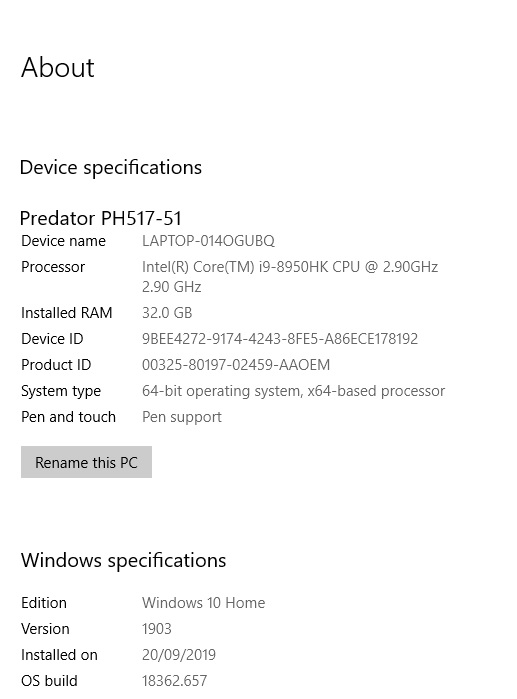
* Playing on a $4000, Acer Predator Helios 500, specs attached.
- crinrict6 years agoHero+@SimisterTV Looks a bit like this: https://answers.ea.com/t5/Technical-Issues-PC/White-Rash-Like-Patches-on-Sim-s-Skin/m-p/8758196
Do you have the uncompressed Sims option checked ? Sorry about that I thought I had added the Sims graphics picture, but I guess it didn't take.
I hadn't looked at those other posted before because most would talk about "white" splotches which weren't what I was having an issue with. However, I did just look to see if I have the Uncompressed option was checked, I could have sworn it was, but it wasn't. So I checked it, restarted, and the problem was fixed. Thanks so much for that! Have a good one.
- crinrict6 years agoHero+@SimisterTV I think you can only attach 3 files per post. That was probably why it didn't attach.
Glad it solved the issue for you too.


Featured Places