Forum Discussion

Re: Website Gallery not loading

We play SIms4 on PS4. Yesterday we could not connect to our profile on the gallery through the console or on the gallery website. Today we can finally connect to to our profile on the console but still can't on the website. The gallery seems to be working, however as soon as it prompts me sign-in, which I do, the 'Oops, something went wrong!' page comes up. It's very frustrating. I've tried signing in and out multiple times and have cleared my history. Nothing helps. Any thoughts??

24 Replies

  • SimQARobo's avatar
    SimQARobo
    Icon for EA Staff rankEA Staff
    6 years ago

    Hello.

    We think this is resolved now.  If anyone is still unable to connect to the website gallery, please let us know.

  • I'm still unable to log in on the Web gallery. 

    I can log in on all other EA services, but not in the gallery in the browser. Both mobile as well as chrome

  • Annabelli_22's avatar
    Annabelli_22
    6 years ago
    @Annabelli_22 I get a pop up to accept terms of agreement, but it disappears again before I can click it. So I can't actually accept it. This happens every time I try to log in on the web based gallery, on mobile
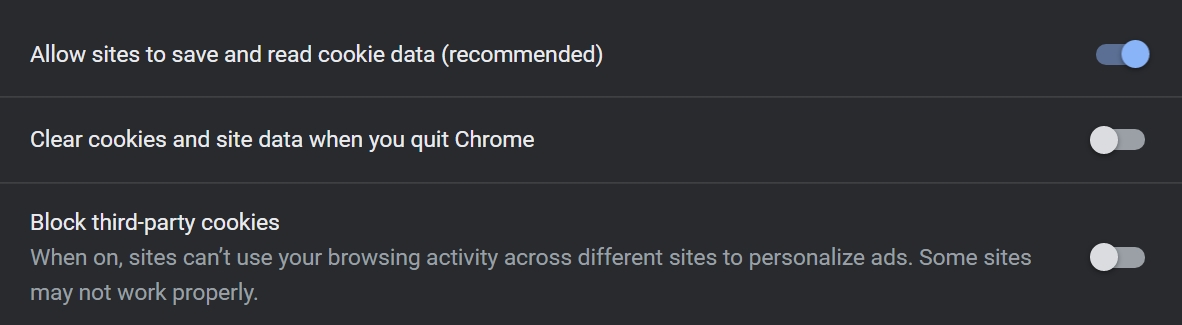
  • @SimQARobo EA help sadly couldn't help me, but have been able to determine it was a google Chrome setting thing. Just... what setting was unclear.
    Managed to find out which one though.
    I didn't allow indirect cookies to be placed. Once I ticked that on and did allow them, I was able to log in on the gallery.
  • SimQARobo's avatar
    SimQARobo
    Icon for EA Staff rankEA Staff
    6 years ago

    @Annabelli_22 

    Interesting.  I have some additional questions, if you don't mind:

    1. What version number of Chrome are you using?

    2. Are you disabling third-party cookies?

    3. Does the browser have some sort of plugin to handle cookies?

  • agwalk's avatar
    agwalk
    6 years ago
    @SimQARobo 1. how would i find out what version of chrome i am using
    2. I dont think so
    3. it does but they are working fine
  • agwalk's avatar
    agwalk
    6 years ago
    @Annabelli_22 as you can read in long drawn out post before that is what i have done and that was my results
  • @SimQARobo 

    1: Google Chrome version 80.0.3987.87

    2: I was, that's the one I have now unticked. (They're called indirect cookies in Dutch, noticed they were called third party cookies in English when I set it to English for the screenshot)

    3: No, I have no plug ins installed, and have disabled all google extensions now as well (this was a step I tried before the cookies thing)

    I've added a screenshot of my current cookie settings. Now that it works again 🙂 

  • @agwalk Hi! It may take some time for them to answer. This a big forum, not a chat. Give them some little time.