Sims 4 won't launch (connectivity issues)
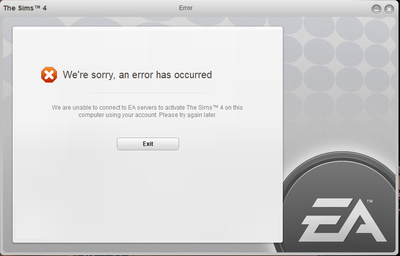


@themukund
Check if there are new drivers for your gpu
https://downloadcenter.intel.com/download/28289/Intel-Graphics-Driver-for-Windows-10
and look for new drivers for your graphics card
You have also a problem with updating your Windows Defender and it is blocking yours Windows updates
Select "Check for updates" in the Windows Security Virus & threat protection screen to check for the latest updates.
If it is done check if your Windows is up to date.
https://support.microsoft.com/help/4027667/windows-10-update
Check also if your antivirus program or Windows Defender isn't blocking the game - add the game to the exceptions there
https://crinrict.com/blog/2019/03/windows-10-defender-controlled-folder-access.html

I created an error report on Origin: 0fd4b96b70061c60
Game still not working.

@themukund - I noticed a couple of errors related to a student app called My Student Life. Is this a school laptop? You may have some restrictions installed that prevent gaming on this laptop; if that's the case, then you might have to contact the school network administrator to see if you can get the proper permissions unlocked. You could try installing Origin on a friend's computer and see if you can run it from there, just to test.
Some other things to try: Set Origin.exe and TS4_64.exe to "Run As Administrator"
Please make sure you are not using a proxy:
You may have to also reset Internet Explorer settings to completely remove any proxy
Reboot your router or modem. Log out of Origin completely and then log back in. Make sure you are using the correct account and password. Then try to launch TS4 again.
Please reply back and let us know how this goes. If it doesn't work, let us know any error messages you are getting. 🤞
Make sure you double-check the network and IE settings to be certain about the proxy settings. I've seen them suddenly enable themselves for some reason, so even if you know you have never used a proxy, it's best to be certain.
On the DNS cache problem, make certain to run the Command Prompt (Admin) window, from an Administrator account.
Just thought of something else for you to check - when you start Origin, do you get a popup window asking if you want this program to make changes to your device? This is a quick way to know if your User Account Control is set to notify. Type UAC in the search box on your task bar, and choose to Change User Account Control Settings. Move the slider to at least the halfway point. You'll need to reboot your computer to be sure the changes take effect.
@themukund - tagging for visibility



