
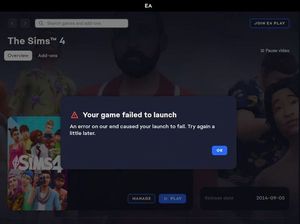
Your Game Failed to Launch - been like this for weeks
 3 years ago
@meldanpick The EA App errors are somewhat generic and don't always correctly identify the problem. It's possible that this is in fact an EA-side error, but it's also possible that the issue is on your end. For that, please uninstall Sims 4 and the EA App with Revo Uninstaller. Start with Sims 4:
- Put aside your Sims 4 folder in Documents\Electronic Arts and rename it to something that doesn't include the words "Sims 4."
- Download Revo Uninstaller (the free version is fine) from here.
- Launch Revo, select Sims 4 from the list, and click Uninstall.
- Once the game is uninstalled, select "Moderate" under "scanning modes," and click Scan.
- Review the list, in case there's something you want to save; otherwise, click Select All, and then Delete.
- Close Revo, and restart your computer.
Uninstall the EA App with Revo as well. I don't have instructions for that at the moment, but the process should be straightforward. Restart again when you're done.
Install the EA App, then create a new folder into which you'll install Sims 4. The folder should be on the root level of the drive of your choice, for example C:\Games is fine, but not C:\Program Files\Games.
While installing, please disable any third-party antivirus you use, and don't reenable it until you've tested the game once. As long as you're not doing anything else at the same time, your computer should be safe.




