Product: The EA app
Platform:PC
Error Report ID (learn how to create an Error Report ID in the sticky post) 4db0e0df-0486-4a15-b71e-f286a5f45ebf
Which client functionality are you experiencing this bug with? Other (Please Describe)
Please describe Update
When did this happen? (dd.mm.yy hh:mm) 02/03/23 09:28
Summarize your bug In my library, the EA App says "The Sims 2 Ultimate Collection" requires an update, but when I click update, the library continues to say "Update Required". I can only play the game if I click "Launch" in the pop-up menu after trying to update.
How often does the bug occur? Every time (100%)
Steps: How can we find the bug ourselves? Having "The Sims 2 Ultimate Collection" in Origin and then transferring to the EA App OR Downloading "The Sims 2 Ultimate Collection" through a disk on Origin. Origin automatically recognizes Sims 2 disks as "The Sims 2 Ultimate Collection". Then, transfer to the EA App.
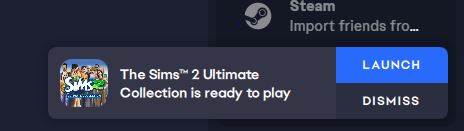
What happens when the bug occurs? 1. I click "Update" 2. The user agreement pops up. I click "Continue". 3. If I have cleared the cache, repaired the app, or repaired the game, the files will download at a normal rate and go through all the steps. If I update after having updated before, it will say "Calculating Time..." before quickly going to the next step. 4. The bottom left corner will say "Update Complete". However, under "Installed Games" and on the "Library" page, it will continue to say "Update Required" under the game title and there is a download icon instead of a play icon on the game's icon. 5. A pop-up on the right side of the screen says "The Sim 2 Ultimate Collection is ready to play". If I click "Launch", I can play the game normally.
What do you expect to see? I expect, after a completed update, to see a play button and to be able to launch the game normally through that button.
Clearing the cache, repairing the app, repairing the game, restarting the app, and signing out and in have not solved the issue. An EA Help representative tried to help me fix this issue but told me it was a bug and that I need to report it here.
This issue has actually been occurring since I transferred to the EA app in January. However, when I first transferred, I couldn't even play the game. At least, the "Launch" pop-up allows me to play.
Images are included to help demonstrate.