
4 years ago
Lost game
Hello, I opened the eco workshop and it didn't work. I was at lvl 42. I contacted EA support and did all that was listed. Then decided to double check my game was saving to cloud, Facebook was linke...


Yes, I played the tutorial and waited my game to load and started it. It opened as the screen shot shows.😞

Unfortunately this is an issue that we can't help you fix from the forums. In order to get help to recover your game progress, you need to send in a Help Ticket from your in-game app.
A Help Ticket from your in-game account is a message that brings through needed details directly to mobile advisors.
Using other methods like Facebook or Twitter will only delay support and you will be asked to go back and send an in-game help ticket.
Help tickets from your mobile in-game account are the best way to contact support as they will go through directly to the mobile advisors who will be far more informed.
If you are not able to open your game app, please use the following link to send in a ticket: https://help.ea.com/en/contact-us/new/?product=the-sims-mobile
If you have lost pack content or haven't received a pack, have valid proof of purchase available for advisors. Purchases on mobile aren't made on Origin aka EA's tool, they are made on either Google Play or iTunes so in order for support to confirm that there was a payment made they will need valid proof of purchase. Once they verified the purchase they can check if the content is on the account,. If it's not the advisors will take it from there.
Follow the following steps:
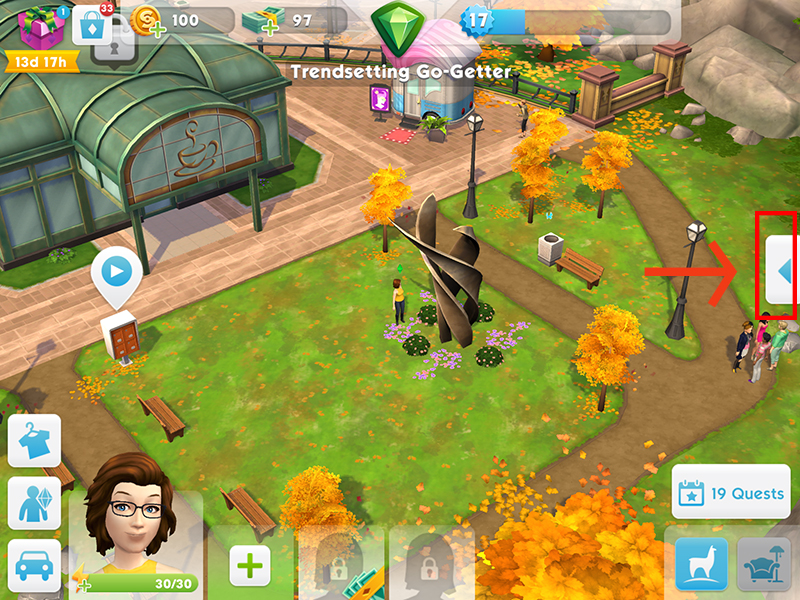
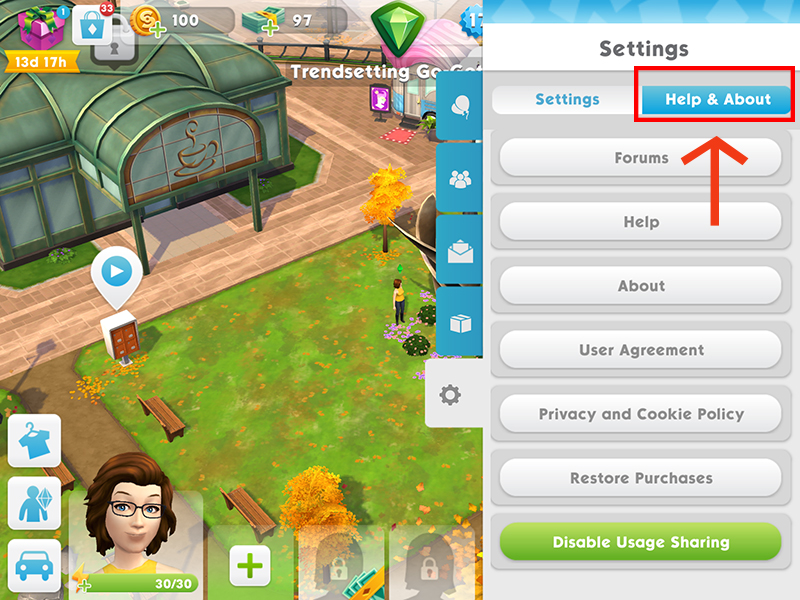
The EA Help site will open on your device's web browser.
If the EA Help site does not open, try clearing cookies on your browser. This might help open the EA website on your device. Here you can read how to clear cookies on iPhone or iPad or how to clear cookies on Android.
Already did it. Just wanted to know if anyone else has gone through same kind of clitch.
Mi have the same issue, game is glitched and stuck at the same place



