Forum Discussion

Huzhaozeah's avatar
4 years ago
Solved

Sims mobile accidental purchase

I accidentally clicked the wrong button ending up purchasing a pianist story, cost me 600 sim cash😭 which I topped up with real money😭…

I don’t want this pianist story and wanna rerun it

I tried to contact EA help and waited for a pop up live chat window for a dozen times but it never show up… 

cant’t receive a phone call either since my number is from China.

Is there ANY OTHER WAY to contact the customer service? 
Please help…and thank you!

  • SalixCat's avatar
    SalixCat
    4 years ago

    @Huzhaozeah 

    You can send in a Help Ticket from your in-game app.

    A Help Ticket from your in-game account is a message that brings through needed details directly to mobile advisors. 

    Using other methods like Facebook or Twitter will only delay support and  you will be asked to go back and send an in-game help ticket.

    Help tickets from your mobile in-game account are the best way to contact support as they will go through directly to the mobile advisors who will be far more informed.

    Follow the following steps:

        • Tap the arrow pull-out tab on the right side of the game screen.
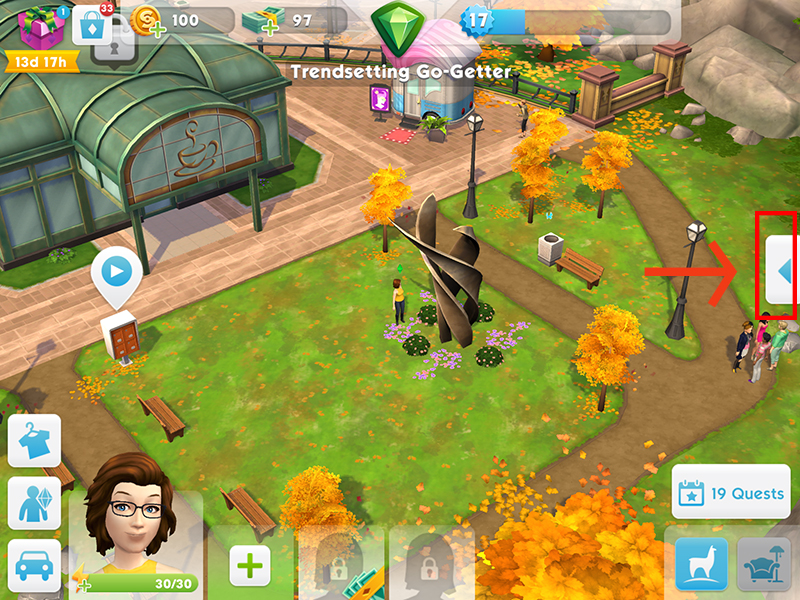
    Tapping the arrow to open the help menu on the right side of the screen in The Sims Mobile.

        • Tap the Settings cog tab.
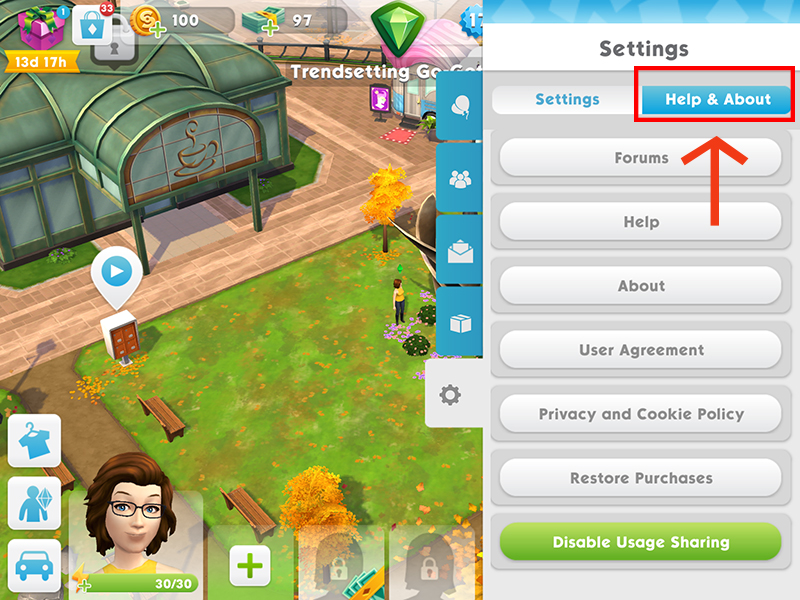
        • Tap Help & About.
        • Tap Help to visit EA Help.

    The Help & About button in The Sims Mobile Settings menu.

    The EA Help site will open on your device's web browser.

        1. Choose your device.
        2. Select topic. Missing content.
        3. Select issue Had content and lost it.
        4. Provide your player-ID
        5. If possible, select contact option Email. (Email is the best option as solving this kind of issue might take some time.)
        6. Fill in the form. Provide all information that could help solve your case.
        7. Attach screenshots that can help the advisor understand your problem.
        8. Tap on the button 'Email us'.

    If the EA Help site does not open, try clearing cookies on your browser. This might help open the EA website on your device. Here you can read how to clear cookies on iPhone or iPad or how to clear cookies on Android.

    If you are not able to open your game app, please use the following link to send in a ticket: https://help.ea.com/en/contact-us/new/?product=the-sims-mobile 

    If you have lost pack content or haven't received a pack, have valid proof of purchase available for advisors. Purchases on mobile aren't made on Origin aka EA's tool, they are made on either Google Play or iTunes so in order for support to confirm that there was a payment made they will need valid proof of purchase. Once they verified the purchase they can check if the content is on the account,. If it's not the advisors will take it from there.

6 Replies

  • EA_Lanna's avatar
    EA_Lanna
    Icon for Community Manager rankCommunity Manager
    4 years ago

    Hi @Huzhaozeah

    Refunds are cases we're not equipped to support from here. I'll share the details below of where to get in touch below. Who you contact will depend on what device you play on and when you made the purchase in some cases.

    To request a refund:

    • For iOS, please contact Apple.
    • For Android
      • If you made your purchase in the last 48 hours, contact Google Play.
      • If it’s been more than 48 hours, contact us (Twitter is also a option to reach support)

    Check out the options above and reach out to the right support team to see if you meet their criteria for a refund. 

    Thanks, 

    EA_Lanna

  • @EA_Lanna Thankssss but I meant I want my sim cash refund as I accidentally purchased a story card in s the game, not the real money refund, since I don’t regret topping up. So, can you please tell me if there’s any method to contact the customer service other than pop-up live chat and phone calling? Thank you!
  • SalixCat's avatar
    SalixCat
    Hero+
    4 years ago

    @Huzhaozeah 

    You can send in a Help Ticket from your in-game app.

    A Help Ticket from your in-game account is a message that brings through needed details directly to mobile advisors. 

    Using other methods like Facebook or Twitter will only delay support and  you will be asked to go back and send an in-game help ticket.

    Help tickets from your mobile in-game account are the best way to contact support as they will go through directly to the mobile advisors who will be far more informed.

    Follow the following steps:

        • Tap the arrow pull-out tab on the right side of the game screen.

    Tapping the arrow to open the help menu on the right side of the screen in The Sims Mobile.

        • Tap the Settings cog tab.
        • Tap Help & About.
        • Tap Help to visit EA Help.

    The Help & About button in The Sims Mobile Settings menu.

    The EA Help site will open on your device's web browser.

        1. Choose your device.
        2. Select topic. Missing content.
        3. Select issue Had content and lost it.
        4. Provide your player-ID
        5. If possible, select contact option Email. (Email is the best option as solving this kind of issue might take some time.)
        6. Fill in the form. Provide all information that could help solve your case.
        7. Attach screenshots that can help the advisor understand your problem.
        8. Tap on the button 'Email us'.

    If the EA Help site does not open, try clearing cookies on your browser. This might help open the EA website on your device. Here you can read how to clear cookies on iPhone or iPad or how to clear cookies on Android.

    If you are not able to open your game app, please use the following link to send in a ticket: https://help.ea.com/en/contact-us/new/?product=the-sims-mobile 

    If you have lost pack content or haven't received a pack, have valid proof of purchase available for advisors. Purchases on mobile aren't made on Origin aka EA's tool, they are made on either Google Play or iTunes so in order for support to confirm that there was a payment made they will need valid proof of purchase. Once they verified the purchase they can check if the content is on the account,. If it's not the advisors will take it from there.

  • @SalixCat Thank you for the detailed advice. unfortunately, it was smooth till step 3, but there’s no step 45678 aka I can’t leave my player ID and find any email-related button, there are only “chat” option and the chatting window never pop up 😰

Featured Places

Node avatar for The Sims Mobile

The Sims Mobile

Make a connection with Simmers, share your knowledge, and troubleshoot issues in The Sims Mobile official community.Latest Activity: 1 day ago
6,659 Posts