Forum Discussion

LokP78's avatar
LokP78
New Novice
6 months ago

EA App Titanfall 2 - Can't activate game

Hello,

I installed Titanfall 2 via Steam. When I launched it, it installed the EA App, where I can see the game in my library.

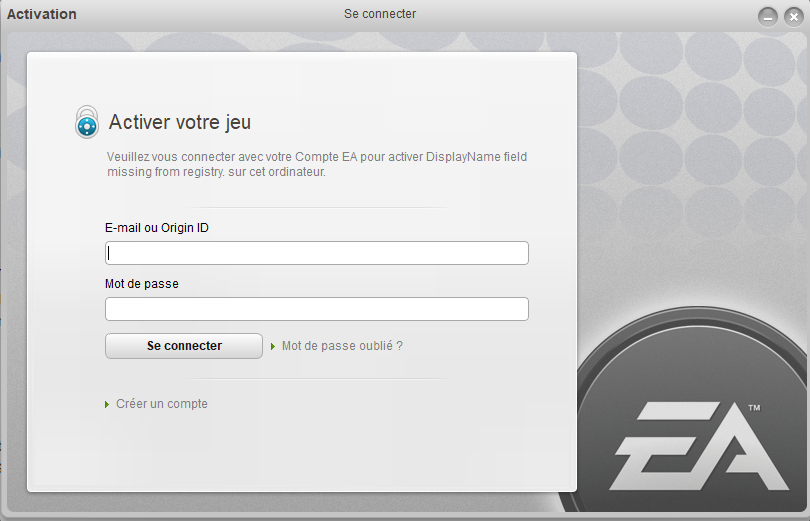
When I try to launch it, I'm redirected to a game activation page.

I enter my EA credentials and get an error saying they're incorrect. However, I've tried multiple times, changed my password on the EA website (using the "Forgot Password" option), and I still get the same result.

Even though it doesn't make sense, I tried creating a new account, but it tells me my computer isn't connected to the internet, which obviously isn't true.

I've uninstalled and reinstalled both the game and the EA App several times, tried running them as administrator, but nothing changes.

Has anyone else experienced this issue?

Thanks for your help.

7 Replies

  • EA_cuervo's avatar
    EA_cuervo
    Icon for Community Manager rankCommunity Manager
    6 months ago

    Hey there,

    I'm sorry to hear you're having problems launching your Titanfall 2. Just to confirm, are you trying to launch the game directly from the EA app or Steam library?

  • Hi,

    I launch it from Steam, but I tried launching from the EA App directly also and I get the same error.

    Thanks

  • EA_cuervo's avatar
    EA_cuervo
    Icon for Community Manager rankCommunity Manager
    6 months ago

    Can you please double-check if your EA account is linked to the same Steam account where you purchased the game? You can do that by checking the Connected Accounts tab in your EA Account settings. 

  • LokP78's avatar
    LokP78
    New Novice
    6 months ago

    Yes it is :


    The weird thing is that in the window where it asks to activate the game, it actually says "Connect to your EA Account to activate DisplayName field missing from registry".

    Don't know if that means something is wrong with one of the installed files.

  • boring_text548's avatar
    boring_text548
    New Novice
    2 months ago

    Hello, I'm currently having the exact same issue, even with the "DisplayName field missing from registry" label on the popup.

    Origin popup requiring activation will never work because Origin servers got shut down.

    The issue started for me when I installed titanfall 2 on my new PC, after I sold off my old one, so I have come to think that on EA's side, my old copy on my former PC is still the "good" one and my new copy doesn't have a valid license or something like that, so when titanfall 2 detects that it ask for activation, which is still done via Origin even though it doesn't work anymore.

    When I first installed the game on my older PC Origin servers still existed so that is probably how I activated my game back then. That is just a theory though, I'm not really sure what is going on, I'm just certain that it wants to go trough Origin for activation.

    Is this the first time you installed the game or did you install it before on a different drive/device? And if yes did it work after or before Origin servers shutdown in April of 2025?

    I would greatly appreciate your help as it may help me find a fix for this issue.

    Thanks for your help.

  • Hello,

    I bought the game a while ago but only installed it for the first time a few months ago, definitely after April 2025. Never installed it on any device prior to that.

    Looks like we have the same issue, but EA doesn't seem to have a fix, it's legitimately broken for any new players it seems.

    Regards

  • boring_text548's avatar
    boring_text548
    New Novice
    2 months ago

    Hello, glad to see that I'm not the only one having this problem.

    This confirms that the issue is linked to origin shutdowns, EA did not update Titanfall 2 code to activate freshly downloaded copies via the EA app and not origin... 

    After my last conversation with EA support they assured me the oversight was told to their "dedicated teams" but their support is a bit shady so I don't know what to take from that. Especially since this issue has been going on for months now.

    Thanks for your response.

Featured Places

Node avatar for Titanfall Franchise Discussion

Titanfall Franchise Discussion

Join the community forums and share your experience from the frontier in the Titanfall Games.Latest Activity: 3 days ago
9,470 Posts