Purchased ultimate edition but I only received standard edition!
Hi everyone, I purchased the Ultimate Edition, however my account and in-game menus continue to show the Standard Edition. Since the purchase, I have contacted EA Support multiple times regarding this issue. During each contact, I completed all troubleshooting steps requested by EA, including reinstalling the game and following entitlement verification steps. After the first advisor was unable to resolve the issue, I explicitly requested escalation to a senior advisor during every subsequent contact. Despite this, my case was never escalated, and I continued to be handled by frontline advisors who were unable to apply a fix. As instructed by EA advisors, I contacted PlayStation Support (PSN) and provided my order details. PlayStation Support confirmed in writing that: The Ultimate Edition purchase is valid and visible on my PlayStation account The correct edition was purchased The issue is not on PSN’s side and must be resolved by EA, as it relates to game entitlements I returned to EA Support with this information and provided full proof of purchase, including: Purchase receipt Transaction ID PSN’s written response confirming the purchase and advising the issue is EA-side Despite following all instructions, providing documentation, and repeatedly requesting escalation, the case was closed as “No fix available” without any entitlement review, and my account still shows the Standard edition. EA Case Number: #229940620 thank you.109Views0likes2Comments
Nice Game
How long is EA going to keep trolling us? How long are you going to keep mocking us? How long will the gameplay stay this broken? How long will it keep happening that when I pass to the right, the ball goes left, or when I pass forward, it goes backward? Explain to me—how long? How long will player stats and chemistry not matter? There’s no way a player like Adeyemi with 97 pace and full stamina should be outrun by a gold card with 80 pace! Fix the **bleep** servers in Champs, Rivals, and Friendlies—I lost two matches today that I was winning just because of your servers! How long are we supposed to tolerate this AI defending? Nerf it already! For four months, people have been posting on the forum, making videos showing how broken the gameplay and AI are—why aren’t you paying attention? It’s not normal that when I pass to the closest player, the ball goes to the farthest one! I want someone from your company to come out and explain to us players what’s going on and why you’re not fixing the real problems in the game! You made so many promises—that this game wouldn’t be like the last one: no delays, no bad servers, no bugs or glitches. Where are those promises? The game is starting to feel like last year’s version, and with every update/patch, it keeps getting worse and worse!Xbox FC26 Mass “Coin Distribution” Permanent Bans
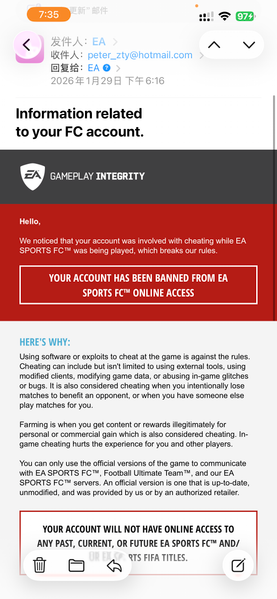
@EAHelp @EA_CommunityTeam Details: • First email: “Terms Violation” • Appeal → second email: “Coin Distribution” • Case status: “Waiting on Studio” → “Declined” • Penalty History: empty after appeal Affected accounts (all same daily batch): 1. My main account(xbox ID: peterzhang80)– recent FC Points purchase, unused. 2. My RTG account(xbox ID: ty zhang8520) – started heavy play last week; zero trades. 3. Friends – normal SBCs, manual small buys only. Common points: • All Xbox. • All hit ~18:10 Beijing Time. • Zero coin farming, zero bots, zero transfers. Attachments: • 1st Red-mail( ban me have no reason) watch the mail's TIME • 2nd Red-mail ( I swear I didn't buy or sell any coins) • Case pages. ( after the 2nd mail, the status turns to decline) • Purchase receipts. (recharged the fc pionts, still leaving in my accounts) •My RTG account also got banned yesterday, I just use it one week( at the same time 18:14pm Beijing time) •My friends account(one of my friends, actually we have more than 10 members got banned in this week ) the funny things, He got the yellow ban after the red ban. THE 1ST MAIL ALSO IN THE SAME TIME. • Screenshots from Chinese FC26 Tieba – same daily bans reported.(almost same time daily) Request: Review batch. System error likely. Thank you. Also, multiple Xbox players in Chinese FC26 Tieba forums reporting identical bans at the same daily window—screenshots there too. Please check if this is a system glitch. Thanks for listening.Solved1.2KViews10likes45CommentsPlease help
EA SPORTS FC 26 crashes a couple of seconds after the splash screen disappears, even after trying DX11, windowed mode, dedicated GPU, disabling fullscreen optimizations, clearing DXCache, deleting local configs, and reinstalling the game. Madden works on the same PC, so this is FC 26–specific. Please escalate this to a senior support team or bug-fix team.”Solved116Views0likes10CommentsPlease someone look into this
Hello, I am experiencing consistent crashes with EA SPORTS FC 26 across multiple devices, and I need assistance troubleshooting. Below is a detailed breakdown of everything I’ve tried, my system setup, and observations. Issue Description When launching the game, it passes the initial splash screen but then crashes or freezes on a black screen after approximately 25 seconds. This happens both online and offline. Previously, the game worked on Wednesday on multiple devices, but now it fails on all of them, including a friend’s PC. Crash occurs even after a clean Windows 11 installation and fresh PC setup. Systems & Environment Primary PC: Alienware Aurora R15 AMD AMD Ryzen 9 7900X 12-Core Processor NVIDIA GeForce RTX 4080 (driver 32.0.15.9186) 32 GB RAM Windows 11 Home 64-bit, build 26200 BIOS Mode: UEFI Secure Boot: On HDR: Off Overclocking: Disabled DirectX 12 installed Other Devices Tested: Friend’s PC with compatible specs (game previously worked) → also crashes at same point Steps Already Attempted Verified EA account entitlements are valid Tried logging into EA App on multiple devices Updated NVIDIA drivers, AMD chipset drivers, Realtek Wi-Fi/Bluetooth drivers Verified all Windows updates installed, including Visual C++ Redistributables (latest v14 for VS 2017–2026) Cleared EA App cache manually from AppData\Local\Electronic Arts\EA Desktop Clean Windows 11 install, set up as new PC No overclock, base RAM speeds verified Secure Boot enabled, TPM 2.0 verified HDR disabled, all overlays (Discord, Steam, Xbox) disabled Ran EA App and game as administrator Offline launch tested — still crashes after splash Reinstalled EA App and FC 26 multiple times Checked disk integrity and removed temporary profile/cache files Tried both EA Play Pro purchase and direct EA store purchase — issue persists Madden (other EA game) works perfectly → rules out Anti-Cheat / EA App issue Deleted / renamed local cloud cache folder → still crashes after splash, black screen persists Observations Crash happens at exact same point (~25 seconds after splash) on all devices Game previously worked on Wednesday; now fails everywhere Offline test does not allow progression to main menu → local cache alone does not resolve it EA Anti-Cheat is not the issue, as other EA games work fine Issue is not hardware-related, given clean new PC and functioning friend’s hardware Conclusion Based on all testing, this is likely a cloud sync / account profile issue on EA’s servers. The game fails while attempting to load my profile from the cloud, causing crashes across all devices. It is not: A local hardware issue A Windows or driver issue An Anti-Cheat issue It is most likely: Cloud profile corruption Server-side data desync EA account-related configuration issue Request / Action Needed I am requesting EA support to: Reset or rebuild my EA SPORTS FC 26 cloud profile Verify my account’s entitlements and anti-cheat status Escalate to development team if needed, as this is reproducible across multiple devices I’ve tried all standard troubleshooting steps, including cache deletion, offline launch, reinstall, clean Windows install, driver updates, and administrator launch. Attachments / Logs Full DxDiag report List of attempted updates / driver versions Observed crash timing (~25 seconds after splash) Thank you for your assistance. I am happy to provide any additional logs or steps needed to resolve this.33Views0likes5CommentsPlease someone help
Hello everyone, I’m hoping someone from EA or the community can help because I’ve exhausted all standard troubleshooting and have isolated this to an account-specific issue. Problem: EA SPORTS FC 26 crashes on my main EA account after the splash screen. It shows a black screen for approximately 20–25 seconds and then closes back to the EA App. There is no error message. Key Detail: The game works perfectly on the same PC when I log into a different EA account. My main account also crashes on a completely different PC (friend’s PC), which rules out hardware issues. What I Have Already Tried: Clean Windows 11 installation (set up as new PC) Updated NVIDIA drivers (RTX 4080) Updated AMD chipset drivers Installed all Windows updates Verified Secure Boot is enabled (UEFI mode confirmed) Verified TPM 2.0 is enabled Disabled HDR Disabled all overlays (Discord, Steam, Xbox) Cleared EA App cache Reinstalled EA App Reinstalled FC 26 multiple times Ran EA App and game as administrator Unlinked Steam from EA account Confirmed EA Anti-Cheat is functioning Tested offline launch Deleted local FC 26 folders in AppData Confirmed another EA account launches and compiles shaders successfully System Specs (Primary PC): Alienware Aurora R15 AMD Ryzen 9 7900X RTX 4080 32GB RAM Windows 11 Home (UEFI, Secure Boot ON) Important Timeline Detail: The game worked earlier in the week. The issue started after I accessed the EA demo/trial version and then switched to the full version. Now it crashes only on my main account on all machines. Conclusion: Since: The same PC works with another EA account My main account crashes on multiple PCs This strongly suggests a cloud profile or account-side corruption tied to my EA account, not a local hardware or driver issue. Request: Can someone from EA please escalate this and reset or rebuild my FC 26 cloud profile? All local troubleshooting has been exhausted and this appears to be server-side/account-specific. Thank you.22Views0likes1Comment