City Storage Desync: HUD Icon Item Count is Higher Than Internal Menu Count
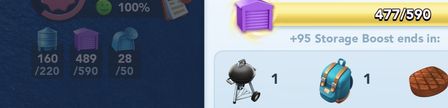
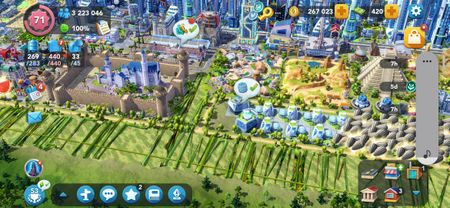
Hello everyone, This is regarding a Technical Issue/Bug with SimCity BuildIt seen on Android (I have no idea if it's also affecting IOS, but my guess is yes, this is most certainly a universal bug). CRITICAL/URGENT Technical Bug Report: Progressive Server-Side City Storage Inventory Count Desynchronization. Main City Storage HUD Icon Item Count is Higher Than Internal City Storage Menu Count. DEMONSTRATION 1 RIGHT: Internal Menu Counter = 477/590 (correct) Short Description: There is a persistent discrepancy between the City Storage capacity integer rendered on the primary heads-up display (HUD) icon and the actual structural inventory array calculated inside the City Storage menu. The application strictly prioritizes the faulty HUD counter to enforce maximum capacity logic, resulting in a game-breaking early lockout of item collection. Also note that the item count seen inside the Trade Depot selling menu (the one you see when you tap "Create Sale") follows the faulty HUD counter. Telemetry & Quantitative Data: City Storage HUD Icon Counter Display: 489 / 590 Internal City Storage Inventory Menu Counter Display (and Manually Verified): 477 / 590 Persistent Inventory Miscount: +12 invisible, unrendered "ghost data packets" occupying index slots. Observed Bug Behavior & Systems Impact: Progressive Memory Leak / Compounding Drift: This state desynchronization is not static. The database variance originated approximately 7 months ago with an item count error of only +3 ghost items. Over a 7-month operational window, the variance has progressively expanded to a +12 item count error. This indicates a cascading write-error on the cloud database, where specific transaction types permanently fail to decrement the total storage integer upon resource consumption. Server-Side State Persistence: Neither buying/selling items in the Trade Depot or even upgrading the City Storage capacity force a re-sync or fix this miscount. Restarting the game after clearing out the cache also didn't fix it. A complete client-side wipe was executed by uninstalling the application, purging local device caches, and reinstalling a fresh build from the storefront. Upon authenticating and downloading the cloud saved profile, the 12-item discrepancy error still persisted. This proves that the data corruption resides natively within the cloud database save-state file on the EA servers, completely independent of local hardware configurations. Critical Gameplay Block (Logic Gate Failure): The game engine utilizes the HUD display value rather than the raw inventory array to process the Storage Full boolean rule. Consequently, when the HUD counter hits 590/590, the application triggers a hard-lock on all incoming items (as the City Storage HUD icon is maxed out). This shortens my actual usable inventory capacity to 578 real items, entirely blocking me from collecting manufacturing outputs or completing commercial trades, despite having 12 empty physical grid slots (as seen inside the City Storage menu). DEMONSTRATION 2 (even tho I still have 12 empty spaces) LEFT: HUD Icon Counter = 505/505 (faulty/maxed out) RIGHT: Internal Menu Counter = 493/505 (correct) (even tho I still have 12 empty spaces) The Trade Depot "Create Sale" Selling Menu Counter follows the faulty HUD Icon Counter I have already attempted to resolve this through the in-game Customer Service portal and the EA Help Mobile Support, however nothing has been fixed and the issue still persists. URGENT REQUEST: Because this inventory miscount is progressive and actively shrinking my gameplay capacity every few weeks, I am escalating this here so it can be routed directly to a SimCity BuildIt Game Developer, Software Engineer, or Account Database Specialist to fix this issue. I have also attached the screenshots that show this error/bug. Any help would be appreciated.289Views2likes2CommentsOpção de Adicionar serviços ao desposito
Olá comunidade equipe Sim City Buildit, uma opção que gostaria e queria opnião da comunidade, é se possível permiti que Serviços como Policia /Saúde/Bombeiro pudesse ser guardado no Deposito, pois pra mim é frustrante quando tenho que fazer alguma mudança na cidade eu não consigo guarda no deposito esses serviço que ja tinha upado,7Views0likes0Comments- 16Views0likes0Comments

Feedback on Special Roads Traffic Restrictions
So...did you revert the traffic mechanics just to roll out the new Haunted Street? I know the official descriptions state that these special roads (except for the gravel road) don't allow regular vehicles. However, at least a year or two ago, a game update quietly allowed all vehicle types to travel freely on these roads without any restrictions. Have we been using a "bugged" feature this entire time ever since? Because of the freedom to use all vehicle types, I extensively used these roads to lay out my city. It offered two major benefits: first, it removed annoying traffic lights; second, it made the urban streets look much more aesthetically pleasing and comfortable. However, with the recent adjustments tied to the new special road, regular vehicles can no longer use or cross these roads to navigate point-to-point. They are now trapped exclusively on standard roads, and my city's entire traffic system has practically collapsed. Could you please consider reverting this, or addressing it in one of the following ways? Add a Toggle Switch for Special Roads: Allow players to choose whether regular vehicles, service vehicles, or pedestrians can use them. Just a simple toggle setting for regular vehicle traffic would solve the problem. Release a Modern Special Road with No Vehicle Restrictions: If not, could you introduce a modern-style special road that permits all vehicle types? The main reason I use these special roads is that I dislike tedious traffic lights—unless you are willing to add an option on standard roads to let us disable traffic lights at specific intersections. Please look into this matter. Thank you for your time and help.55Views2likes1CommentTown Forum - Response?
I can’t help but notice the recent town forum discussion has been locked so no one can comment. Many mayors took the time out of their days to provide feedback and also mention again about a lot of unresolved issues with the game. Was this all done to make it appear like they care, but all our comments fall on deaf ears? Literally no response from the OP. What did the developers say about our feedback?153Views1like6CommentsGreen checkmark on CoM icon with no active assignment (Visual bug after update?)
Hi everyone, Is anyone else seeing a persistent green checkmark on the CoM icon (green diamond), even though you have no active assignments running and nothing to collect? I noticed this issue yesterday, about two hours after the update. Before that, I had only completed and claimed my daily tasks — there were no active assignments or points waiting to be collected. Here is what I've already tried without success: Restarted the game and Google Play Games Force stopped the app Cleared the app cache Completed a new assignment Switched between Wi-Fi and mobile data Loaded the game on a second device (phone) Since the issue persists across devices, it seems to be a server-side visual bug (phantom notification) on EA's end. Has anyone else experienced this since yesterday's update?35Views1like0CommentsAndroid: Broken external railway tracks / Prellbock?
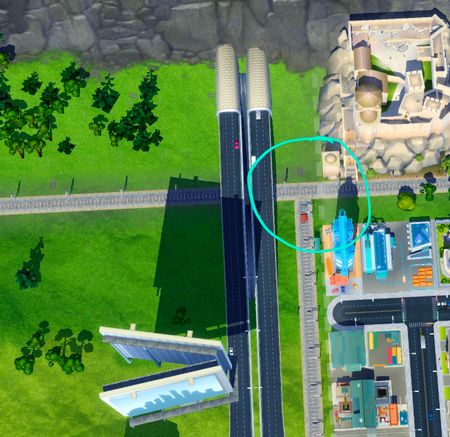
Hi everyone, I noticed something strange in my Capital City today: The two external railway connections no longer share a continuous link. While the tracks on the Mountain side still lead out of the city, the tracks near HQ now end abruptly with a buffer stop right at the mountain connection point, completely cutting off the connection. I checked several other cities via HQ and noticed it's missing in some, but completely normal in others. Are any other Android players experiencing this sudden change or broken railway link in your cities? Would love to hear if this is happening to you as well!66Views0likes2CommentsBug: Design Challenge submission fails during active Leaderboards
Issue Description: When submitting a Design Challenge entry, the submission routine fails on the first attempt whenever the Leaderboard/Voting system is actively tracking scores. Note: Prior to the last week of the previous CoM, submissions always worked perfectly in a single step. Observed Timeline: Before: Submissions always worked in 1 single step without any issues. Previous CoM (Final Week - 6th & 7th Design Challenge): Bug appeared for the first time. Active Leaderboards → Required 2 steps / attempts. New CoM (Week 1 - 1st Design Challenge of the new season): Fresh season start / Initial setup phase → Worked smoothly in 1 single step. New CoM (Week 2 - 2nd & 3rd Design Challenge): Active Leaderboards running → Failed back to requiring 2 steps / attempts every time. What Happens During the 2-Step Submissions: Step 1 (Failed Upload): Blueprints and completion rewards are credited immediately, but the city layout fails to upload. An error pops up asking to "Check internet connection", and you are returned to the design city. Step 2 (Immediate Retry): Submitting a second time right away succeeds instantly. Testing Done: I tested this over both my home Wi-Fi and a mobile hotspot (cellular data). The issue occurs identically on both connections. This proves it is not a local network issue, but a server-side bug introduced in a recent update when syncing the city layout upload with the active Leaderboard system. Request to EA: Please inspect the server-side submission routine during active Leaderboards to fix these false Iconnection error messages and prevent failed first attempts.226Views2likes11Comments
With all of the tech request... I just want to thanks EA for an amazing game!
I see a lot of bugs and request. But this thread is to thank EA for their efforts to make a incredible game! Remember, your efforts matches theirs! But be creativive with the imagination that anything is possible. I applauded EA for their efforts to build a beautiful thriving city with players interest in mind. Everyone feel free to like this post to show support to the EA production team. And remember that microtransactions are a positive thing to support the longevity of the game! So dream, build and inspire!78Views0likes4CommentsAnyone else having issues with playable ads (Gossip Harbor / Arros Puzzle)?
Hi everyone, Since the recent patch a couple of days ago, I’ve been having issues receiving rewards from certain ads—specifically interactive/playable ads like Gossip Harbor and Aros Puzzle 3D. What happens: The ad plays, but when reaching the playable end-card (asking to test the game), the script gets stuck in a loop. Even after pressing "Next" twice and hitting the close "X", no reward is granted. Regular video ads without interactive test prompts still work perfectly fine and grant rewards immediately. Is anyone else experiencing this with interactive/playable ads recently, or is it just isolated to certain devices/regions? Thanks!146Views3likes5Comments