Please bring back Battlefield 1943
It's been almost 2 years since the servers were taken offline and there has been no game like it since. Drop in/drop out with rock, paper, siccors weapon mechanics, no level up advantages, and arcade style gameplay. All EA would have to do is upgrade the textures and they could sell it for $40. Heck if EA really wanted to milk this is could just port the 3 original maps and release it as free to play but then sell DLC for more maps and game modes (though if done incorrectly it could hurt the game). I still have the game saved on my ps3, 360, and Series X in hopes that the servers might get turned back on someday. Even the r/battlefield1943 sub reddit is still active.How to fix the "Missing multiplayer privileges" error on BF1
I figured out how to fix the terrible " Missing multiplayer privileges " error on BF1. It might also work for other EA games like BF3, BF4, BFV, BF HARDLINE... You probably have this issue because your Xbox subscription ended and you renewed it recently. FIRST OF ALL : make sure you have an Xbox Game Pass ULTIMATE membership active, I am not sure if this method works with Xbox Game Pass CORE so if it doesn't work, buy the ULTIMATE membership. If you are trying on Playstation and this method doesn't work, I suggest you purchase the Playstation Plus Premium membership and try again. QUICK FIX: launch BF1, and when you arrive on the multiplayer menu where you get the error, press the xbox home button on your controller, and launch BF4, accept all the pop-ups, and when you arrive on BF4 main menu press X to load multiplayer, it should load, then come back to BF1 and it should load and the error is gone. This might also work if you launch BFV instead of BF4 and when on the main menu, press RT to connect to multiplayer, it should load, then come back to BF1 and it should load and the error is gone. If you are lucky you will be asked to download an update, do it and it will be fixed. This works even if you have never played to BF4 or BFV. If this didn't work, try this longer method that will force BF1 to download an update: Make sure you have an Xbox Game Pass Ultimate subscription, not Core, because you will need the Cloud Gaming functionality. While doing this make sure your automatic subscription renewal is OFF (it worked for me this way). Make sure you have BF4 and all BF4 DLCs uninstalled. Go to the Xbox Store and launch BF4 with cloud gaming. Let it load, a lot of pop-up screens will appears, just accept everything and once you arrive to the multiplayer screen, you should see that you are connected. You might need to press X to refresh the screen. Press LB to open the left menu and navigate to BF1, you won’t have the "missing privileges error" and your multiplayer progress will be shown, BUT that doesn’t mean that it is fixed yet. It’s fixed in the cloud but not on your console. Press the xbox home button on your controller, press the triple bar button (menu button) on the controller and press on quit BF4. Try launching BF4 again and it should ask you to download the game with all the DLCs, press yes. If this message doesn't appear yet, then launch BF4 again exactly the same way through cloud gaming, then quit it the same way (press xbox home button and triple bar button on your controller, press on quit BF4), and launch it again until this message appears. Wait until BF4 is downloaded at about 20%, launch it, there should be some pop-ups about Xbox Live Gold subscription, accept everything, and once you arrive in the main menu saying the game is being installed with the % shown, press the xbox home button on your controller, press the triple bar button (menu button) on the controller and press on quit BF4. Wait until BF4 is fully downloaded, and before the Naval Strike DLC is completed downloading, launch BF4. (don't stop the other DLCs from downloading in background, let them in the download queue) Now that you have launched BF4, accept all the new pop-up messages saying you need an Xbox Live Gold Subscription. Go to the multiplayer section, you should be connected, if not, press X to refresh and you will be connected. Wait patiently in the BF4 main menu until you get a notification saying that the Naval Strike DLC has completed downloading in background. You will also see a green text message on your BF4 main menu saying an update is ready. If you don't see this green text message, wait for some other DLCs to complete downloading. Press the home xbox button, press the triple bar button on the controller, and quit BF4. Launch BF4 again to apply the update and accept all pop-ups. Quit BF4 the same way on step 13 and launch BF1. It should ask you for a forced update, accept it. Then, BF1 should load and the multiplayer should work. Yay ! DON’T DELETE BF4 AND ANY DLC RELATED TO BF4 BECAUSE THIS ERROR MIGHT COME BACK OTHERWISE. If you power off your console this error might come back, so just launch BF1, on the main menu, go back to home and launch BF4 (don’t quit BF4), on that main menu press X to load multiplayer, it should load, then come back to BF1 and it should load. Install BFV and launch it, if you have the "missing multiplayer privileges" error, press RT to refresh and it should ask you to download an update, accept it, then launch BF1. It should work forever, if it asks you for an update accept and do it. Also, if you are gamesharing your subscription with someone and he has this error, what you need is, have both accounts signed-in in the xbox home screen, then select the account that is paying the subscription, do step 20, until BF1 multiplayer is loaded and working for your main account. Still on BF1 main menu, you can switch to the account that you are sharing with, then you can disconnect from your main account, and it will still work. Recommended to do: put your xbox in Sleep power option mode (not the power saving one), to avoid completely shutting it off and keep the multiplayer data loaded continuously. I hope this will help as many players as possible! This is what I found after a few hours of being locked out of BF1, I don't think there is another solution for this error, so make sure to share it around ! See you on the Battlefield (1) !4.4KViews3likes2Comments[SOLVED]pc disconnecting from WiFi once starting Battlefield 1
I have recently bought Battlefield 1 on Steam, and every time I launch it either through Steam or the EA app, after a few minutes my PC gets disconnected from my Wi-Fi with no error code. I have to restart my PC just to be able to connect to my Wi-Fi again. I have tried multiple troubleshooting methods. I have contacted support. Nothing has helped. Support told me to ask here. I have seen others have similar issues seemingly caused by the anti-cheat. Mine seems unique, though, so IDK what to do. Please help. edit i connected Ethernet cable to wifi box that seemed to fix it1.1KViews2likes10Comments
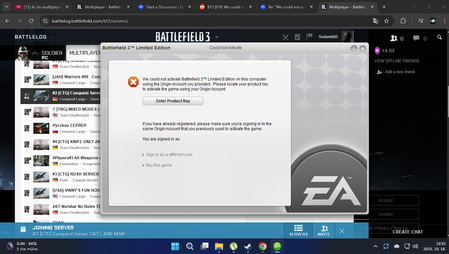
Battlefield 3 Activation Error
When i wan't to join to a server via Battlelog, i got this message, i tried everything, deleting Logs,restart pc,uninstalling the game,uninstalling the EA App, tried with VU client, but the same problem... i played this game 10+ years ago with my old pc there was no problem with it..Solved660Views0likes10Comments
Решение проблемы Ошибка "Лицензия игры недействительна" в Battlefield 3 (БФ3)
1. Удаление файлов лицензии (Самый частый способ) Это часто решает проблему, заставляя EA app сгенерировать новый, рабочий файл лицензии. Закройте полностью приложение EA app. Нажмите клавиши Win + R (или введите в строке поиска Windows %PROGRAMDATA% и нажмите Enter). Перейдите по следующему пути: C:\ProgramData\Electronic Arts\EA Services\License (Папка ProgramData обычно скрыта, но переход по пути с %PROGRAMDATA% должен сработать). Удалите все файлы с расширениями .dlf и .dla, или просто все файлы в папке License. Перезагрузите компьютер. Запустите EA app и попробуйте запустить Battlefield 3. 2. Восстановление игры через EA app Если удаление лицензии не помогло, попробуйте восстановить файлы игры: Запустите EA app. Перейдите в свою Библиотеку. Найдите Battlefield 3. Нажмите на три точки (...) или правую кнопку мыши по обложке игры и выберите опцию "Восстановить" (или "Проверить/Восстановить"). Приложение проверит целостность файлов и, возможно, восстановит лицензию. 3. Изменение файла version.json Некоторые пользователи сообщали, что это "магическое" изменение сработало для них: Найдите папку установки Battlefield 3. Обычно это: ваш_диск:\EA Games\Battlefield 3 Откройте файл version.json в любом текстовом редакторе (например, Блокноте). Найдите строку, где указано "sku": "origin" (или что-то похожее). Замените значение: с "sku": "origin" на "sku": "bf3" (или "sku": "bf6sux", как советовали в одном из тредов). Сохраните файл и попробуйте запустить игру. 4. Убедитесь, что вы вошли в нужную учетную запись Убедитесь, что вы вошли в EA app под той же учетной записью, на которую была куплена или активирована игра Battlefield 3. Если ничто из этого не поможет, возможно, придется переустановить игру и/или само приложение EA app.⚫5.3KViews2likes12Comments
Bring back Battlefield 2 and Bad Company 3
It seems EA/DICE is really good at making games run on the same maps forever. BF 6 is using several BF maps from older versions such as BF 3 and BF 4. Why not redo BF 2 (at least the maps) and add the destruction. Make the helicopters and jets flyable like the original Battlefield 2 without the overlapping controls. Set the game so a person can actually practice on maps on their own using a single player option like Battlefield 2 had. Maps are a big thing for me and many others. El Alamein, strike at Karkand and other maps would be nice to see. Just a thought I’ve had for years. Maybe even bring back Battlefield Vietnam and/or 1942. I’m sorry, I just think the maps on Battlefield 2 may have been a little bigger than what’s available with Battlefield 6 and more fun the way they were laid out.234Views0likes5Comments