[BF Comms] Mise à jour du Matchmaking – 9 octobre
À la suite de notre mise à jour côté serveur du 30 septembre, nous souhaitons faire le point avec vous, aborder certains des désagréments rencontrés au cours de la semaine dernière, et vous présenter nos mesures pour fluidifier votre enchaînement de parties. En bref (TL;DR) Des parties plus saines : La stabilité du matchmaking est revenue à la normale sur l'ensemble des plateformes et des sélections (playlists). Rester ensemble : Vous êtes désormais plus nombreux à pouvoir enchaîner les manches avec votre escouade et vos rivaux habituels. Moins de salons remplis de bots : Nous avons ajusté aujourd'hui le compte à rebours de recherche en arrière-plan afin de laisser plus de temps aux vrais joueurs pour remplir les salons avant que l'IA ne vienne compléter les places vides. Pourquoi ce changement ? Notre objectif principal est de maintenir les joueurs ensemble d'une partie à l'autre, afin que les salons de qualité ne soient pas dissous. Lorsque vous trouvez une escouade avec laquelle le courant passe bien, ou une équipe adverse qui vous donne du fil à retordre, vous ne devriez pas avoir à subir un mélange complet des équipes à chaque nouvelle manche. Le 30 septembre, nous avons introduit des améliorations de serveur conçues pour garder autant de joueurs que possible ensemble d'un match à l'autre, tout en respectant vos préférences de cartes et de sélections. Ce qu'il s'est passé et vos retours Bien que ce système ait réussi à maintenir davantage de groupes soudés entre les manches, nous savons qu'il a également entraîné des effets secondaires frustrants : Une augmentation inattendue de parties remplies de bots. Des salons qui se figeaient ou mettaient trop de temps à se remplir. Se lancer dans une partie pour constater que la moitié du serveur est occupée par des IA n'est pas l'expérience que nous souhaitons vous offrir. Au cours des derniers jours, nos équipes ont déployé des correctifs à chaud (hotfixes) et des ajustements en direct pour stabiliser les files d'attente, et les indicateurs sont progressivement revenus à la normale. La correction du jour : des comptes à rebours plus intelligents Pour résoudre le problème du remplissage par des bots sans pour autant rallonger le temps d'attente en file d'attente, nous avons déployé aujourd'hui une mise à jour serveur supplémentaire : Prolongation du compte à rebours d'avant-manche en Conquête et Escalade : Dès qu'un salon atteint le seuil minimum de joueurs requis pour démarrer, le compte à rebours accorde désormais un court délai supplémentaire afin de permettre aux joueurs en attente de rejoindre la partie. Ce que cela change pour vous : Les manches débuteront avec des salons plus complets et composés de vrais joueurs, ce qui réduira considérablement le risque de voir des bots IA occuper les places vides avant le coup d'envoi. Tout cela s'accompagne d'une augmentation quasi imperceptible de vos temps d'attente globaux. Et pour la suite ? Le matchmaking reste un équilibre constant entre qualité des parties, continuité des salons et rapidité des files d'attente. Nous continuons de surveiller l'état des serveurs, les taux de remplissage et, surtout, vos commentaires à mesure que ces ajustements se stabilisent. Lancez-vous, faites quelques parties et dites-nous ce que vous en pensez. Merci pour votre fidélité, pour vos partages de clips et de rapports de bugs, et pour votre aide précieuse à rendre le jeu meilleur jour après jour.
[BFComms] Battlefield 6 - Community Survey [Aug 2026]
We're looking for your feedback. Our latest Battlefield Community Survey is now open, with this edition focused on Pacific Front. These surveys help us better understand your experience with Battlefield and the community. Your responses help us identify broader trends, highlight what's working well, and pinpoint where we should be focusing our improvements. The survey takes around 5 minutes to complete. Responses are available on a first come, first served basis, with a limited number of spots available, so if you'd like your voice to be heard, be sure to complete it soon. Survey: https://www.surveymonkey.com/r/Q8TMXWS As always, this is just one of the ways we gather feedback. We're also reading your discussions here on the EA forums, as well as across Discord, social media, Battlefield Labs, and other community spaces. Wherever you choose to share your thoughts, we're listening. Thank you for helping shape the future of Battlefield.1.4KViews3likes39Comments
Vegas Insider: Ein Leitfaden zu Vegas Strip und Area 51
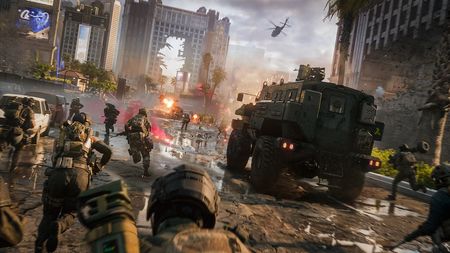
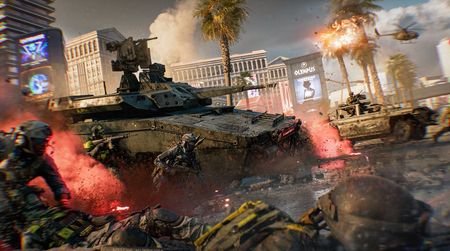
Sin City wird belagert. Bevor du loslegst, solltest du das Gelände kennen. Season 5 führt zwei sehr unterschiedliche Schlachtfelder ein. Vegas Strip verwandelt ein weltberühmtes Reiseziel in eine dichte urbane Kampfzone voller umkämpfter Hotels, Casino-Areale und unterirdischer Routen. Area 51 verlagert den Kampf über die Begrenzungszäune hinaus und kombiniert groß angelegte Fahrzeugkriege mit Infanteriegefechten innerhalb einer versteckten Forschungseinrichtung unter der Wüste. Werfen wir einen genaueren Blick auf beide Karten, einschließlich der wichtigsten Ziele, Design-Einblicke und Tipps der Teams, die sie entwickelt haben. Vegas Strip Las Vegas wurde nicht für einen Krieg gebaut, steckt aber mitten in einem. Vegas Strip wirft dich auf ein dichtes urbanes Schlachtfeld, auf dem Casinos, Hotels und bekannte Sehenswürdigkeiten zum Brennpunkt geworden sind. Die Karte wurde mit einem Fokus auf Abwechslung entworfen. In einem Moment kämpfst du dich durch eine Hotel-Lobby, im nächsten drängst du durch die Abflusskanäle unter dem Boulevard oder lieferst dir Feuergefechte von einem Hotelzimmer in den oberen Etagen. Kein Kampf gleicht dem anderen. Ein Vorstoß durch ein Luxusresort erfordert einen anderen Ansatz als eine Schlacht in den Abflusskanälen unter dem Vegas Strip. Das Ziel des Teams war einfach: ein All-Out Warfare-Erlebnis in einer ikonischen urbanen Umgebung schaffen und gleichzeitig sicherstellen, dass jeder Spielstil seinen Platz findet. Schlachtanalyse Olympus-Pools Die Olympus-Lobby ist ein auf Infanterie ausgerichtetes Ziel, bei dem sich alles um vertikale Kämpfe dreht. Truppen können durch den Parkservice-Bereich eindringen, sich durch Service-Eingänge drängen oder Seilrutschen benutzen, um das Dach zu erreichen, bevor sie durch die eingestürzte Kuppel nach unten springen. Dieses Ziel belohnt Teams, die aus mehreren Winkeln angreifen und den Raum über und unter sich nutzen. Krater & Abflusskanäle Im Zentrum des Strips liegt ein riesiger Krater, der vom Wrack eines zerstörten PAX-Konvois umgeben ist. An der Erdoberfläche kämpfen Infanterie und Fahrzeuge auf den offenen Straßen und in den Trümmerfeldern. Unter der Oberfläche sorgen Abflusskanäle und Tunnel für ein völlig anderes Erlebnis, mit engen Korridoren und Gefechten auf kurze Distanz, die eine sicherere Route durch die Mitte der Karte bieten. Karat Plaza Karat Plaza ist um einen großen öffentlichen Platz herum gebaut, der von Brunnen und Pflanzen umgeben ist. Ein zerstörbares Casino-Schild steht im Zentrum des Ziels und kann den Spielverlauf in diesem Bereich dramatisch verändern, wenn es herabstürzt. Die meisten Kämpfe finden auf mittlere Distanz um den Plaza herum statt, während sich Kämpfe auf längere Distanz eher an den Rändern abspielen. Art Deko Schwere Gefechtsspuren haben sich durch das Zentrum dieses Hotels gefressen und ein kollabiertes Inneres hinterlassen, das voller Trümmer liegt. Squads können sich durch die Überreste des Gebäudes bewegen, sich an den Seiten Raum für Raum vorkämpfen oder direkt um das Ziel im Zentrum kämpfen. Bodenfahrzeuge üben oft Druck auf den Bereich um das Ziel aus, während sich Infanteriekämpfe innerhalb des Gebäudes konzentrieren. Blick hinter die Designentscheidungen Eine der größten Herausforderungen des Teams war es, das Erlebnis für Infanterie und Fahrzeuge gleichermaßen auszubalancieren. Der Vegas Strip dient natürlich als Zentrum des Schlachtfelds und schafft einen weitläufigen Raum, den Fahrzeuge für sich nutzen können. Während der Entwicklung konzentrierte sich das Team darauf, der Infanterie mehr Möglichkeiten zu geben, sich über alternative Routen, Innenräume und Deckung zwischen den Zielen zu bewegen, um die Action aufzubrechen. Vertikalität war eine weitere wichtige Überlegung. Dächer, Hotelzimmer und Seilrutschen-Routen bieten alle einzigartige Möglichkeiten, ein Ziel anzugehen, erfordern aber auch klare Kontermöglichkeiten. Das Ziel war es, den Spieler:innen Optionen zu geben und Bewegungen auf der Karte zu fördern, anstatt alle in dieselben Kämpfe zu drängen. Die Spieltests unterstrichen, wie wichtig es ist, dass sich jeder Abschnitt des Strips besonders anfühlt. Jedes Casino-Areal wurde mit einem eigenen Charakter und Kampfrhythmus entworfen, damit sich die Bewegung über die Karte wie eine Reise durch verschiedene Teile von Las Vegas anfühlt, statt wie ein einziges, zusammenhängendes Schlachtfeld. Tipps vom Team Spieler:innen der Aufklärungs-Klasse können wertvolle Informationen liefern und Teammitgliedern helfen, umkämpfte Gebiete zu navigieren und Angriffe zu koordinieren. Hubschrauber können die Skyline der Stadt nutzen, um sich schnell neu zu positionieren und aus unerwarteten Winkeln anzugreifen. Stürme nicht direkt den Vegas Strip entlang. Nutze Deckung, alternative Routen und Squad-Versorgung, wann immer es möglich ist. Sichere Dächer und obere Stockwerke, bevor du auf ein Ziel vorrückst. Der zerstörte PAX-Konvoi kann wertvolle Deckung bieten, wenn du dich durch das Zentrum der Karte bewegst. Nutze Fahrzeuge, um dich schnell zwischen Zielen zu bewegen und nicht auf offenem Gelände erwischt zu werden. Area 51 Die meisten Menschen haben schon von Area 51 gehört. Nur sehr wenige wissen, was sich darin befinden soll. Für Battlefield 6 nutzte das Team dieses Setting, um eine Karte zu erstellen, die militärische Kämpfe im großen Stil mit einer versteckten unterirdischen Anlage unter der Wüste Nevadas verbindet. Über Tage kämpfen Panzer, Hubschrauber und Jets über dem ausgetrockneten Seebett und den umliegenden Bergen. Unter Tage kämpfen Infanterie-Squads durch Tunnel, Labore und geheime Forschungsbereiche. Spieler:innen können über Tage auf der Basis kämpfen oder in die darunter versteckte Anlage vorstoßen. Beide Bereiche spielen sich sehr unterschiedlich, sind aber durch den Spielverlauf ständig miteinander verbunden. Spieler:innen erhalten einen Blick hinter eines der berühmtesten Betreten verboten-Schilder der Welt, während sie auf einem Schlachtfeld kämpfen, das auf Fahrzeuge und Infanterie ausgelegt ist. Gefechtsübersicht Der Kommunikationsbereich Der Kommunikationsbereich liegt auf einem Hügel mit Blick auf das Schlachtfeld und bietet verteidigenden Truppen starke Sichtlinien auf nahegelegene Zugangswege. Das Ziel konzentriert sich auf ein Kommunikationsgebäude und einen Parkplatz, was es zu einem wertvollen Posten für Infanterie macht und gleichzeitig den Luftkampf darüber unterstützt. Absturzstelle Ein abgestürztes Flugzeug hat diesen Straßenabschnitt in eine wichtige Fahrzeug-Kampfzone verwandelt. Bodenfahrzeuge treffen häufig rund um das Wrack aufeinander, während nahegelegene Hangars der Infanterie die Möglichkeit bietet, sich zwischen Deckungen zu bewegen und vorrückende Vehikel zu beeinträchtigen. Hubschrauberlandeplatz Der in den Berghang gebaute Hubschrauberlandeplatz dient als starke Aussichtsplatform. Die erhöhte Lage bietet klare Sichtlinien auf mehrere Ziele und macht ihn zu einem beliebten Ort für die Aufklärungsklasse, während Teams gleichzeitig Flugabwehr-Optionen gegen feindliche Luftfahrzeuge haben. Der Krater Der Krater bildet das Zentrum des Infanterieerlebnisses auf der Karte. Ein massiver Einschlag hat Teile der unterirdischen Anlage freigelegt und ein Netzwerk aus Tunneln, Garagen, verlassenen Laboren und Verteidigungsstellungen unter der Wüstenoberfläche freigelegt. In diesem Bereich sind drei Ziele angesiedelt, was die Infanterie in ständige Nahkämpfe verwickelt, während die Teams um die Kontrolle unter der Erde kämpfen. Flugkontrollturm Der Flugkontrollturm verändert sich im Verlauf einer Partie. Zu Beginn der Partie dienen die oberen Stockwerke als mächtiges Scharfschützennest mit Blick auf weite Teile des Schlachtfelds. Lässt man ihn stehen, kann die verteidigende Seite große Teile der Karte abriegeln. Bringst du ihn zum Einsturz, verlagert sich der Kampf in die Trümmer darunter. Klimatest-Hangars Die Klimatest-Hangars bieten zwei sehr unterschiedliche Kampferlebnisse. Der Heißklima-Hangar bedingt einen ständigen Kampf zwischen Infanterie und gepanzerten Fahrzeugen. Eine zentrale Plattform bietet der Infanterie Verteidigungsraum, während Fahrzeuge das Ziel umkreisen und nach Lücken suchen. Der Kaltklima-Hangar verengt den Fokus auf ein infanterielastiges Ziel, das um eine Testanlage voller experimenteller Flugzeuge herum gebaut wurde. Blick hinter die Designentscheidungen Area 51 wurde erbaut, um zwei sehr unterschiedliche Stile des Battlefield-Kampfes durch Versorgung zu unterstützen. Oberhalb haben Fahrzeuge und Luftfahrzeuge Raum, um auf der Basis und der umliegenden Wüste zu agieren. Unter Tage verlagert sich der Kampf in engere, auf Infanterie ausgerichtete Räume, die im Krater und in der unterirdischen Anlage verborgen sind. Der Krater erhielt während der gesamten Entwicklung besondere Aufmerksamkeit. Das Team verfeinerte die Tunnel, Labore und Routen in den Innenbereichen weiter, um ein zusammenhängendes Infanterieerlebnis im Zentrum der Karte zu schaffen, das gleichzeitig eng mit der großen Schlacht über Tage verknüpft ist. Spieltests halfen ebenfalls dabei, das Luftkampferlebnis zu formen. Die Spieler:innen genossen die Größe des Schlachtfelds und die Art und Weise, wie sich Luftfahrzeuge durch die umliegenden Berge bewegen konnten, was das Team dazu veranlasste, diese Routen weiterzuentwickeln und mehr Manövriermöglichkeiten auf der Karte zu schaffen. Zudem erhielten die unterirdischen Bereiche positives Feedback für ihre temporeichen Infanteriegefechte. Die unmittelbare Nähe der Ziele hält die Teams im Geschehen und erzeugt ein ganz anderes Tempo als bei den Kämpfen an der Oberfläche. Tipps vom Team Spieler:innen der Aufklärungs-Klasse können die Türme, Bergrücken und erhöhten Positionen der Karte nutzen, um Teammitglieder bei mehreren Zielen zu unterstützen. Pioniere sind hier besonders wertvoll, da sie helfen, Vorstöße gepanzerter Fahrzeuge zu verlangsamen und wichtige Ziele zu verteidigen. Pilot:innen sollten sich bei Bewegungen über dem Schlachtfeld die umliegenden Gebirgszüge zunutze machen. Der Flugkontrollturm ist eines der wichtigsten Ziele auf der Karte. Eine frühzeitige Sicherung kann deinem Team helfen, die Kontrolle über das umliegende Gebiet zu behalten. Wenn das verteidigende Team den Turm abschließend sichert, kann sein Einsturz den Kampf völlig verändern und beide Teams zum Umdenken zwingen. Halte den Druck auf die unterirdischen Ziele aufrecht. Das Halten des Kraternetzwerks kann deinem Team einen starken Stützpunkt in der Kartenmitte verschaffen. Der Vegas Strip und die Area 51 erfordern von den Spieler:innen sehr unterschiedliche Kampfansätze. Der eine belohnt kluge Bewegungen durch ein dichtes urbanes Schlachtfeld. Der andere teilt den Kampf zwischen offenen Fahrzeugschlachten und Nahkämpfen unter der Erde auf. Je mehr Zeit du damit verbringst, die beiden Karten kennenzulernen, desto mehr Routen, Flanken und Möglichkeiten wirst du entdecken. Weitere Informationen zu Battlefield: besuche unsere Website, abonniere unseren Newsletter und bleibe mit unserer Community auf allen Social-Media-Plattformen unter @Battlefield in Verbindung, inklusive Discord. *Battlefield 6 und alle Spiel-Updates erforderlich. Enthält optionale In-Game-Käufe. Angebot nur für begrenzte Zeit. Es gelten Bedingungen und Beschränkungen. Siehe https://www.ea.com/de-de/games/battlefield/battlefield-6/game-disclaimers für Details.3Views0likes0CommentsRoadmap für Season 5: Die Belagerung von Vegas beginnt
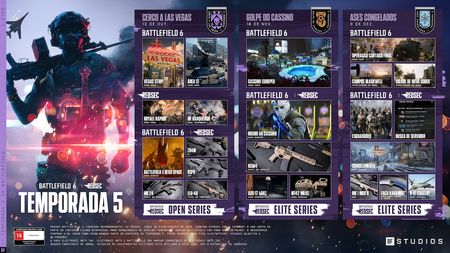
Die Würfel sind gefallen. Der Krieg kommt nach Las Vegas und bringt unsere bisher größte Season mit sich. Ab dem 13. Oktober kämpfst du auf zwei neuen Karten, stürzt dich in Rapid Royale und erhalte ein neues Waffenarsenal*. Also mobilisiere deinen Squad. Es geht nach Sin City. Eine vollständige Übersicht der neuesten Gameplay-Updates und Verbesserungen findest du in unserem aktuellen Combat-Update. Bist du auf dem neusten Stand? Dann ist dies deine offizielle Einweisung zu allem, was dich in Season 5: Belagerung von Vegas erwartet. Der Krieg kommt nach Vegas Las Vegas wurde nicht für den Krieg gebaut. Das wird ihn nicht aufhalten. Der Krieg hat Nevada erreicht. Kämpfe dich durch das neonbeleuchtete Chaos des Vegas Strips, decke auf, was in Area 51 geheimgehalten wird, und erlebe einige der bislang ambitioniertesten Schauplätze von Battlefield 6. Die Action beginnt zum Launch mit Vegas Strip und Area 51; eine weitere neue Karte erscheint im Laufe der Season. Vegas Strip Was auch immer in Vegas passiert, es wird alle betreffen. Kämpfe in Casinos, luxuriösen Hotel-Innenräumen, auf überfüllten Straßen und in unterirdischen Abwasserkanälen, während Hubschrauber über den Wolkenkratzern kreisen und gepanzerte Fahrzeuge durch die Stadt darunter pflügen. Egal, wo du im Einsatz bist, jeder Winkel des Vegas Strip bietet eine andere Möglichkeit den Sieg zu sichern. Area 51 Es wurde vorgewarnt... Area 51 wirft dich in eine der berüchtigtsten Militäranlagen der Welt, wo Panzer, Hubschrauber und Jets den Himmel beherrschen, während unten heftige Infanteriegefechte toben. Im Herzen der Karte liegt ein gewaltiger Krater, der in eine geheime unterirdische Anlage voller enger Korridore und Nahkämpfe führt. Die Wahrheit ist da draußen. Dorthin zu gelangen, ist der schwierige Teil. Rapid Royale Battle Royale kommt mit Rapid Royale nach Las Vegas – einem neuen REDSEC-Erlebnis für Spielende, die schnell ins Geschehen eintauchen wollen. Stürze dich in optimierte Trios- oder Solos-Matches mit einer geringeren Anzahl an Spielenden, hochwertiger Beute und einem unerbittlichen Feuerring, der Squads auf Trab hält. Sammle Eliminierungen. Verdiene Wiedereinsätze. Bleib am Leben. Jeder Kampf ist eine Chance, deinen Squad wieder ins Spiel zu bringen. Das belohnt eine aggressive Spielweise und sorgt für durchgehende Action vom ersten Absprung bis zum finalen Showdown. Mehr Wettkampfmöglichkeiten Der Wettbewerb wird hitziger. Season 5 erweitert die kompetitiven Angebote von Battlefield mit einer neuen Ranglistenspiel BR-Season und der Einführung der Open Series von REDSEC. Für Squads, die sich gegen die Besten beweisen wollen: Die Elite Series erscheint später in dieser Season mit riesigen Geldpreisen. Für Multiplayer-Fans bieten Ranglisten eine neue Möglichkeit, Fortschritte zu messen und Leistungen im Laufe der Zeit zu verfolgen. Glaubst du, dein Squad hat das Zeug dazu? Beweise es. Erweitere dein Arsenal Eine neue Season verlangt nach neuer Hardware. Gemeinsam mit dem Launch führt Season 5 vier neue Waffen ein, die dir helfen jede Situation zu meistern, von Nahkampfgefechten bis zu Distanzduellen: Mk 24 – Sturmgewehr Ein Sturmgewehr mit geringerer Kapazität, das Magazingröße gegen konsistente Leistung und außergewöhnlichen Schaden auf Distanz eintauscht. Mit einer stabilen Feuerrate ist die Mk 24 für diejenigen gedacht, die Wert auf Präzision und Effektivität legen. RSPR – MP Eine MP mit den Eigenschaften eines Gewehrs, die eine gleichmäßige Feuerrate mit hohem Schaden kombiniert. Das kleinere Magazin und der stärkere Rückstoß erfordern mehr Kontrolle, was die Waffe leistungstechnisch zwischen der SG 553R und der SCW-10 einordnet. Z84M Leichtes Maschinengewehr Das Z84M wurde für aggressive Kämpfe auf kurze Distanz entwickelt und kombiniert ein 100-Schuss-Stangenmagazin mit hohem Schaden und einer hohen Feuerrate, was es effektiv gegen Gruppen von Feinden macht. Diese Feuerkraft geht mit erheblichem Rückstoß und Einbußen bei der Handhabung einher, daher ist die Kontrolle entscheidend. ELR-40-Zylinderverschluss-Scharfschützengewehr Das für extreme Distanzen konzipierte ELR-40 bietet die beste Geschossflugbahn und den größten Sweet-Spot in seinem Waffen-Archetyp und ist damit ideal für die offenen Sichtlinien unserer neuen Karte Area 51 geeignet. Eine spezielle Einzelschuss-Munitionsoption verändert ihre Rolle grundlegend und verlagert den Sweet-Spot in den Nahbereich mit einer Funktionalität, die langjährige Battlefield-Fans kennen dürften. Egal, ob du die Sichtlinien in Area 51 hältst oder dich durch das Chaos auf dem Vegas Strip kämpfst – dein liebstes Loadout wird sich wahrscheinlich bald ändern. Dead Space kehrt zu Battlefield zurück Sie hätten es in Ruhe lassen sollen. Dieses Halloween löst eine dunkle Entdeckung unter Area 51 das Konvergenz-Event aus, ein zeitlich begrenztes Crossover, das Dead Space zurück zu Battlefield bringt. Als Einheiten tief in der Anlage einen mysteriösen Marker entdecken, verbreitet sich dessen Einfluss und droht eine katastrophale Konvergenz auszulösen. Weitere Details folgen, je näher das Event rückt, aber eines ist sicher: manche Entdeckungen sollten besser begraben bleiben. Kommendes in Season 5 Der Launch war nur das Vorspiel … Casino-Überfall-Update | 10. November In dem zeitlich begrenzten Event Casino-Überfall verlagert sich die Schlacht tiefer nach Las Vegas. Im Verlauf der Season verlagert sich der Kampf in das European Casino, ein neues, auf Infanterie ausgelegtes Schlachtfeld, auf dem Nahkämpfe im Mittelpunkt stehen. Kämpfe dich durch prunkvolle Spielhallen, navigiere durch die verworrenen Innenräume des Casinos und nutze die Zerstörung, um neue Pfade durch das Chaos zu schaffen. Weitere Details werden vor dem Starttermin mitgeteilt. Eiskaltes Ass-Update | 8. Dezember Während sich das Jahr dem Ende zuneigt, entwickelt sich das Schlachtfeld weiter. Eiskaltes Ass führt Operation High Roller sowie mehrere stark nachgefragte Funktionen ein, darunter Platoons und den Server-Browser. Spielende können auch zu Blackwell-Ölfelder und Neu-Sobek zurückkehren, die beide basierend auf Community-Feedback aktualisiert wurden. Neue Waffen, Ausrüstung und die B-81 Cavalry erweitern die Sandbox weiter. Weitere Details werden vor dem Starttermin mitgeteilt. Eine letzte Runde in Gauntlet Mit dem Launch von Season 5 wird Gauntlet Battlefield 6 verlassen. Falls du einsteigen wolltest, jetzt ist der richtige Zeitpunkt. Schnapp dir deinen Wingman und erlebe den Modus, bevor er am 13. Oktober seinen letzten Flug antritt und am Horizont verschwindet. Die bisher größte Season In Vegas ist Risiko Teil der DNS. Hier draußen kann eine Glückssträhne schnell abreißen. Ein einziger Vorstoß kann das Blatt wenden. Ein einziger Fehler kann alles kosten. Die Schlacht beginnt am 13. Oktober, wobei noch mehr Spieler:innen während der Battlefield 6 Vollversions-Trial vom 15. bis 19. Oktober am Kampf teilnehmen werden**. Weitere Informationen zu Battlefield: besuche unsere Website, abonniere unseren Newsletter und bleibe mit unserer Community auf allen Social-Media-Plattformen unter @Battlefield in Verbindung, inklusive Discord. * Battlefield REDSEC und alle Spiel-Updates erforderlich. Enthält optionale In-Game-Käufe. Angebot nur für begrenzte Zeit. Es gelten Bedingungen und Beschränkungen. Siehe https://www.ea.com/de/games/battlefield/battlefield-6/game-disclaimers für Details. ** Es gelten Bedingungen & Einschränkungen. Weitere Informationen auf battlefield.com/disclaimers. Der Trialzeitraum kann je nach Plattform variieren. Weitere Informationen hierzu sind beim Händler erhältlich.3Views0likes0Comments[BFComms] Matchmaking Update – October 9
Following our backend update on September 30, we want to check in, address some of the friction you experienced over the past week, and share what we’re doing to make your match-to-match experience smoother. TL;DR Healthier Matches: Matchmaking stability has returned to normal across all platforms and playlists. Staying Together: More of you are successfully rolling into the next round with your squads and friendly rivals. Fewer Bot Lobbies: We deployed a backend timer adjustment today that gives real players more time to fill lobbies before AI backfill kicks in. Why We Made the Change Our core goal has been to keep more players together from one match to the next, which means great lobbies stay together. When you find a squad that clicks or an opposing team that gives you a hard-fought match, you shouldn’t have to get completely reshuffled every single round. On September 30, we introduced backend improvements aimed at keeping as many players together as possible from match to match, while still respecting your individual playlist and map preferences. What Happened & What We Heard While the system succeeded in keeping more groups together across rounds, we know it also introduced frustrating side effects: An unexpected surge in bot-filled matches. Lobbies stalling out or taking too long to populate. Jumping into a match only to find half the server populated by AI isn't the experience any of us want. Over the past several days, our team rolled out hotfixes and live tweaks to stabilize queue performance, and metrics have steadily returned to healthy baselines. Today’s Fix: Smarter Countdown Timers To resolve the bot backfill issue without sacrificing queue speed, we rolled out an additional backend update today: Extended Pre-Round Countdown for Conquest and Escalation: Once a lobby hits the minimum player threshold to start, the countdown timer now gives a brief additional window for incoming players to filter in. What This Means for You: Rounds will start with fuller, real-player lobbies, reducing the chance that AI bots fill empty slots before the match kicks off. All of this comes with virtually no noticeable increase to your overall queue times. Looking Ahead Matchmaking remains an ongoing balance between match quality, lobby continuity, and quick queue times. We are continuing to monitor server health, fill rates, and—most importantly—your feedback as these adjustments settle in. Jump in, play a few rounds, and let us know how your matches feel. Thank you for sticking with us, sharing your clips and reports, and helping us build a better game every day.55Views1like1Comment
[BFComms] Aktualizacja matchmakingu – 9 października
Po naszej aktualizacji backendu z 30 września chcemy przekazać Wam nowe informacje, odnieść się do problemów, które napotkaliście w zeszłym tygodniu, oraz podzielić się działaniami, jakie podejmujemy, aby przejścia między kolejnymi meczami były dla Was płynniejsze. TL;DR Stabilniejsze mecze: Stabilność matchmakingu wróciła do normy na wszystkich platformach i playlistach. Wspólna gra: Więcej z Was z powodzeniem przechodzi do kolejnej rundy ze swoimi drużynami i rywalami. Mniej lobby z botami: Wdrożyliśmy dziś poprawkę backendu modyfikującą licznik czasu, co daje prawdziwym graczom więcej czasu na zapełnienie lobby, zanim do gry wejdą boty. Dlaczego wprowadziliśmy te zmiany Naszym głównym celem było zatrzymanie większej liczby graczy razem z meczu na mecz, co pozwala utrzymać świetne lobby w tym samym składzie. Gdy znajdziecie drużynę, z którą świetnie się dogadujecie, lub przeciwników, którzy stawiają Wam czoła w zaciętej walce, nie powinniście być całkowicie rozdzielani po każdej rundzie. 30 września wprowadziliśmy ulepszenia backendu, których celem było utrzymanie jak największej liczby graczy razem między meczami, przy jednoczesnym poszanowaniu Waszych indywidualnych preferencji dotyczących playlist i map. Co się stało i jakie opinie otrzymaliśmy Choć system z powodzeniem zatrzymywał więcej grup razem między rundami, wiemy, że wywołał on również frustrujące skutki uboczne: Niespodziewany wzrost liczby meczów zapełnionych botami. Blokowanie się lobby lub zbyt długi czas ich zapełniania. Dołączanie do meczu tylko po to, by odkryć, że połowę serwera zapełnia sztuczna inteligencja, nie jest doświadczeniem, jakiego oczekujemy. W ciągu ostatnich kilku dni nasz zespół wdrożył hotfixy i poprawki na żywo, aby ustabilizować działanie kolejek – dzięki temu wskaźniki stale wracają do zdrowych poziomów bazowych. Dzisiejsza poprawka: Inteligentniejsze odliczanie Aby rozwiązać problem zapełniania lobby botami bez poświęcania szybkości wyszukiwania gier, wdrożyliśmy dzisiaj dodatkową aktualizację backendu: Wydłużone odliczanie przed rundą w trybach Conquest i Escalation: Gdy lobby osiągnie minimalny próg graczy wymagany do startu, licznik czasu da teraz dodatkową, krótką chwilę, aby kolejni dołączający gracze mogli zapełnić miejsca. Co to oznacza dla Was: Rundy będą rozpoczynać się z pełniejszymi lobby złożonymi z prawdziwych graczy, co zmniejszy szansę na to, że boty zajmą wolne sloty przed rozpoczęciem meczu. Wszystko to odbywa się przy praktycznie niezauważalnym wydłużeniu ogólnego czasu oczekiwania w kolejce. Co dalej Matchmaking to nieustanne balansowanie pomiędzy jakością meczów, ciągłością lobby a szybkim czasem oczekiwania w kolejce. Nadal będziemy monitorować stan serwerów, stopień ich zapełnienia oraz – co najważniejsze – Wasze opinie, podczas gdy wprowadzane zmiany będą się stabilizować. Wskakujcie do gry, rozegrajcie kilka rund i dajcie nam znać, jak oceniacie swoje mecze. Dziękujemy, że jesteście z nami, dzielicie się swoimi nagraniami oraz zgłoszeniami i pomagacie nam każdego dnia tworzyć lepszą grę.[BFComms] Matchmaking w Battle Royale Duos został naprawiony
Rozwiązaliśmy problem z trybem Battle Royale Duos i matchmaking jest już ponownie dostępny na wszystkich platformach. Aby wrócić do gry, może być konieczne zrestartowanie gry lub ponowne wejście do kolejki. Dziękujemy za cierpliwość podczas prac nad usunięciem tej usterki.[BFComms] Matchmaking w trybie Casual Breakthrough
Wdrożyliśmy poprawkę po stronie backendu, aby rozwiązać problem z matchmakingiem w trybie Casual Breakthrough. Wprowadzenie tej aktualizacji na wszystkich serwerach może zająć trochę czasu, dlatego po wyszukaniu gry wciąż możecie od czasu do czasu zostać cofnięci do menu głównego. Ponowne dołączenie do kolejki powinno teraz szybciej wprowadzić Was do gry. Dziękujemy za cierpliwość.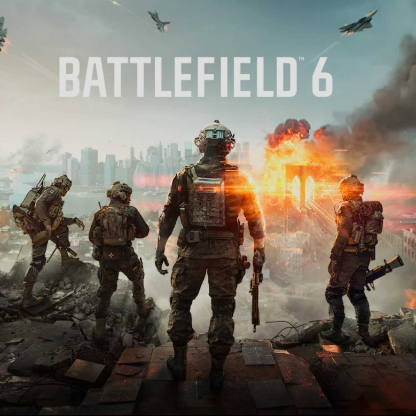
BATTLEFIELD 6 - POR DENTRO DE VEGAS
GUIA DA EQUIPE DE DESENVOLVIMENTO PARA OS MAPAS VEGAS STRIP E ÁREA 51 Vegas Strip está sitiada. Antes de se posicionar, vale a pena conhecer o terreno. A Temporada 5 apresenta dois campos de batalha bem diferentes. A Vegas Strip transforma um destino mundialmente famoso em uma zona de combate urbana densa, repleta de hotéis disputados, lotes de cassinos e rotas subterrâneas. A Área 51 estende o combate para além das cercas perimetrais, combinando guerra de veículos em grande escala com combate de infantaria dentro de uma instalação de pesquisa oculta sob o deserto. Aqui está uma visão mais detalhada de ambos os mapas, incluindo objetivos principais, insights de design e dicas das equipes que os criaram. VEGAS STRIP Las Vegas não foi construída para uma guerra, mas está bem no meio de uma. A Vegas Strip coloca quem está jogando em um campo de batalha urbano denso, onde cassinos, hotéis e atrações turísticas se tornaram o centro do combate. O mapa foi projetado com base na variedade. Em um momento você está lutando no saguão de um hotel, no outro está avançando por drenos pluviais sob a avenida ou trocando tiros a partir de um quarto de hotel em um andar superior. Nenhuma luta é exatamente igual à outra. Um avanço por um resort de luxo exige uma abordagem diferente de uma batalha nos drenos pluviais sob a Vegas Strip. O objetivo da equipe era simples: criar uma experiência de guerra total em um cenário urbano icônico, garantindo que todo estilo de jogo tenha um lugar para prosperar. ANÁLISE DE BATALHA Piscinas do Olympus O Lobby do Olympus é um objetivo focado em infantaria, centrado no combate vertical. Pessoas podem entrar pela área de manobristas, entradas de serviço ou usar tirolesas para alcançar o telhado antes de descer pela cúpula desmoronada no topo. O objetivo recompensa equipes que atacam de múltiplos ângulos e utilizam o espaço acima e abaixo delas. Cratera e Drenos pluviais No centro da Strip fica uma cratera massiva cercada pelos destroços de um comboio PAX destruído. Acima do solo, infantaria e veículos lutam por ruas expostas e escombros. Abaixo da superfície, drenos pluviais e túneis criam uma experiência completamente diferente, com corredores estreitos e combates de curta distância que oferecem uma rota mais segura pelo meio do mapa. Karat Plaza Karat Plaza é construída em torno de uma grande praça pública cercada por fontes e vegetação. Um letreiro destrutível de cassino fica no centro do objetivo e pode mudar drasticamente como a área funciona quando ele cai. A maioria das lutas acontece em médio alcance ao redor da praça, enquanto confrontos de longo alcance tendem a se desenvolver ao redor das bordas. Art Déco Danos pesados de batalha atravessaram o centro deste hotel, deixando um interior colapsado cheio de escombros. Quem joga pode se mover pelos restos do prédio, lutar de quarto em quarto ao longo de suas laterais ou batalhar diretamente sobre o objetivo no centro. Veículos terrestres frequentemente pressionam a área ao redor do objetivo, enquanto as batalhas de infantaria permanecem concentradas dentro da estrutura. POR TRÁS DO DESIGN Um dos maiores desafios da equipe foi equilibrar a experiência tanto para infantaria quanto para veículos. A Vegas Strip serve naturalmente como o centro do campo de batalha, criando um espaço aberto que veículos podem aproveitar. Durante todo o desenvolvimento, a equipe focou em dar à infantaria mais formas de se mover entre objetivos por meio de rotas alternativas, espaços internos e coberturas que ajudaram a fragmentar a ação. Verticalidade foi outra consideração fundamental. Telhados, quartos de hotel e rotas de tirolesa oferecem formas únicas de abordar um objetivo, mas também precisam de contra-ataques claros. O objetivo era dar opções a quem joga, incentivando o movimento pelo mapa em vez de afunilar todo mundo nas mesmas lutas. Os testes de jogo reforçaram a importância de fazer com que cada seção da Strip pareça distinta. Cada lote de cassino foi projetado com seu próprio caráter e ritmo de combate, ajudando a garantir que mover-se pelo mapa pareça uma jornada por diferentes partes de Las Vegas em vez de um único campo de batalha contínuo. DICAS DA EQUIPE Quem joga em Reconhecimento pode fornecer informações valiosas, ajudando colegas de equipe a navegar em áreas disputadas e coordenar ataques. Helicópteros podem usar o horizonte da cidade para se reposicionar rapidamente e atacar de ângulos inesperados. Não avance diretamente pela Vegas Strip. Use cobertura, rotas alternativas e suporte de pelotão sempre que possível. Ocupe telhados e andares superiores antes de avançar para um objetivo. O comboio PAX destruído pode fornecer cobertura valiosa ao se mover pelo centro do mapa. Use veículos para se mover rapidamente entre objetivos e evitar ser pego em campo aberto. ÁREA 51 A maioria das pessoas já ouviu falar da Área 51. Pouca gente sabe o que realmente se esconde lá dentro. Para Battlefield 6, a equipe usou esse cenário para criar um mapa que mistura combate militar em grande escala com uma instalação subterrânea oculta sob o deserto de Nevada. Acima do solo, tanques, helicópteros e jatos batalham pelo leito seco do lago e pelas montanhas ao redor. Abaixo do solo, pelotões de infantaria lutam em túneis, laboratórios e espaços de pesquisa confidenciais. É possível batalhar pela base na superfície ou invadir as instalações escondidas no subsolo. Ambos os espaços têm mecânicas de jogo muito distintas, mas estão constantemente conectados pelo fluxo da partida. Quem joga tem a chance de ver além de uma das placas de Proibida a Entrada mais famosas do mundo enquanto luta em um campo de batalha construído em torno de veículos e infantaria. ANÁLISE DE BATALHA Área de Comunicação Posicionada em uma colina com vista para o campo de batalha, a Área de Comunicação oferece aos soldados defensores linhas de visão claras sobre as abordagens próximas. O objetivo se concentra em um prédio de comunicações e um estacionamento, tornando-o uma posição valiosa para a infantaria e, ao mesmo tempo, dando suporte ao combate aéreo acima. Local da queda Uma aeronave abatida transformou este trecho da estrada em uma grande zona de combate de veículos. Veículos terrestres frequentemente colidem ao redor dos destroços, enquanto hangares próximos criam oportunidades para que a infantaria se mova entre coberturas e desafie a blindagem inimiga. Heliponto Construído na encosta da montanha, o Heliponto serve como uma posição de vigilância poderosa. Sua elevação oferece linhas de visão claras para vários objetivos, tornando-o um local popular para Reconhecimento, ao mesmo tempo em que oferece às equipes opções antiaéreas para desafiar aeronaves hostis. A Cratera A Cratera é o centro da experiência de infantaria do mapa. Um impacto massivo expôs seções das instalações subterrâneas, criando uma rede de túneis, garagens, laboratórios abandonados e posições defensivas abaixo da superfície do deserto. Três objetivos estão concentrados nesta área, o que mantém a infantaria em constante combate corpo a corpo enquanto as equipes lutam pelo controle do subsolo. Torre de controle de aeronaves A Torre de Controle de Aeronaves muda ao longo do curso de uma partida. No início da partida, os andares superiores servem como um poderoso ponto de observação de atiradores com visão de grande parte do campo de batalha. Se a torre continuar de pé, quem defende pode isolar grandes seções do mapa. Se a torre for derrubada, o combate se desloca para os escombros no solo. Hangares de Teste Meteorológico Os hangares de teste meteorológico oferecem duas experiências de combate muito diferentes. O Hangar de Clima Quente cria uma batalha constante entre infantaria e veículos blindados. Uma plataforma central dá à infantaria espaço para se defender enquanto os veículos circulam o objetivo em busca de aberturas. O Hangar de Clima Frio estreita o foco com um objetivo voltado para infantaria, construído em torno de uma instalação de teste cheia de aeronaves experimentais. POR TRÁS DO DESIGN A Área 51 foi construída para dar suporte a dois estilos muito diferentes de combate em Battlefield. Acima do solo, veículos e aeronaves têm espaço para operar em toda a base e no deserto ao redor. Abaixo do solo, a luta muda para espaços mais apertados e focados na infantaria, escondidos dentro da cratera e da instalação subterrânea. A cratera recebeu atenção especial durante todo o desenvolvimento. A equipe continuou refinando seus túneis, laboratórios e rotas interiores para criar uma experiência de infantaria conectada no centro do mapa, mantendo-a intimamente ligada à batalha maior que ocorre acima. Os testes de jogo também ajudaram a moldar a experiência de combate aéreo. O pessoal que jogou gostou da escala do campo de batalha e das maneiras como as aeronaves podiam se mover pelas montanhas ao redor, levando a equipe a desenvolver ainda mais essas rotas e criar mais oportunidades para que pilotos manobrassem pelo mapa. Ao mesmo tempo, as áreas subterrâneas receberam um feedback positivo por seu combate de infantaria em ritmo acelerado. A proximidade dos objetivos mantém as equipes em ação e cria um ritmo muito diferente das batalhas que ocorrem na superfície. DICAS DA EQUIPE Quem joga como Reconhecimento pode usar as torres, cumes e posições elevadas do mapa para dar suporte a colegas de equipe em múltiplos objetivos. A classe Engenharia é especialmente valiosa aqui, ajudando a desacelerar os avanços de veículos blindados e defender objetivos principais. Pilotos devem fazer uso da cadeia de montanhas ao redor ao se moverem pelo campo de batalha. A Torre de Controle de Aeronaves é um dos objetivos mais importantes do mapa. Garantir essa posição rapidamente pode ajudar sua equipe a manter o controle da área ao redor. Se defensores fizerem um bloqueio na torre, derrubá-la pode mudar completamente a luta e forçar ambas as equipes a se adaptarem. Mantenha a pressão nos objetivos subterrâneos. Manter a rede da cratera pode dar à sua equipe uma base sólida no centro do mapa. Vegas Strip e Área 51 pedem que quem esteja jogando aborde o combate de formas muito diferentes. Um recompensa o movimento inteligente através de um denso campo de batalha urbano. O outro divide a luta entre guerra aberta com veículos e combate corpo a corpo no subsolo. Quanto mais tempo você passar aprendendo cada mapa, mais rotas, flancos e oportunidades descobrirá. Para mais informações sobre Battlefield, adicione nosso site aos favoritos, assine nossa newsletter, e fique de olho na nossa Comunidade em todas as nossas plataformas sociais @Battlefield, incluindo no Discord. * Requer Battlefield 6 e todas as atualizações do jogo. Inclui compras opcionais dentro do jogo. Oferta por tempo limitado. Existem condições e restrições. Acesse https://www.ea.com/pt-br/games/battlefield/battlefield-6/game-disclaimers para mais detalhes.BATTLEFIELD 6 - ROTEIRO DA TEMPORADA 5
O CERCO A VEGAS COMEÇA As apostas estão feitas. A guerra está chegando a Las Vegas e traz consigo a nossa maior temporada até agora. A partir de 13 de outubro, você lutará em dois mapas novos, entrará no Royale Rápido e terá em mãos um arsenal novo de armas*. Então, reúna seu pelotão. Estamos indo para a Cidade do Pecado. Para uma análise completa das últimas atualizações de jogabilidade e melhorias, confira nossa Atualização de Combate mais recente. Caso contrário, considere este seu briefing oficial sobre tudo o que virá na Temporada 5: Cerco a Vegas. A GUERRA CHEGA A VEGAS Las Vegas não foi construída para a guerra. Isso não vai impedir. A guerra chegou a Nevada. Lute em meio ao caos iluminado por neon da Vegas Strip, descubra o que está escondido na Área 51 e experimente alguns dos locais mais ambiciosos de Battlefield 6 até agora. A ação começa no lançamento com a Vegas Strip e a Área 51, com outro novo mapa chegando mais adiante na temporada. VEGAS STRIP O que acontece em Vegas está prestes a se tornar um problema de todo mundo. Lute em cassinos, interiores de hotéis de luxo, ruas lotadas e bueiros subterrâneos enquanto helicópteros passam entre arranha-céus e veículos blindados avançam pela cidade. Não importa onde você se posicione, cada canto da Vegas Strip oferece uma maneira diferente de faturar alto. ÁREA 51 Havia sinais de aviso... A Área 51 coloca você em uma das instalações militares mais famosas do mundo, onde tanques, helicópteros e jatos dominam o deserto acima, enquanto combates intensos de infantaria acontecem abaixo. No coração do mapa existe uma cratera enorme que leva a uma instalação subterrânea secreta, repleta de corredores estreitos e combates de curta distância. A verdade está lá fora. Chegar até ela é a parte difícil. ROYALE RÁPIDO O Battle Royale chega a Las Vegas com o Royale Rápido, uma nova experiência da REDSEC feita para quem quer entrar logo na ação. Participe de partidas dinâmicas de Trios ou Solos com menos pessoas na partida, saques de alto valor e um Anel de Fogo implacável que mantém os pelotões em constante movimento. Acumule eliminações. Ganhe reposicionamentos. Mantenha-se vivo. Cada combate é uma chance de trazer seu pelotão de volta ao jogo, o que recompensa o estilo agressivo e cria uma ação ininterrupta desde o primeiro salto até o confronto final. MAIS JEITOS DE COMPETIR A competição está esquentando. A Temporada 5 expande os horizontes competitivos de Battlefield com uma nova temporada de BR Ranqueado e a chegada da Open Series da REDSEC. Para pelotões que desejam se testar contra os melhores, a Elite Series chega mais adiante nesta Temporada com grandes prêmios em dinheiro em jogo. Para quem joga o Multiplayer, os placares de líderes trazem uma nova maneira de medir o progresso e acompanhar o desempenho ao longo do tempo. Acha que seu pelotão tem o que é preciso? Prove. EXPANDA SEU ARSENAL Uma nova temporada exige novos equipamentos. Disponível no lançamento, a Temporada 5 introduz quatro novas armas para ajudar você a enfrentar de tudo, desde tiroteios de curta distância até confrontos de longo alcance: Fuzil de assalto Mk 24 Um fuzil de assalto com capacidade reduzida que troca o tamanho do pente por um desempenho consistente e dano excepcional a distância. Com uma cadência de tiro estável, a Mk 24 é feita para quem valoriza precisão e eficácia. Submetralhadora RSPR Uma SMT com características de fuzil, combinando uma cadência de tiro constante com alto dano. O carregador menor e o recuo mais pesado exigem mais controle, posicionando a arma entre a SG 553R e a SCW-10 em termos de desempenho. Metralhadora Leve Z84M Feita para avanços agressivos a curta distância, a Z84M combina um carregador de caixa de 100 projéteis com alto dano e cadência de disparo elevada, sendo ideal contra grupos de hostis. Esse poder de fogo vem acompanhado de recuo e manuseio significativos, portanto, mantê-la sob controle é fundamental. Fuzil de precisão de ferrolho ELR-40 Feito para confrontos a longuíssima distância, o ELR-40 apresenta o melhor desempenho de arrasto de projétil e a maior zona de dano máximo em seu arquétipo de arma, sendo ideal para as linhas de visão abertas do nosso novo mapa, a Área 51. Uma opção de munição personalizada de disparo único muda totalmente sua função, trazendo essa zona de dano máximo para curta distância com uma funcionalidade que quem joga Battlefield há mais tempo vai reconhecer. Esteja você mantendo as linhas de visão na Área 51 ou avançando pelo caos da Vegas Strip, é provável que seu equipamento favorito esteja prestes a mudar. DEAD SPACE RETORNA AO BATTLEFIELD Deveriam ter deixado como estava. Neste Halloween, uma descoberta sombria sob a Área 51 desencadeia o Evento Convergência, um crossover por tempo limitado que traz Dead Space de volta ao Battlefield. À medida que soldados descobrem um Marcador misterioso escondido nas profundezas da instalação, sua influência começa a se espalhar, ameaçando uma Convergência catastrófica. Mais detalhes serão revelados à medida que o evento se aproxima, mas uma coisa é certa: algumas descobertas são melhores deixadas enterradas. CHEGANDO MAIS ADIANTE NA TEMPORADA 5 O lançamento foi apenas o primeiro ato… ATUALIZAÇÃO GOLPE DO CASSINO | 10 DE NOVEMBRO A batalha avança mais profundamente em Las Vegas no evento por tempo limitado, Roubo ao Cassino. Mais tarde na temporada, a luta se desloca para dentro do Cassino Europeu, um novo campo de batalha focado em infantaria, onde o combate a curta distância ganha destaque. Batalhe por luxuosos salões de jogos, navegue pelos espaços interconectados do cassino e use a destruição para abrir novos caminhos em meio ao caos. Mais detalhes serão compartilhados mais perto do lançamento. ATUALIZAÇÃO ASES CONGELADOS | 8 DE DEZEMBRO À medida que o ano chega ao fim, o campo de batalha continua a evoluir. Ases Congelados apresenta a Operação Cartada Final junto com vários recursos altamente solicitados, incluindo Esquadrões e Navegador de Servidores. Quem joga também poderá retornar aos Campos Blackwell e à Cidade de Nova Sobek, ambos atualizados com base no feedback da comunidade. Novas armas, equipamentos e a B-81 Cavalry expandem ainda mais as possibilidades de jogo. Mais detalhes serão compartilhados mais perto do lançamento. UMA ÚLTIMA RODADA NA ARENA Com o lançamento da Temporada 5, a Arena sairá do Battlefield 6. Se você estava querendo entrar na ação, agora é a hora. Reúna seu ala e experimente este modo antes que ele faça sua última decolagem e saia de cena em 13 de outubro. A MAIOR TEMPORADA ATÉ AGORA Vegas foi construída sobre o risco. Aqui, as fortunas mudam rapidamente. Um avanço pode mudar o rumo da batalha. Um erro pode custar caro. A batalha começa em 13 de outubro, com ainda mais pessoas se juntando à luta durante o Teste do Jogo Completo de Battlefield 6, de 15 a 19 de outubro** . Para mais informações sobre Battlefield, adicione nosso site aos favoritos, assine nossa newsletter, e fique de olho na nossa Comunidade em todas as nossas plataformas sociais @Battlefield, incluindo no Discord. * Requer Battlefield REDSEC e todas as atualizações do jogo. Inclui compras opcionais dentro do jogo. Oferta por tempo limitado. Existem condições e restrições. Acesse https://www.ea.com/pt-br/games/battlefield/battlefield-6/game-disclaimers para mais detalhes. ** Existem condições e restrições. Acesse battlefield.com/disclaimers para mais detalhes. O período de teste pode variar de acordo com a plataforma, consulte o revendedor para mais detalhes.