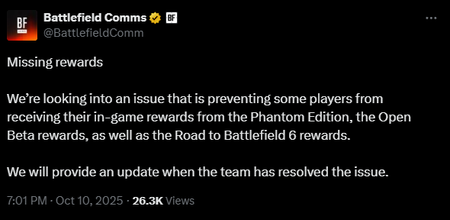
[BFComms] Missing rewards
We’re looking into an issue that is preventing some players from receiving their in-game rewards from the Phantom Edition, the Open Beta rewards, as well as the Road to Battlefield 6 rewards. We will provide an update when the team has resolved the issue.7.8KViews34likes0CommentsCOMMUNITY UPDATE - OPEN BETA DEBRIEF
Hello everyone, Thank you to everyone who joined us during the Battlefield 6 Open Beta weekends—your passion and feedback have been invaluable. With tens of thousands connecting on Discord to play together, over 600,000 hours streamed, and over 30 million hours watched, your enthusiasm and participation is what made it great! Initial Learnings and In-Game Changes As we approach the launch of Battlefield 6 on October 10, we’d like to take a moment to look back at the recent Open Beta to share our key learnings and in-game changes we’re making based on your feedback and in-game data. Weapons We’re making targeted adjustments to deliver a more consistent and rewarding gunplay experience. This includes a general pass on recoil and tap-fire characteristics across all weapons, further emphasizing their unique feel and improving range differentiation. We’ve also made changes to encourage more controlled tap-firing and burst-firing, rewarding precision and weapon mastery. Additionally, the M87A1 shotgun now requires more pellets to secure a kill. We are investigating the Time-to-Kill and Time-to-Death experiences, and we will share an update if definitive changes are made in these areas. Movement Movement mechanics have been adjusted to create a more balanced and traditional Battlefield experience. Momentum, especially horizontal speed, carried from a slide into a jump has been reduced. There is now a greater penalty for consecutive jumps, which lowers jump height when jumps are spammed. Firing while jumping or sliding will result in increased inaccuracy. These changes are designed to make sliding and jumping more situational, so they are no longer ideal options for engaging in gunfights, and will contribute to a gameplay pace that rewards skillful movement without becoming too fast or unpredictable. Parachute physics have also been re-tuned, with reduced initial acceleration when opening the parachute for more controlled aerial movement. Maps We observed some players finding a way to reach rooftops and venture out of bounds. This gameplay is not intended for these maps, and the upcoming ladder for the Assault class is also not designed to access these areas. We’re actively working on adjustments to prevent unintended access and ensure gameplay stays within the intended boundaries. We also heard strong feedback from players excited by the larger-scale maps that Battlefield has to offer. While the Open Beta featured smaller, more fast-paced maps, larger-scale maps are already part of our launch package, delivering action-packed gameplay and memorable, unique moments for every player. As part of the upcoming Battlefield Labs testing, we’ll be testing two new multiplayer maps: one set in Mirak Valley, the other a remake of the fan-favorite from Battlefield 3, Operation Firestorm. These two maps include the full complement of vehicles, like Liberation Peak, along with a more vast combat space. Modes When it comes to Rush, the conversation we observed wasn’t just about player count, but also about how maps play, and the tactical experience they offer. Rush is a mode with deep roots, originally known as Gold Rush in Bad Company, where matches typically ranged from 12v12 to 16v16 players. Many of you remember this as the golden era of Rush, and it continues to inspire our approach today. We’ve experimented with larger player counts over the years, such as 64- and even 128-player versions. While these matches created intense, fast-paced moments, they also led to issues: Overwhelming defenses, stalled frontlines, and too many games ending in the first sector. Rush is especially sensitive to higher player counts due to its tactical and strategic requirements; when a player tries to arm the M-COM while more than 20 opponents are defending, the intended gameplay becomes less tangible. Based on feedback throughout recent titles, we’re lowering the default player count for Rush to improve the flow of combat and restore the tactical, methodical experience that defines the mode. For those who enjoy large-scale Rush, Portal will allow you to experiment with different player counts at launch. In contrast, Breakthrough is designed to accommodate higher player counts of up to 64 players, and that’s where the mode really shines. Using win/loss data from the Open Beta, we’re continuing to make map-by-map balance adjustments towards our goal of 50/50 win ratio for both Attackers and Defenders. The Approach to Player Counts There was some confusion around the number of players in different games so we wanted to take a moment to clarify our current direction for how these get determined. Rather than locking maps and modes to a fixed player count, our philosophy is to adapt to best fit the intended experience. This may vary by map or evolve over time with player feedback. For example, at launch, some Breakthrough layouts will support 48 players, while others will have 64. It’s the one of many factors we adjust to create the right balance and feel for each scenario. In Breakthrough higher player counts work well on open, dynamic maps, while smaller player-groups offer a more focused experience on denser maps. Portal gives players the flexibility to try different settings and find what works best for their group and playstyle. Finding the right balance is an ongoing process as everyone gets familiar with map size, lanes, and combat spaces. For now, we’ve found that 8v8 provides a solid starting point for small-scale, fast-paced modes like Team Death Match, Squad Death Match, Domination, and KOTH. Playlist Options A limited variety of playlist options were created for the Open Beta to both showcase and test the flexibility of the matchmaking system. For more details on our playlist adjustments, see our post about Open Beta Week 2 Playlist Options. Playing with both Open and Closed Weapons will continue to be options in Battlefield 6 and we are looking for ways to keep them easily accessible. We recognize that some players experienced difficulty finding games to complete the Challenge of capturing sectors in Breakthrough or Rush. It wasn’t ideal and we’re actively using your feedback and in-game data to review and improve the Matchmaking system, with the goal of providing a smoother experience in the future. Reflecting on the Open Beta & Next Steps With the insights gathered during the Open Beta play sessions, we will be introducing in-game adjustments in upcoming Battlefield Labs events. Stay tuned for progress updates and future opportunities to get involved. Join our official Battlefield Discord server to talk more Battlefield, share feedback, and find squadmates. Lastly, thanks again for joining the Battlefield 6 Open Beta. Your feedback and participation made it an incredible experience. //The Battlefield Team This announcement may change as we listen to community feedback and continue developing and evolving our Live Service & Content. We will always strive to keep our community as informed as possible. Originally posted on ea.com on 21/08/20252.5KViews29likes0Comments
[BFComms] Menu tiles not working
We are investigating the issues players are experiencing with menu tiles not working reliably. Some players report that restarting the game can temporarily solve this issue. We will update you on progress as soon as we have additional info. Originally posted by Battlefield Comms on X1.7KViews21likes0Comments[BFComms] Installation of Battlefield 6 Content Packs - 10/10
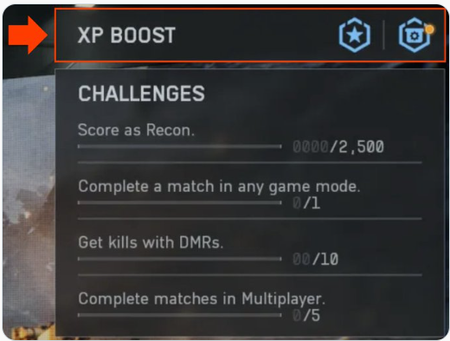
Installation of Content. We're aware of an issue preventing players from accessing the game with some receiving an error stating they need to purchase DLC or similar. Stay tuned for further updates as the team investigates this issue. Thank you for your patience! __________________________________________________________________________________ UPDATE 1 Oct 11 : Today, we experienced an outage on the EA app that prevented some of our players who pre-ordered Battlefield 6 from accessing the game, and we know this can be frustrating wo we wanted to offer an apology...with perks. The fix has been rolled out. But we're not done. Anyone on the EA app who was impacted will receive 12 Hardware and 12 Career 60-Minute Boosters, which should be arriving in impacted players'in-game inbox this weekend. In addition, we will also be granting impacted players full access to a seasonal Battlefield Pass. If impacted players purchased the Phantom Edition we will be granting them access to Season 2's full Battle Pass. We want to apologize again for this outage. See you on the Battlefield UPDATE 1 Oct 12 - EA app – Compensation Update Players impacted by yesterday’s EA app outage will now find their XP Boosters delivered to their in-game mailbox and XP Boost inventory. To see your XP Boost inventory, on the main menu, select "Training Grounds" and select "XP Boost" in the top-right menu. Thank you for your patience and understanding!28KViews20likes91Comments
[INFO - FAQ] Battlefield 6: Mission Brief - All You Need to Know!
Intel Incoming, Soldier. This is your complete Battlefield 6 Field Manual for everything outside the combat zone. Inside, you’ll find all the details on editions, platforms, launchers, hardware requirements, and answers to the most common questions from the community. Before you deploy, make sure you’re fully briefed. 0) SITREP - Quick Facts Drop Date: Oct 10, 2025 (worldwide, no early access) AO (Platforms): PlayStation 5, Xbox Series X|S, PC — Steam / EA app / Epic Games Store Switch 2: ❌ No plans Campaign: ✅ Full single‑player - elite Marine raiders Dagger 1‑3 Multiplayer @ Launch: Conquest, Breakthrough, Rush + Squad DM, Team DM, King of the Hill, Domination, Escalation (details later) Portal: ✅ Create/play custom experiences (NPC scripting, custom UI); Server Browser accessible from main menu Cross‑play: ✅ See ROE below Anti‑Cheat: EA Javelin integrated at launch (see Security) 1) Platforms, Launchers & Access Consoles PS5 / XSX|S with Quality and Performance modes PS5 Pro: Enhanced visuals supported PC Storefronts Steam: EA account required; EA app not required to run the game Epic Games Store: EA app + EA account required EA app: Native launcher option EA Play Pro Day‑1 unlimited access to the Phantom Edition via the EA app Preload / Day‑0 Patch Digital purchases can preload now A required Day‑0 patch drops before launch; enable auto‑updates or pull it manually for a smooth Day‑1 2) Editions - What You’re Carrying In Phantom Edition includes: Full game download Phantom Squad skin pack 2 weapon packs, 1 vehicle skin, 1 knife skin Battlefield Pro — Season 1: Battle Pass, 25 tier skips, cosmetics, XP tokens, more 3) Combat Ops - Modes & Campaign All‑Out Warfare: Conquest, Breakthrough, Rush Close‑Quarters Rotation: Squad DM, Team DM, King of the Hill, Domination New Threat: Escalation (intel to follow) Portal: Build with NPC scripting & custom UI; share across platforms Campaign: Dagger 1‑3 — narrative op to stabilise the global theatre 4) Cross‑Play ROE (Rules of Engagement) Consoles — Cross‑play ON: We prioritise placing you in console‑only servers, but you may enter a larger cross‑platform pool depending on population PC — Cross‑play: ON is the only option Consoles — Cross‑play OFF: You play only with your platform. Mixed‑platform parties/friends are not available in this mode Connectivity: Internet required for updates & online play 5) Security & Anti‑Cheat EA Javelin is integrated at launch to detect and remove bad actors Secure Boot: Required to launch Battlefield 6. Ensures only trusted software loads at startup and boosts cheat detection TPM 2.0 / UEFI: Required for modern security posture 6) Tech Readiness - Features & Performance (PC) Upscalers: NVIDIA DLSS 4, Intel XeSS 2, AMD FSR 4 Displays: Ultrawide 21:9 & Super‑Ultrawide 32:9 Framerate: Uncapped on PC; 4K supported with capable hardware Customisation: 600+ options (graphics, HUD, controls, haptics, streamer/incognito modes) HDR: Supported Controller Support: Xbox Series S|X & PS5 controllers + various third‑party options Steam Deck: No dedicated support; compatibility not guaranteed Consoles PS5 / XSX|S: Quality vs Performance modes PS5 Pro: Enhanced visuals 7) PC Requirements - Pack Light, Fight Hard Minimum (1080p @ ~30 FPS, Low) OS: Windows 10 (HAGS recommended) CPU: Intel Core i5‑8400 / AMD Ryzen 5 2600 RAM: 16 GB (dual‑channel 2133 MHz) GPU (6 GB VRAM): NVIDIA RTX 2060 / AMD RX 5600 XT / Intel Arc A380 DirectX: 12 Online: Yes Storage: 55 GB HDD — base install (Campaign or MP without High‑Res Texture Pack) Security: TPM 2.0, UEFI Secure Boot enabled; HVCI/VBS capable Recommended (1440p @ ~60 FPS High | 1080p @ 80 FPS+ Low) OS: Windows 11 64‑bit CPU: Intel Core i7‑10700 / AMD Ryzen 7 3700X RAM: 16 GB (dual‑channel 3200 MHz) GPU (8 GB VRAM): NVIDIA RTX 3060 Ti / AMD RX 6700 XT / Intel Arc B580 DirectX: 12 Online: Yes Storage: ~90 GB SSD total — Base 55 GB + High‑Res Texture Pack ~35 GB (Campaign + MP + HRTP) 8) Drivers - Keep Your Kit Clean Minimum Driver Versions • NVIDIA 576.88 • AMD 25.10.13.01 • Intel 32.0.101.6881 Recommended Driver Versions • NVIDIA 581.42 • AMD 25.10.25.10 • Intel 32.0.101.8135 Performance Tips: Enable HAGS and Resizable BAR (ReBAR) - especially beneficial on Intel Arc 9) Portal & Server Browser Server Browser: Launch directly from the main menu via Portal Portal Builder: Best‑in‑class on PC web browser; works on some console browsers (PC recommended). Playable across all platforms 10) Common Questions - Fast Answers Do I need prior Battlefield games? Negative. Standalone operation Frame rate cap? PC: Uncapped. Consoles: Mode‑dependent Controller support on PC? ✅ Xbox & PlayStation controllers supported Steam Deck? Not supported; compatibility not guaranteed Live service? Seasonal. Free/earnable gameplay‑impacting content; Battle Pass offers cosmetics, skips, XP tokens, etc. EA Play Pro? Phantom Edition access on Day‑1 via the EA app Switch 2? ❌ No plans 11) Helpful Links Game Modes page - https://www.ea.com/en/games/battlefield/battlefield-6/features/modes Driver downloads - NVIDIA / AMD / Intel Secure Boot guide (EA Help) - https://help.ea.com/en/articles/technical-issues/secure-boot/ EA Play Pro - https://www.ea.com/games/battlefield/ea-play Read our full FAQ on EA.com.3.4KViews20likes0CommentsLock and Load for the Battlefield 6 Open Beta
Drop into the Open Beta This is your shot to jump in early, squad up, and rack up rewards before launch. Whether you’re a battle-hardened veteran or hitting the frontlines for the first time, this is your chance to make your mark in the most expansive Battlefield Open Beta ever. Our Open Beta has a number of maps, modes, and features for you to try across these two weekends, including the opportunity to play with Closed Weapons. Open Beta schedule Get to the frontline. Battlefield’s biggest Open Beta ever goes LIVE for two weekends only, Aug 9-10 and 14-17. Watch select creators during today’s reveal stream on Twitch for a chance to join Early Access alongside our BF Labs squad, beginning Aug 7. Lock and load. How to play the Open Beta You can play Battlefield’s Open Beta on: PlayStation®5 Xbox Series X|S PC Steam Epic Games Store EA app You can pre-load the game as early as August 4 at 15:00 UTC (8AM PT) and start playing during the Open Beta Weekends: Early access opens on August 7 at 8:00 UTC (1AM PT) If you signed up for Battlefield Labs before July 31, you don’t need a code. Just log in with the EA Account you registered with Battlefield Labs. If you didn’t sign up for Battlefield Labs, you can watch select creators during the reveal streams beginning on July 31 on Twitch to unlock Early Access. EA Play Pro players will also receive early access to the Open Beta Weekend 1 opens on August 9 at 8:00 UTC (1AM PT) and closes August 11 at 8:00 UTC (1AM PT) No code needed, available to anyone Weekend 2 opens on August 14 at 8:00 UTC (1AM PT) and closes August 17 at 8:00 UTC (1AM PT) No code needed, available to anyone You can play through the EA app on PC or any PlayStation®, Xbox, or Steam account that’s linked to your EA Account. You can find more info about the Open Beta over on EA.com, and chat with the community about it here on EA Forums. Make sure your EA Account is linked Before you get started, double-check that the EA app, Steam, PlayStation®, or Xbox account you plan to play on is linked to this EA Account—the one this email was sent to. Need help? Read this article on linking accounts or watch these video guides for PlayStation® and Xbox: How to Link Your EA Account to PlayStation® How to Link Your EA Account to Xbox Open Beta PC requirements Here are the minimum and recommended requirements to run Battlefield 6 on your PC You’ll also get a prompt to enable Secure Boot if you haven’t already – it’s a requirement to play the Open Beta. For guidance about Secure Boot, head over to our EA Help article. Our Anticheat system, EA Javelin Anticheat, has unique modifications designed to safeguard against cheats and hacks specific to the FPS space. Javelin has been built from the ground up by a team of veteran engineers and analysts focused on studying cheating problems for each specific game under EA’s umbrella and designing unique features to solve those issues. It is designed solely to protect against cheats within and outside of kernel mode.2.8KViews19likes0Comments[BFComms] Installation of Battlefield 6 Content Pack issue - Update 2
The team is in the process of deploying a resolution for the issue that causes players on the EA App to be unable to start game modes due to missing DLC/content. Players will need to restart the game for this to take effect. We expect this to be completed within the next hour or so and will update when it's done.10KViews18likes0Comments[INFO/GUIDE] ⚠️ Missing Content in Battlefield 6 - What to Do
Hey everyone, We know how frustrating it can be when items you’ve earned or expected don’t appear in your loadouts, vehicle customizations, or rewards. Below you’ll find clear steps to resolve the most common missing content issues in Battlefield 6. 🪖 Not Sure Where to Start? Begin by checking for any known service issues: Updates on content delivery problems are often shared via our official forums, @EAHelp, @Battlefield Comms, r/Battlefield6, and the Battlefield Discord. You can also verify platform status through PlayStation Network and Xbox Live pages. 🔧 Weapon Attachments Not Unlocking If weapon attachments aren’t appearing even though you’ve met the mastery requirements: Weapon Mastery System: Attachments unlock based on mastery of each specific weapon. XP earned with one weapon doesn’t carry over to others. Fully restart the game - some unlocks only register after a new session or completed match. Play a full round with the weapon in question, since mid-match unlocks may not update. Check the firing range to see if the attachment appears there before contacting support. 🎯 Assignment or Challenge Rewards Missing If your challenge or assignment reward hasn’t shown up: Make sure all requirements were met - many assignments must be completed sequentially and are rank-locked. Confirm progress under your Challenges tab. Log out, restart your game, and play a full match to sync your account with the servers. If rewards still don’t appear, take a screenshot showing completion and contact EA Help. Include the date, time, platform, and all additional information you think might be helpful. 🔒 Lost Content from a Compromised Account If your account may have been compromised and content or currency is missing: Immediately change your EA password and enable two-factor authentication. If you can’t access your account, reach out to EA Help for account recovery. Report any unauthorized purchases or changes as soon as possible. 🎁 Pre-Order, Edition, and Event Rewards Not Showing If you’re missing Phantom Edition, Tier Skips, Beta rewards, or Road to Battlefield 6 items, don’t worry. The game officially launches worldwide on October 10, 2025, at 4 PM BST, and some rewards may not be fully activated in all regions until that time. Here’s what to check: Wait a little longer: Reward distribution can take time. We recommend waiting until around 4 PM BST on October 10, 2025, to see if the missing items appear after global launch. Restart the game: Fully close and relaunch Battlefield 6 a few times to reauthenticate with the servers. Play a multiplayer match: Completing a match in any mode can trigger the servers to refresh your reward data. Check your edition details: Make sure you redeemed the correct edition and on the correct platform. Verify your linked accounts: Ensure your platform account (Steam, PlayStation, or Xbox, etc.) is properly connected to your EA account. Still missing? Contact EA Help and include your purchase details - edition, region, and time of redemption. 💰 Purchased Items Not Received If you spent Battlefield Currency and didn’t get the item: Restart Battlefield 6 and log back in. Play a full match to trigger a sync. Still missing? Contact EA Help and include transaction details, timestamps, and your platform. 📺 Missing Twitch Drops If you participated in a Twitch Drop campaign but didn’t receive the reward: Confirm your EA account is linked to your Twitch account. Check that you watched during the eligible campaign window. Claim your rewards from the Twitch Drops inventory page. Drops can take up to 24 hours to appear. If it’s still missing, contact EA Help and include the campaign name, date, and linked account details. Also, check our Battlefield 6 Launch Twitch Drops | EA Forums - 12728202 article on the forums! 🎟️ Missing Battle Pass Rewards If you’re missing rewards from the Battle Pass: Restart the game and log back in to refresh your progress. Play a match to trigger synchronization. Remember: Battle Pass progression mainly comes from completing weekly missions, not just XP. Check both your inventory and customization menus for cosmetic items - some appear in different sections. 🚗 Vehicle Customization Missing If vehicle skins or decals aren’t appearing: Check all customization categories - they can be separate. Some items require vehicle mastery or Battle Pass progress. Restart the game if the unlocks don’t show up immediately after completion. 🛠️ How to Contact EA Help Go to help.ea.com: Log in with your EA account (or continue as a guest if you can’t access it). Select Battlefield 6 and your platform. Choose your issue type (Missing Content, Purchase Issue, Account Issue, etc.). Fill out the contact form with as much detail as possible, including screenshots if available. Once submitted, look for “Chat with us” or “Start chat.” Wait times can vary, but once connected, most cases are resolved in 15–30 minutes. ✅ Quick Tips Keep records of your purchases and transactions. Enable two-factor authentication to secure your account. Log out and back in before troubleshooting. Play a full match to force progress synchronization. Make sure your platform account (Steam, PlayStation, Xbox, etc.) is linked to your EA account. Weapon attachments depend on individual mastery, not overall rank. We hope this helps you recover your missing content and get back into the fight. On help.ea.com: How to find missing content and rewards in Battlefield 653KViews18likes0Comments[Battlefield Comms] BF Pro Bonus Path
We’re aware of an issue with the BF Pro Bonus Path where the Bonus Challenge isn’t awarding enough path points to complete the full path. We’re currently looking into an update so that the bonus path challenge is awarding the intended amount of points. After that, we’ll begin investigating another update for players who already completed the challenge, which will take additional time. Thank you for your patience and understanding.812Views14likes0Comments