[INFO] BATTLEFIELD 6 - KNOWN ISSUES 1.0.1.0
Please note that the following is not an exhaustive list of all issues present in the 1.0.1.0 launch build. Battlefield 6 is a live game, and some issues are expected at release. We encourage you to continue reporting anything you encounter so the team can investigate and resolve them in future updates. PLAYER: Party System: Accepting a multiplayer invite while in Campaign does not transfer you to the lobby or server. Soldiers may bounce off vault-height objects if jumping from too far away. Characters can bounce when landing on certain assets. Profile: All Weapon Mastery Badges appear greyed out in the loadout screen. You will still be able to progress towards these badges. GADGETS: EOD Bot may get stuck if deployed on top of a Supply Crate. Defibrillators may have inconsistent hit registration after range adjustments. WEAPONS: Some weapons are missing the intended camera shake when aiming. Crosshair does not scale correctly when playing in 4K resolution. Weapon sway can disconnect after exiting a vehicle. Some weapons cannot reload if reload input is pressed immediately after firing. Charm loops are missing on some weapons. For certain scopes, the lens may visually detach from the scope during ADS reload. VEHICLES: R-84V2 and AIM-84 Air-to-Air Missiles have been temporarily disabled due to an issue related to Air-to-Air missiles from jets towards other aircraft. These missiles will be re-enabled in an upcoming update. MAPS & MODES: The combat area may sometimes fail to render on the minimap or deploy screen while playing Escalation. Strikepoint: Halftime screen may show no information. Empire State (Rush): All sectors may appear active from the start of a match. UI & HUD: HUD may not appear in gameplay when using 16:10 aspect ratio with certain resolutions. The game mode UI at the top of the screen (including team scores) may not update if you join a match mid-round. This will remain incorrect for the rest of that round on your client. Rejoining the match resolves the issue. Command Console cannot currently be accessed. “Purchase Failed” error message may appear when pressing the CTA button in Inbox, Front-End Bulletin, or Takeover screens. The "Highly Trained" Dog Tag currently refers to it being an AI Dog Tag, this is due to be renamed to "Bot Dog Tag" and will remain being unable to be equipped. CHARACTERS: Faction and Class patches may be missing on some skins. The Sunstroke skin uses the wrong camo pattern. The Bramble skin has an incorrect texture. Player choice patches may override Faction and Class patches. Patches are not correctly applied on Assault ROAR when using the Get Loud Class Assignment. The Copperpulse skin currently shares the same outfit/pattern as Evergreen. The System Override cosmetic is currently too saturated and will be reduced in vibrancy in a later update. SINGLE PLAYER: Challenges may not unlock if they were failed in a previous mission during the same playthrough. Relaunch the mission from the main menu and complete the challenge again in that mission to unlock it. Graphical issues may occur if settings are set to Low; Performance Mode will also force settings to Low. Adjust graphics settings to resolve. Screen tearing may occur; enabling V-Sync can resolve this. Teammates can sometimes get stuck; restarting the checkpoint or mission resolves the issue. Characters may become stuck due to collision; restarting the checkpoint or mission resolves this. Reloading a checkpoint can cause issues; restarting the mission resolves this. Playing outside intended areas (edges of the map, ignoring objective markers) can cause AI or mission objectives to stop functioning; restart the checkpoint and follow the mission path to resolve. The game may become unresponsive after being idle for long periods; restart the title to continue playing. On PC, unintentional interactions with apps outside of the game may occur when in Windowed mode; switch to Fullscreen mode to prevent this. The Challenge Mode UI may not display correctly after unpausing; restart the checkpoint or mission to resolve. Controller issues may occur on PC; switch to mouse and keyboard if this happens. Shader stutter may occur at the beginning of the Prologue and some missions on PC. Corrupted weapon firing VFX can appear when running at 120Hz. Mission 07: Nile Guard: Player camera may break and fly through the map after triggering a specific cinematic while in first-person view. On Xbox and PS5, the game may crash when pressing “Continue” in Campaign if no add-ons are installed. SETTINGS: Graphics settings may default to Low when using the Auto Performance preset on some RTX 5080 cards at 4K or 1080p. Different aspect ratio selections may cause see-through borders or other display issues, depending on resolution. PC Players: If you played on release day on PC your deadzone values may be defaulted at a too high of a value (22%). This may result in scenarios such as your aim moving when no input is taking place. We recommend you change this to the new default of 8%. Consoles: Currently DRS (Dynamic Resolution Scaling) is not working as intended in Performance Mode. After joining a Game Session, the Performance Mode option will need to be toggled off and then back on again to receive the full benefit. This process would need to be repeated each time a new Game Session is joined or after having gone to the Main Menu. We are working on a more permanent solution for a future update. PORTAL: Unable to host an experience if the server description contains special characters. On PS5, the title may crash if a party leader starts a Portal server while certain content packs (01 and 04) are disabled. Portal: Unable to scroll to the bottom row in the “My Experiences” tab. PROGRESSION: Player stats may incorrectly count progress from custom Portal game modes. Challenges: “Resupply teammates with the Supply Pouch” is not tracking progress. Challenges:The Progress bar for “Repair Vehicles” does not update when repairs are made. Challenges: “Use Vehicle Supply Crate” does not progress even after completing the action. Challenges: The Weapon Expert Unit Challenge is not tracking correctly. The description says you must “Get a kill with each type of weapon in a match,” but the actual requirement is to get 15 longshot kills in a single match. Assignments: Helicopters are incorrectly counted as Ground Vehicles in the “Land Vehicle Expert“ assignment. Assignments: Helicopters are not counted properly in Vehicle Challenge 1. VFX & VIDEO: Shader stutter may occur in the intro video on the PC splash screen. Accessibility: Photosensitivity concerns may occur when rapidly switching from third-person to first-person weapon perspective while in a vehicle. CHARACTERS: Faction and Class patches may be missing on some skins. The Sunstroke skin uses the wrong camo pattern. The Bramble skin has an incorrect texture. Player choice patches may override Faction and Class patches. Patches are not correctly applied on Assault ROAR when using the Get Loud Class Assignment. The Copperpulse skin currently shares the same outfit/pattern as Evergreen. The System Override cosmetic is currently too saturated and will be reduced in vibrancy in a later update. SINGLE PLAYER: Challenges may not unlock if they were failed in a previous mission during the same playthrough. Relaunch the mission from the main menu and complete the challenge again in that mission to unlock it. Graphical issues may occur if settings are set to Low; Performance Mode will also force settings to Low. Adjust graphics settings to resolve. Screen tearing may occur; enabling V-Sync can resolve this. Teammates can sometimes get stuck; restarting the checkpoint or mission resolves the issue. Characters may become stuck due to collision; restarting the checkpoint or mission resolves this. Reloading a checkpoint can cause issues; restarting the mission resolves this. Playing outside intended areas (edges of the map, ignoring objective markers) can cause AI or mission objectives to stop functioning; restart the checkpoint and follow the mission path to resolve. The game may become unresponsive after being idle for long periods; restart the title to continue playing. On PC, unintentional interactions with apps outside of the game may occur when in Windowed mode; switch to Fullscreen mode to prevent this. The Challenge Mode UI may not display correctly after unpausing; restart the checkpoint or mission to resolve. Controller issues may occur on PC; switch to mouse and keyboard if this happens. Shader stutter may occur at the beginning of the Prologue and some missions on PC. Corrupted weapon firing VFX can appear when running at 120Hz. Mission 07: Nile Guard: Player camera may break and fly through the map after triggering a specific cinematic while in first-person view. On Xbox and PS5, the game may crash when pressing “Continue” in Campaign if no add-ons are installed. Additional Known issues 11/10/2025,SETTINGS The team is aware that Smooth Motion being set in the Nvidia App (found in Graphics > Global Settings) causes the client to either get stuck on a black screen, or crash shortly after launching., Individuals may find that their Phantom Edition shows as Standard Edition on Steam. Deselecting all DLC within the Steam DLC window, restarting Steam and selecting them once again will result in a fix for this issue whilst we work towards a permanent fix.90KViews14likes325Comments[INFO/GUIDE] ⚠️ Missing Content in Battlefield 6 - What to Do
Hey everyone, We know how frustrating it can be when items you’ve earned or expected don’t appear in your loadouts, vehicle customizations, or rewards. Below you’ll find clear steps to resolve the most common missing content issues in Battlefield 6. 🪖 Not Sure Where to Start? Begin by checking for any known service issues: Updates on content delivery problems are often shared via our official forums, @EAHelp, @Battlefield Comms, r/Battlefield6, and the Battlefield Discord. You can also verify platform status through PlayStation Network and Xbox Live pages. 🔧 Weapon Attachments Not Unlocking If weapon attachments aren’t appearing even though you’ve met the mastery requirements: Weapon Mastery System: Attachments unlock based on mastery of each specific weapon. XP earned with one weapon doesn’t carry over to others. Fully restart the game - some unlocks only register after a new session or completed match. Play a full round with the weapon in question, since mid-match unlocks may not update. Check the firing range to see if the attachment appears there before contacting support. 🎯 Assignment or Challenge Rewards Missing If your challenge or assignment reward hasn’t shown up: Make sure all requirements were met - many assignments must be completed sequentially and are rank-locked. Confirm progress under your Challenges tab. Log out, restart your game, and play a full match to sync your account with the servers. If rewards still don’t appear, take a screenshot showing completion and contact EA Help. Include the date, time, platform, and all additional information you think might be helpful. 🔒 Lost Content from a Compromised Account If your account may have been compromised and content or currency is missing: Immediately change your EA password and enable two-factor authentication. If you can’t access your account, reach out to EA Help for account recovery. Report any unauthorized purchases or changes as soon as possible. 🎁 Pre-Order, Edition, and Event Rewards Not Showing If you’re missing Phantom Edition, Tier Skips, Beta rewards, or Road to Battlefield 6 items, don’t worry. The game officially launches worldwide on October 10, 2025, at 4 PM BST, and some rewards may not be fully activated in all regions until that time. Here’s what to check: Wait a little longer: Reward distribution can take time. We recommend waiting until around 4 PM BST on October 10, 2025, to see if the missing items appear after global launch. Restart the game: Fully close and relaunch Battlefield 6 a few times to reauthenticate with the servers. Play a multiplayer match: Completing a match in any mode can trigger the servers to refresh your reward data. Check your edition details: Make sure you redeemed the correct edition and on the correct platform. Verify your linked accounts: Ensure your platform account (Steam, PlayStation, or Xbox, etc.) is properly connected to your EA account. Still missing? Contact EA Help and include your purchase details - edition, region, and time of redemption. 💰 Purchased Items Not Received If you spent Battlefield Currency and didn’t get the item: Restart Battlefield 6 and log back in. Play a full match to trigger a sync. Still missing? Contact EA Help and include transaction details, timestamps, and your platform. 📺 Missing Twitch Drops If you participated in a Twitch Drop campaign but didn’t receive the reward: Confirm your EA account is linked to your Twitch account. Check that you watched during the eligible campaign window. Claim your rewards from the Twitch Drops inventory page. Drops can take up to 24 hours to appear. If it’s still missing, contact EA Help and include the campaign name, date, and linked account details. Also, check our Battlefield 6 Launch Twitch Drops | EA Forums - 12728202 article on the forums! 🎟️ Missing Battle Pass Rewards If you’re missing rewards from the Battle Pass: Restart the game and log back in to refresh your progress. Play a match to trigger synchronization. Remember: Battle Pass progression mainly comes from completing weekly missions, not just XP. Check both your inventory and customization menus for cosmetic items - some appear in different sections. 🚗 Vehicle Customization Missing If vehicle skins or decals aren’t appearing: Check all customization categories - they can be separate. Some items require vehicle mastery or Battle Pass progress. Restart the game if the unlocks don’t show up immediately after completion. 🛠️ How to Contact EA Help Go to help.ea.com: Log in with your EA account (or continue as a guest if you can’t access it). Select Battlefield 6 and your platform. Choose your issue type (Missing Content, Purchase Issue, Account Issue, etc.). Fill out the contact form with as much detail as possible, including screenshots if available. Once submitted, look for “Chat with us” or “Start chat.” Wait times can vary, but once connected, most cases are resolved in 15–30 minutes. ✅ Quick Tips Keep records of your purchases and transactions. Enable two-factor authentication to secure your account. Log out and back in before troubleshooting. Play a full match to force progress synchronization. Make sure your platform account (Steam, PlayStation, Xbox, etc.) is linked to your EA account. Weapon attachments depend on individual mastery, not overall rank. We hope this helps you recover your missing content and get back into the fight. On help.ea.com: How to find missing content and rewards in Battlefield 653KViews18likes0Comments
[BFComms] Installation of Battlefield 6 Content Packs - 10/10
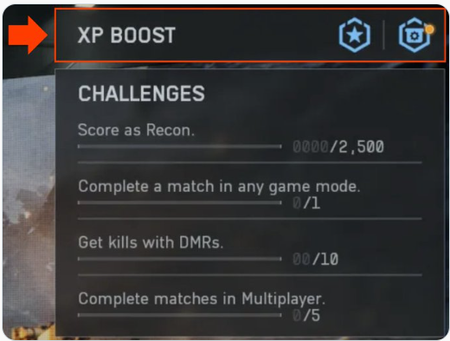
Installation of Content. We're aware of an issue preventing players from accessing the game with some receiving an error stating they need to purchase DLC or similar. Stay tuned for further updates as the team investigates this issue. Thank you for your patience! __________________________________________________________________________________ UPDATE 1 Oct 11 : Today, we experienced an outage on the EA app that prevented some of our players who pre-ordered Battlefield 6 from accessing the game, and we know this can be frustrating wo we wanted to offer an apology...with perks. The fix has been rolled out. But we're not done. Anyone on the EA app who was impacted will receive 12 Hardware and 12 Career 60-Minute Boosters, which should be arriving in impacted players'in-game inbox this weekend. In addition, we will also be granting impacted players full access to a seasonal Battlefield Pass. If impacted players purchased the Phantom Edition we will be granting them access to Season 2's full Battle Pass. We want to apologize again for this outage. See you on the Battlefield UPDATE 1 Oct 12 - EA app – Compensation Update Players impacted by yesterday’s EA app outage will now find their XP Boosters delivered to their in-game mailbox and XP Boost inventory. To see your XP Boost inventory, on the main menu, select "Training Grounds" and select "XP Boost" in the top-right menu. Thank you for your patience and understanding!28KViews20likes91Comments[INFO] BATTLEFIELD 6 REDSEC KNOWN ISSUES 1.1.1.0
This update continues our ongoing work on Battlefield REDSEC and includes a number of known issues currently under investigation. These do not impact all players but are being tracked by the team for future updates. Battle Royale GAMEPLAY: Players may become stuck in a top-down view of the map after redeploying. If killed immediately after a Mobile Respawn completes, the player’s teammates are not revived and the squad is eliminated. Players may retain a Second Chance after redeploy and not transition to the End of Round screen after their next elimination. Squad elimination may not result in immediate mission failure. Rounds may not end even after all enemies are eliminated. Players may be unable to earn session points by surviving for a set time. Earning a new field-level trait may display the number for the previous level. Mission Progressed scoring event does not appear after completing a partial challenge. Scoring Events for Objective MCOM Destroyed Support may not award points to squad members. Completing a rerolled daily mission can revert it to the original version in the Challenges tab. Players can experience high latency and hit-registration issues during Battle Royale Initiation. MISSIONS & OBJECTIVES: Bomb Defusal (Counter Wreckage) timer can remain stuck when the targeted player picks up the bomb. Marked counter mission does not become available for the second user after the first user activates the Evasion mission. Headhunter missions may grant incorrect rewards upon completion. Counter-marked teams can complete missions despite objectives being destroyed by the ring of fire. Obliteration Defense bomb can be instantly defused if planted on the ground. Certain Mission Events can cause performance degradation. MAP: The world may appear to despawn when spectating the winning team while the second-place team disconnects. Multiple assets may pop in when using helicopters. Several visual flaws such as missing collision or floating assets. Signal Hack antenna may remain floating after the crow’s nest collapses. Schematics can attempt to despawn players already being despawned, causing a crash. Strike Package area-of-effect visuals may be invisible when called in over water. Ring prediction may not be accurate with the closing ring. The fastest-path-to-zone line can remain visible and inaccurate after the smallest ring closes. The ring prediction line on the in-game map does not scale correctly with altitude. Intel Caches spawn in the same locations rather than randomised. Loot dropped on an open chest can fall beneath it and become unobtainable after leaving and returning to the area. LOOT & ITEMS: Deploying a gadget on any supply drop may cause the drop crate to break. Throwing a call-in smoke grenade on top of a supply drop can cause continuous smoke sound effects. Resupply Drop crate may not despawn after being accessed. Upgrade Kit can be looted by another player while being applied in-world. Vehicle Supply Station charges may not appear consumed when replenishing standard vehicle ammo. Assault Ladder lacks UI indicating it cannot be mounted on certain terrain. Smoke Cover cannot be used in the late game. UI & HUD: Targeted HUD/UI can remain visible after redeployment from a countered mission death or failure. The entire team may sometimes see the same highlighted stat on the squad placement screen. Second Chance spectating camera does not show the user’s loadout. Missing UI elements indicating a Redeploy Tower cannot be reused. Inventory highlighting may persist and allow players to accidentally discard items. UI elements can display incorrect names or icons. Vehicle Customization screen may fail to display unlock criteria for Anti-Air vehicle presets. Wrong description is shown for the Airstrike onboarding tutorial. VEHICLES: Insertion helicopter look sensitivity may be extremely low when using low sensitivity settings. Vehicle loadouts may display incorrect passive abilities. SOCIAL: Teammates may not appear in the pre-game lobby. PERFORMANCE: Players may become stuck on a black screen during insertion or gameplay after changing settings. Multiple Battle Royale actions may have delayed response times. GAUNTLET MODES: Deadlock is missing the “Zone Captured” message. Deadlock: No points awarded for the final three seconds of a zone capture. Extraction: Data drive cannot be picked up after being dropped by an enemy or squadmate. Extraction: The extraction point icon may switch to the data-drive icon. Wreckage: Dying out of bounds with the bomb causes a new bomb with glitched fuse visual and audio effects to spawn. Wreckage: Bomb may explode immediately when dropped after being picked up from outside the play area. Wreckage: Bomb detonates at its spawn location if the player dies out of bounds while carrying it. UI & HUD: Assault Trait Commanding Presence lacks a HUD indicator. Brief Screen is not shown if the scoreboard is opened between rounds.13KViews6likes0Comments[INFO] BATTLEFIELD 6 KNOWN ISSUES 1.1.1.0
Please note that the list below does not represent every known issue in the 1.1.1.0 update. As Battlefield 6 continues to evolve as a live game, some issues may still occur following launch. We appreciate your reports and feedback as they help the team identify, prioritize, and resolve issues in future updates. GAME: After upgrading from the Free-to-Play version to the Standard or Phantom Edition, a game restart is required to access all Single Player and Multiplayer DLC content. If a player removes the "Battlefield 6 Marker" from their installed DLC on Steam, it will result in them being unable to play Battlefield 6 and will be presented with an "account restricted" message. Reinstalling this marker will allow you to connect and play once more. Steam players buying Starter or Advanced Pack might not receive their cosmetics instantly, but need to restart their client in order for them to appear. PLAYER: Party System: Accepting a multiplayer invite while in Campaign does not transfer you to the lobby or server. Profile: All Weapon Mastery Badges appear greyed out in the loadout screen. You will still be able to progress towards these badges. GADGETS: EOD Bot may get stuck if deployed on top of a Supply Crate. Defibrillators may have inconsistent hit registration after range adjustments. The SLM93A Spire can currently lock onto ground vehicles that are laser designated. This will be changed in a future update. WEAPONS: Some weapons are missing the intended camera shake when aiming. Crosshair does not scale correctly when playing in 4K resolution. Some weapons cannot reload if reload input is pressed immediately after firing. Weapon Charm loops are missing on some weapons. For certain scopes, the lens may visually detach from the scope during ADS reload. VEHICLES: R-84V2 and AIM-84 Air-to-Air Missiles have been temporarily disabled due to an issue related to Air-to-Air missiles from jets towards other aircraft. These missiles will be re-enabled in an upcoming update. MAPS & MODES: The combat area may sometimes fail to render on the minimap or deploy screen while playing Escalation. Strikepoint: Halftime screen may show no information. Empire State (Rush): All sectors may appear active from the start of a match. UI & HUD: Certain Battle Pass background cards or sticker rewards appear locked even after being equipped from the Profile tab. Command Console cannot currently be accessed. “Purchase Failed” error message may appear when pressing the CTA button in Inbox, Front-End Bulletin, or Takeover screens. The "Highly Trained" Dog Tag currently refers to it being an AI Dog Tag, this is due to be renamed to "Bot Dog Tag" and will remain being unable to be equipped. CHARACTERS: Faction and Class patches may be missing on some skins. The Sunstroke skin uses the wrong camo pattern. The Bramble skin has an incorrect texture. Player choice patches may override Faction and Class patches. Patches are not correctly applied on Assault ROAR when using the Get Loud Class Assignment. The Copperpulse skin currently shares the same outfit/pattern as Evergreen. The System Override cosmetic is currently too saturated and will be reduced in vibrancy in a later update. SINGLE PLAYER: Challenges may not unlock if they were failed in a previous mission during the same playthrough. Relaunch the mission from the main menu and complete the challenge again in that mission to unlock it. Graphical issues may occur if settings are set to Low; Performance Mode will also force settings to Low. Adjust graphics settings to resolve. Screen tearing may occur; enabling V-Sync can resolve this. Teammates can sometimes get stuck; restarting the checkpoint or mission resolves the issue. Characters may become stuck due to collision; restarting the checkpoint or mission resolves this. Reloading a checkpoint can cause issues; restarting the mission resolves this. Playing outside intended areas (edges of the map, ignoring objective markers) can cause AI or mission objectives to stop functioning; restart the checkpoint and follow the mission path to resolve. The game may become unresponsive after being idle for long periods; restart the title to continue playing. On PC, unintentional interactions with apps outside of the game may occur when in Windowed mode; switch to Fullscreen mode to prevent this. The Challenge Mode UI may not display correctly after unpausing; restart the checkpoint or mission to resolve. Controller issues may occur on PC; switch to mouse and keyboard if this happens. Shader stutter may occur at the beginning of the Prologue and some missions on PC. Corrupted weapon firing VFX can appear when running at 120Hz. Mission 07: Nile Guard: Player camera may break and fly through the map after triggering a specific cinematic while in first-person view. On Xbox and PS5, the game may crash when pressing “Continue” in Campaign if no add-ons are installed. SETTINGS: Graphics settings may default to Low when using the Auto Performance preset on some RTX 5080 cards at 4K or 1080p. PC Players: If you played on release day on PC your deadzone values may be defaulted at a too high of a value (22%). This may result in scenarios such as your aim moving when no input is taking place. We recommend you change this to the new default of 8%. Consoles: Currently DRS (Dynamic Resolution Scaling) is not working as intended in Performance Mode. After joining a Game Session, the Performance Mode option will need to be toggled off and then back on again to receive the full benefit. This process would need to be repeated each time a new Game Session is joined or after having gone to the Main Menu. We are working on a more permanent solution for a future update. The team is aware that Smooth Motion being set in the Nvidia App (found in Graphics > Global Settings) causes the client to either get stuck on a black screen, or crash shortly after launching. Individuals may find that their Phantom Edition shows as Standard Edition on Steam. Deselecting all DLC within the Steam DLC window, restarting Steam and selecting them once again will result in a fix for this issue whilst we work towards a permanent fix. PORTAL: Unable to host an experience if the server description contains special characters. Portal: Unable to scroll to the bottom row in the “My Experiences” tab. Battlefield Portal experiences do not currently display [Bot] next to bot names within the scoreboard. This will be resolved in a future update. PROGRESSION: Player stats may incorrectly count progress from custom Portal game modes. Challenges: “Resupply teammates with the Supply Pouch” is not tracking progress. Challenges:The Progress bar for “Repair Vehicles” does not update when repairs are made. Challenges: “Use Vehicle Supply Crate” does not progress even after completing the action. Challenges: The Weapon Expert Unit Challenge is not tracking correctly. The description says you must “Get a kill with each type of weapon in a match,” but the actual requirement is to get 15 longshot kills in a single match. Assignments: Helicopters are incorrectly counted as Ground Vehicles in the “Land Vehicle Expert“ assignment. Assignments: Helicopters are not counted properly in Vehicle Challenge 1. VFX & VIDEO: Shader stutter may occur in the intro video on the PC splash screen. Accessibility: Photosensitivity concerns may occur when rapidly switching from third-person to first-person weapon perspective while in a vehicle.13KViews6likes0Comments
BATTLEFIELD 6 - Problèmes connus
BATTLEFIELD 6 - PROBLÈMES CONNUS VERSION 1.0.1.0 Veuillez noter que ce qui suit n’est pas une liste exhaustive de tous les problèmes relevés dans la version de lancement 1.0.1.0. Battlefield 6 est un jeu en live service susceptible de contenir certains problèmes à son lancement. Nous vous encourageons à signaler tous les problèmes que vous rencontrez afin que l’équipe puisse les analyser et les résoudre dans les prochaines mises à jour. JEU : Système de groupe : accepter une invitation multijoueur pendant votre campagne ne vous transfère pas dans le salon ou le serveur. Les soldats peuvent rebondir sur des objets en hauteur s’ils sautent de trop loin. Les personnages peuvent rebondir s’ils atterrissent sur certaines ressources. Profil : tous les insignes de maîtrise des armes apparaissent grisés sur l’écran d’équipement. Vous pourrez toujours progresser vers l’obtention de ces insignes. GADGETS : Le robot NEM peut se retrouver bloqué s’il est déployé au-dessus d’une caisse de ravitaillement. Les défibrillateurs peuvent souffrir de validations d’impact incohérentes à la suite d’ajustements de portée. ARMES : Certaines armes ne subissent pas le tremblement de la caméra pendant la visée. Le réticule n’est pas à l’échelle lorsque vous jouez en résolution 4K. Le balancement de l’arme peut s’interrompre lorsque vous sortez d’un véhicule. Certaines armes peuvent ne pas se recharger si vous appuyez sur la touche de rechargement immédiatement après avoir tiré. Il manque des boucles de pendentif sur certaines armes. La lentille peut se détacher visuellement de certaines lunettes lors du rechargement en visant. VÉHICULES : Les missiles R-84V2 et AIM-84 air-air ont été temporairement désactivés en raison d’un problème relatif aux missiles air-air des chasseurs par rapport à ceux des autres appareils. Ces missiles seront réactivés à l’occasion d’une prochaine mise à jour. CARTES ET MODES : Parfois, la zone de combat ne donne pas le rendu escompté sur la minicarte ou l’écran de déploiement lors d’une partie en mode Expansion. Point d’attaque : il se peut que l’écran de mi-temps n’affiche aucune information. Empire State (Ruée) : tous les secteurs peuvent apparaître actifs dès le début de la partie. IU et ATH : L’ATH peut ne pas apparaître en jeu en cas d’utilisation du format d’image 16:10 avec certaines résolutions. L’interface des modes de jeu en haut de l’écran (y compris les scores des équipes) risque de ne pas s’actualiser si vous rejoignez une partie en milieu de manche. L’affichage restera incorrect jusqu’à la fin de la manche sur votre client. Le fait de rejoindre la partie corrige le problème. Vous ne pouvez pas accéder à la console de commandes pour le moment. Le message d’erreur "Échec de l’achat" peut s’afficher lorsque vous appuyez sur le bouton d’invite dans la boîte de réception, le bulletin front-end ou les écrans de modes spéciaux. La plaque "Instinct de survie" désigne actuellement une plaque IA, qui devrait être rebaptisée en "Plaque bot" et ne pourra toujours pas être équipée. PERSONNAGES : Les écussons de classe et de faction n’affichent parfois pas leurs skins. Le skin Insolation utilise le mauvais motif de camouflage. Le skin Ronce affiche une texture incorrecte. Les écussons de choix de joueur/joueuse peuvent écraser les écussons de faction et de classe. Les écussons ne sont pas correctement appliqués au ROAR de la classe Assaut avec la tâche de classe Rugissement. Le skin Pouls de cuivre partage actuellement le même motif que le skin Feuillage éternel. MODE SOLO : Les défis peuvent rester indisponibles en cas d’échec lors d’une mission précédente au cours de la même partie. Relancez la mission depuis le menu principal et venez à bout du défi pour le débloquer. Des problèmes graphiques peuvent survenir si les paramètres sont réglés sur "Faible", le mode Performance forçant également les paramètres au niveau "Faible". Réglez les paramètres graphiques pour remédier au problème. Un déchirement des images peut se produire ; l’activation de la synchronisation verticale peut résoudre ce problème. Les membres de l’équipe peuvent parfois se retrouver coincés ; recommencez le point de passage ou la mission pour résoudre le problème. Des personnages peuvent se retrouver coincés en cas de collision ; recommencez le point de passage ou la mission pour résoudre le problème. Le fait de recharger un point de passage peut entraîner des problèmes. Recommencez la mission pour résoudre le problème. Si vous évoluez hors des zones de jeu (sur les bords de la carte, en ignorant les marqueurs d’objectifs), les objectifs de missions ou l’IA peuvent cesser de fonctionner. Recommencez le point de passage et suivez le cheminement de la mission pour y remédier. Si vous avez fait preuve d’inaction pendant de longues périodes, le jeu risque d’arrêter de répondre. Vous devez le redémarrer pour continuer à jouer. Sur PC, des interactions involontaires avec les applications en dehors du jeu peuvent se produire si vous jouez en mode Fenêtré. Passez en mode Plein écran pour y remédier. L’interface du mode Défi peut ne pas s’afficher correctement au retour d’une mise en pause ; recommencez le point de passage ou la mission pour résoudre le problème. Des problèmes de manette peuvent survenir sur PC ; passez à la souris et au clavier en cas de problème. Un tressautement des shaders peut se produire au début du prologue et lors de quelques missions sur PC. Les effets visuels de tir des armes peuvent être corrompus en cas d’exécution à 120 Hz. Mission 7 : Garde du Nil : la caméra du joueur ou de la joueuse peut se briser et voler à travers la carte après le déclenchement d’une cinématique spécifique en vue à la première personne. Sur Xbox et PS5, il arrive que le jeu plante lorsque vous appuyez sur "Continuer" pendant la campagne si aucune extension n’est installée. PARAMÈTRES : Les paramètres graphiques sont réglés par défaut sur "Faibles" lorsque vous utilisez le réglage prédéfini Performances auto avec certaines cartes graphiques RTX 5080 en 4K ou à 1080p. Selon la résolution utilisée, différentes sélections de format d’image peuvent provoquer des problèmes d’affichage, notamment de bordures transparentes. Jeu sur PC : si vous avez joué le jour de la sortie sur PC, les valeurs de zone morte peuvent atteindre par défaut un chiffre trop élevé (22 %). Cela peut entraîner des scénarios tels qu’un déplacement inopiné de la visée. Nous vous recommandons de ramener la valeur par défaut à 8 %. PORTAL : Il est impossible d’héberger une expérience si le descriptif du serveur comporte des caractères spéciaux. Sur PS5, il est possible que le jeu plante si un leader de groupe lance un serveur Portal alors que certains packs de contenu (01 et 04) sont désactivés. Portal : impossible de faire défiler l’écran jusqu’au rang inférieur dans l’onglet "Mes expériences". PROGRESSION : Les statistiques de jeu peuvent comptabiliser la progression de manière incorrecte dans les modes de jeu personnalisés de Portal. Défis : la progression du défi "Ravitailler des membres d'équipe avec la pochette de ravitaillement" n’est pas suivie. Défis : la barre de progression du défi "Réparer des véhicules" ne s’actualise pas une fois les réparations effectuées. Défis : le défi "Déployer la caisse de ravitaillement pour véhicules." ne connaît aucune progression une fois le défi achevé. Défis : le défi "Maîtrise des armes" n’est pas correctement suivi. La description vous demande de "Réussir une élimination avec chaque type d'arme en une partie", mais le défi réel consiste à réussir 15 éliminations en tir à distance en une seule partie. Tâches : les hélicoptères sont comptabilisés de manière erronée parmi les véhicules terrestres dans la mission "Pro des véhicules terrestres". Tâches : les hélicoptères ne sont pas pris en compte correctement dans le Défi Véhicule 1. EFFETS VISUELS ET VIDÉO : Un tressautement des shaders peut survenir dans la vidéo d’introduction à l’écran de démarrage sur PC. Accessibilité : des problèmes de photosensibilité peuvent survenir si vous passez rapidement de la perspective de l’arme à la troisième personne à la perspective à la première personne quand vous êtes à bord d’un véhicule.BATTLEFIELD 6 - KNOWN ISSUES 1.1.2.0
The team continues to monitor your feedback and reports following Update 1.1.1.0 and the launch of Season 1. This list highlights the key issues currently under investigation in 1.1.2.0 across core gameplay, weapons, vehicles, gadgets, maps, and more. Our goal is to ensure you remain informed about any ongoing problems as we work toward their resolution in future updates. Thank you for continuing to share your findings and for helping us improve Battlefield 6 with every patch. Your reports make a real impact. Keep them coming through official channels so we can address them as efficiently as possible. GAME: Matchmaking errors may occur after a player leaves the party while the party leader remains in a match. Accepting a multiplayer invite while in Campaign does not transfer you to the lobby or server. After upgrading from the Free-to-Play version to the Standard or Phantom Edition, a game restart is required to access all Single Player and Multiplayer DLC content. The “Homefront” event may display the wrong theme on the event screen. We're aware of EA app installation issues with Battlefield 6 for some players in China, the team is working to address this as soon as possible. Players unfortunately have had their keybinds/setting reset as part of Update 1.1.2.0, we are working to address this in future updates. PLAYER: Walking up certain staircases may result in jittery animations or cause the soldier to become stuck. Players reviving downed teammates cannot change stance during the initial pen-ready animation at the start of the revive process. After being revived, the second primary weapon cannot be selected if the underslung attachment was equipped on the other weapon. Players might be unable to deploy the XFGM-6D Recon Drone when standing next to a tank. Soldiers in water do not receive melee damage. GADGETS: Mine Countermeasure equipment can destroy incoming rockets when triggered. Using the MBT LAW can unintentionally activate the Mine Countermeasure ability on MBTs. EOD Bot may get stuck if deployed on top of a Supply Crate. The SLM93A Spire can currently lock onto ground vehicles that are laser designated. WEAPONS: The Match Trigger effect remains active on weapons in semi-automatic mode, even when the attachment is not equipped. FMJ ammunition’s penetration bonus is currently applied to all other ammunition types except shotguns. The rare sticker Encrypted Intent displays the incorrect icon art. Some weapons are missing the intended camera shake when aiming. Crosshair does not scale correctly when playing in 4K resolution. Weapon Charm loops are missing on some weapons. For certain scopes, the lens may visually detach from the scope during ADS reload. For certain weapons and scopes, zooming and firing very early in the zoom transition will cause the first bullet fired to be more off-target than intended. We’re aware of an issue where firing range targets don’t reset or bounce back after being hit. This issue is temporary and will be fixed in an upcoming update. The Basic Sight Attachment (Iron Sights) is currently causing sight issues when the Unstoppable Force Weapon Skin is active. This is a known issue, and we are working towards getting it updated in a future update. VEHICLES: The M1A2 MBT equipped with the Chimera skin currently takes increased damage. IFVs’ MR Missiles can destroy heavy vehicles in one hit. MAPS & MODES: Players may be unable to respawn after a round of Strikepoint concludes. When opening the map, the interface may become unresponsive if multiple keys (such as Space and Esc) are pressed simultaneously. Sabotage assets take more damage than intended from the sledgehammer. The combat area may fail to render on the minimap or deploy screen while playing Escalation. Empire State (Rush): All sectors may appear active from the start of a match. UI & HUD: The scoreboard does not currently track player deaths accurately in Strikepoint Rush: The End of Round screen may show an incorrect match outcome, reporting attackers as losing due to time expiring even when tickets remain. The “Homefront” Challenge and Bonus Path tiles are missing event icons and timers. The kill card does not appear when a player is killed by an AT Mine while inside a vehicle. Certain Battle Pass background cards or sticker rewards appear locked even after being equipped from the Profile tab. Command Console cannot currently be accessed. “Purchase Failed” error message may appear when pressing the CTA button in Inbox, Front-End Bulletin, or Takeover screens. The "Highly Trained" Dog Tag currently refers to it being an AI Dog Tag, this is due to be renamed to "Bot Dog Tag" and will remain unable to be equipped. CHARACTERS: Faction and Class patches may be missing on some skins. The Sunstroke skin uses the wrong camo pattern. The Bramble skin has an incorrect texture. Player choice patches may override Faction and Class patches. Patches are not correctly applied on Assault ROAR when using the Get Loud Class Assignment. The Copperpulse skin currently shares the same outfit/pattern as Evergreen. The System Override cosmetic is currently too saturated and will be reduced in vibrancy in a later update. SINGLE PLAYER: Challenges may not unlock if failed in a previous mission during the same playthrough. The game may crash on Xbox and PS5 when pressing “Continue” if no add-ons are installed. SETTINGS: The “Stick Forward Sprint Time” setting cannot currently be modified. Gyro controls set to “In Zoom Only” prevent stick input during hipfire. Graphics settings may default to Low when using the Auto Performance preset on some RTX 5080 cards at 4K or 1080p. Consoles: Currently DRS (Dynamic Resolution Scaling) is not working as intended in Performance Mode. After joining a Game Session, the Performance Mode option will need to be toggled off and then back on again to receive the full benefit. This process would need to be repeated each time a new Game Session is joined or after having gone to the Main Menu. We are working on a more permanent solution for a future update. The team is aware that Smooth Motion being set in the Nvidia App (found in Graphics > Global Settings) causes the client to either get stuck on a black screen, or crash shortly after launching. Individuals may find that their Phantom Edition shows as Standard Edition on Steam. Deselecting all DLC within the Steam DLC window, restarting Steam and selecting them once again will result in a fix for this issue whilst we work towards a permanent fix. Decimals do not show up when using the keyboard arrow keys to change the values of certain sliders. AUDIO: Vehicle “Detect and Deactivate Mines” ability audio plays for all players instead of only those nearby. PORTAL: Unable to host an experience if the server description contains special characters. Portal: Unable to scroll to the bottom row in the “My Experiences” tab. Battlefield Portal experiences do not currently display [Bot] next to bot names within the scoreboard. This will be resolved in a future update. PROGRESSION: The DB-12’s SU-230 LPVO scope appears as “Currently Unavailable” and does not unlock after completing its challenge. The Dog Tag “ARMORY” does not display as unlocked after meeting the required criteria. The California Resistance Challenge does not correctly register destruction of enemy Decoy Gadgets. Profile: All Weapon Mastery Badges appear greyed out in the loadout screen (progress still tracks). Player stats may incorrectly count progress from custom Portal game modes. Challenges: “Resupply teammates with the Supply Pouch” is not tracking progress. Challenges:The Progress bar for “Repair Vehicles” does not update when repairs are made. Challenges: “Use Vehicle Supply Crate” does not progress even after completing the action. Challenges: The Weapon Expert Unit Challenge is not tracking correctly. The description says you must “Get a kill with each type of weapon in a match,” but the actual requirement is to get 15 longshot kills in a single match. Assignments: Helicopters are incorrectly counted as Ground Vehicles in the “Land Vehicle Expert“ assignment. Assignments: Helicopters are not counted properly in Vehicle Challenge 1. Battle Pass Tier Skips purchased for the Battle Pass may be applied to the active path instead of the one they were bought for. The DB-12 shotgun is not currently available in the Battle Pass, despite being listed as unlockable. VFX & VIDEO: Accessibility: Photosensitivity concerns may occur when rapidly switching from third-person to first-person weapon perspective while in a vehicle.11KViews6likes0Comments[BFComms] Installation of Battlefield 6 Content Pack issue - Update 2
The team is in the process of deploying a resolution for the issue that causes players on the EA App to be unable to start game modes due to missing DLC/content. Players will need to restart the game for this to take effect. We expect this to be completed within the next hour or so and will update when it's done.10KViews18likes0CommentsBATTLEFIELD 6 UPDATE 1.1.1.0
We are deploying Update 1.1.1.0 on Tuesday, October 28, followed by the Season 1 launch later that day at the following times: 09:00 UTC: Update 1.1.1.0 goes live on all platforms. Players will be prompted to download and install the update, which includes all technical and gameplay changes. 15:00 UTC: Season 1 content, including the Battle Pass and new seasonal features, becomes available for all players. Between these times, players can continue to play Battlefield 6 as normal after updating, but Season 1 content and progression will unlock at 15:00 UTC. The Season 1 Update marks the next step in our ongoing journey to evolve and expand the Battlefield 6 experience. This includes fixes, balance changes, and quality-of-life improvements focused on polish, performance, and player feedback to deliver an even smoother experience moving forward. Major Updates for 1.1.1.0: Improved core movement and animations, including smoother landings, faster stance transitions, better vaulting behavior, and reduced “bouncing” issues on landing or spawning. Reworked weapon dispersion to better align accuracy and handling with each weapon’s intended design and performance over range. These changes address cases where accuracy behaved inconsistently, such as dispersion not properly settling after sprinting, and bring overall firing behavior closer to the intended balance between precision, control, and weapon power. Significant visibility and lighting improvements, with better exposure transitions, interior lighting, and reduced fog and smoke persistence. Audio overhaul, adding new projectile flybys, destruction and explosion sounds, refined vehicle and weapon mixes, and improved haptic feedback across multiple interactions. UI and HUD updates for clarity and consistency, including overtime indicators, end-of-round fixes, and new unlock markers for weapons and gadgets. Map fixes across multiple locations, resolving spawn animations, out-of-bounds issues, misaligned assets, and general stability across Conquest, Breakthrough, and Rush modes. CHANGELOG PLAYER: Fixed an issue where combat dive could break when diving uphill. Fixed an issue where players would detach from ziplines when entering at high speed. Improved steady aim and sight centering for more consistent precision. Fixed an issue where movement could interrupt steady aim. Adjusted misaligned character hitboxes for upper body and head to better match the visual models. Fixed an issue where the jump animation could play twice when aiming down sights. Landing animations now have their animation path properly centered, instead of shifting to the side when landing. Fixed an issue where jump inaccuracy could linger too long after landing. Fixed a visual issue causing weapons to appear rotated incorrectly after spawning. Fixed an issue where throwing grenades from prone could make players appear standing in third-person view. Fixed an animation delay when opening doors while sliding. Fixed an issue where players could get stuck while vaulting over certain objects. Fixed a visual issue where dead players appeared alive while swimming. Fixed an issue where quick meleeing with a gadget would swap back to the primary weapon instead of the gadget. Fixed an issue where getting killed by a mine would highlight it in the killcam. Fixed a camera jitter that could occur when entering ladders and looking down. Fixed an issue where camera and weapon sway behaved incorrectly after entering or exiting vehicles. Fixed an issue where weapons of other soldiers could clip through walls when they entered your view. Fixed an issue where pistols disappeared while swimming. Improved lighting precision for visibility while hip-firing and aiming down sights. Reduced occurrences of bouncing or landing issues when dropping onto certain objects. Fixed an issue where the killer snapshot sometimes did not display in the killcam. Small improvements to weapon and camera sway for smoother movement. Fixed an issue where enemies could take melee damage in protected vehicle seats. Fixed an issue where vaulting could fail if triggered right as the player hit an obstacle. Fixed an animation issue where repeated vaulting could cause incorrect hand placement. Fixed an issue where simultaneous melee hits could make an enemy briefly invisible Fixed an issue where soldier heads briefly disappeared during redeploy transitions. Improved training path progression display to better match actual unlocks. Fixed an issue where friendly players could clip into each other when climbing ladders. Fixed an issue preventing vaulting directly from a slide. Fixed an issue causing the camera to rotate abruptly after a takedown. Fixed an issue where hands briefly disappeared after using the AJ-03 COAG Med Pen. Improved stab animations when reviving with drag and revive. Fixed issues affecting peeking and prone transitions, ensuring both actions function correctly. Fixed a camera clipping issue when going prone while strafing. Fixed a missing third-person animation when transitioning from prone to sprint. Fixed an issue where falling while sprinting caused incorrect hand movement. Fixed visual clipping when soldiers stood too close to glass doors. Fixed jittery aim animations in third-person when mounted. Fixed a bug where mounting near walls prevented aiming left or right. Fixed an issue where leaning, peeking, or mounting could cancel unexpectedly. Fixed an issue where third-person hit reactions were missing when hit while mounted. Fixed an animation issue where the character’s knee clipped with the camera when falling while crouched. Fixed takedown inconsistencies, allowing players to properly perform melee takedowns even near walls. Fixed an issue where taking melee damage interrupted weapon fire. Fixed multiple visibility improvements including lighting, exposure, and fog behavior for better contrast and clarity across all maps. Improved vaulting, parachute, and door-opening animations for smoother transitions. Fixed rare animation freezes for friendly soldiers reloading off-screen. Fixed minor inconsistencies in mounting, peeking, and prone transitions for more reliable gameplay. Added parachute customization for soldiers. Prevented unintended shoulder bump animation when equipping a weapon while sprinting. Improved ragdoll impacts for more consistent and reliable reactions. Improved stance transition and landing animations to settle faster and feel smoother. VEHICLES: Fixed missing haptic feedback when switching between tank weapons. Fixed a visual issue where the player’s hand clipped with the M1A2 SEPv3 handle when sitting in external seats. GADGETS: Fixed a rare issue where the MAS 148 Glaive could block the first-person view during a combat dive. Fixed a MAS 148 Glaive visual issue during combat dives in first-person. Fixed an issue where Defibrillators appeared floating during vaulting animations. Fixed an issue where the Supply Pouch would sometimes not resupply correctly. Deployable gadgets are not destroyed/removed from debris piles AT grenades now create a small sized crater instead of a medium one. Buildings now take more hits to be destroyed by a Sledgehammer. WEAPONS: Weapon dispersion has been rebalanced to better match each weapon’s damage profile across all ranges. Lower-damage weapons will now see a slightly higher increase in dispersion when firing, while higher-damage weapons will experience slightly less. Using Sniper Rifles with any class other than Recon will no longer increase weapon spread. Instead, weapon sway will now begin during the zoom transition, maintaining balance and distinguishing Recon’s precision advantage. Fixed a misalignment issue with top-mounted red dot sights. Fixed an issue where mounting a bipod while zoomed only changed the FOV instead of using the correct optic. Fixed an issue where the Long Suppressor used the wrong attachment point cost for some weapons. Improved reticle settling for automatic weapons to make burst firing more efficient. Fixed an issue where using a bipod too close to complex geometry could throw the player off position while prone. Balanced sledgehammer damage against world objects for better consistency. Fixed an issue preventing players from leaving the Firing Range. MAPS & MODES: Improved fog and smoke effects after destruction to prevent them from lingering too long and impacting visibility. Improved exposure transitions between indoor and outdoor areas for better visibility. Fixed an issue where the zipline carabiner could appear offset and fly next to the wire instead of along it. Squad names are now randomized at the start of Squad Deathmatch matches. Added visible bomb meshes to armed M-COMs in Rush. Updated overtime UI visualization across all modes. Fixed animation and positioning issues during insertion sequences on all maps. Fixed an issue where the game mode UI could display incorrect scores or fail to update during a round. Fixed an End of Round progression issue in King of the Hill mode. Fixed an issue where players could encounter a bouncing animation when spawning at HQs after capturing new territories in Escalation across multiple maps. Mirak Valley Fixed a misaligned zipline mesh in Conquest. Fixed an issue where the deploy camera in Rush displayed attackers on the wrong side of the map. Fixed an issue that prevented players from arming M-COM A in Rush due to a misplaced asset. Siege of Cairo Fixed overlapping territory lines and boundaries during the briefing screen in Escalation. Liberation Peak Fixed an issue in Escalation where a portion of the map on the NATO side was disconnected during the first period of the match. Fixed an issue in Rush where part of the Attacker’s HQ area was incorrectly marked as out of bounds. New Sobek City Fixed an issue preventing players from capturing part of Flag C in Escalation. Fixed an issue where players could ignite when spawning near a burning lorry in Team Deathmatch. Adjusted an infantry vehicle spawn that was placed too close to a building in the PAX Armata HQ area. Manhattan Bridge Fixed an issue in Breakthrough where players could become stuck on the End of Round screen if the party leader left during the EOR sequence. UI & HUD: Added new markers for newly unlocked weapons, weapon packages, attachments, gadgets, and throwables. Updated 3D previews for certain gadgets to show their deployed state. Added preview videos demonstrating how gadgets work. Added new cosmetic options for selected gadgets. Changed “Save & Close” to “Close” in the Deploy menu for clarity. Fixed various UI issues in Loadouts. Fixed an issue where Battlefield 6 Ownership XP Boost did not display properly at End of Round. Fixed multiple text inconsistencies in Dog Tags and Challenges. Fixed an issue where the HUD would not appear when using a 16:10 aspect ratio with certain resolutions. SETTINGS: Added Flick Look bindings to Helicopter, Jet, and Transport control schemes. Fixed visual issues where some aspect ratio settings caused transparent borders or inconsistent display behavior. SINGLE PLAYER: Fixed an issue in Mission 01 where players were unable to lean out during the Last Stand sequence if the cinematic began while the knife was equipped. Fixed a black screen issue in the Night Raid mission. PORTAL: Fixed an issue where the Host Experience screen did not display the Portal experience image. Fixed a crash that could occur if a party leader started a Portal server while Content Packs 01 and 04 were disabled. Improved loading times for the Server Browser experience info tab to ensure joining functions properly. Corrected a spelling error in the message shown when attempting to join an unavailable server. AUDIO: Fixed an issue where footstep sounds were missing when moving with the knife equipped. Fixed a voiceline issue where directional callouts (e.g., “enemy north”) played the wrong direction. Tuned haptic feedback across multiple actions, including window barging, defibrillator use, swimming, rocket pods, mounted MGs, and sea vehicle collisions. Polished large projectile audio with new missile, rocket pod, and cannon shell flyby effects; improved distance handling and overall mix for more realistic impact sounds. Updated audio configs for light rockets and LMGs; refined explosion sound crossfades and adjusted distant sound behavior. Improved vehicle and weapon firing audio balance, reducing noise artifacts, unwanted phasing, and over-saturation. Added radio chatter through controller speakers. Fixed an issue where firing range dummies and vehicle-hit reactions sometimes played incorrect or processed hurt sounds. Disabled radio processing for stationary vehicle pings and fixed compass orientation for ping indicators. Fixed missing or incorrect ambient and destruction sounds across several maps, including Siege of Cairo, as well as missing explosion sounds for silos and tanker trailers. Added missing ambient audio setups for environmental props like construction barriers and buses. Added new sound effects for the bulletin and takeover sections of the main menu, including improved reveal animations. Fixed an issue where delayed challenge tab displays triggered early audio playback. Fixed an issue where defibrillator loop sounds could get stuck when vaulting. Fixed missing or out-of-sync reload sounds. Corrected the M39 EMR using suppressed audio when unsuppressed. Restored missing external sound effects for RWS Gunner countermeasure mines. Fixed issues where soundtrack tracks cut off abruptly or skipped mid-song. Reload audio polish for several weapons. This announcement may change as we listen to community feedback and continue developing and evolving our Live Service & Content. We will always strive to keep our community as informed as possible.9.9KViews4likes0Comments