EA F1 Future Games
Does anyone else out there think EA need to make future F1 games better and not worse? And they keep adding more things to do? Like everyone has all the time in the world to complete these things. Also certain things in future games (especially for F1 26) need to be left out. Such as invitationals which is completely pointless. And I can’t really see the point in Series either. You know. Pointless things like that. But certain things should be added. Such as classic F1 cars and classic race tracks. Even if that means having to add sochi. Which I personally thought was a nice track to race round. Also the choice to pick a driver style is extremely limited. Why not just let us customise our own look alikes. Because none of the existing one’s look anything like me or probably anyone else. EA should also think about releasing more survival challenges as well. There hasn’t been any new ones for a while now. It’s like EA just gave up on that idea. Anyway I could ramble on about a lot more pros and cons. But seriously EA game developers. Just give it a hard think and throw in some better ideas like mentioned above. Just to spice things up a bit more and make the gaming experience more enjoyable and interesting.121Views0likes2Comments
Monitor shutting off after flashbacks and entering/exiting menus
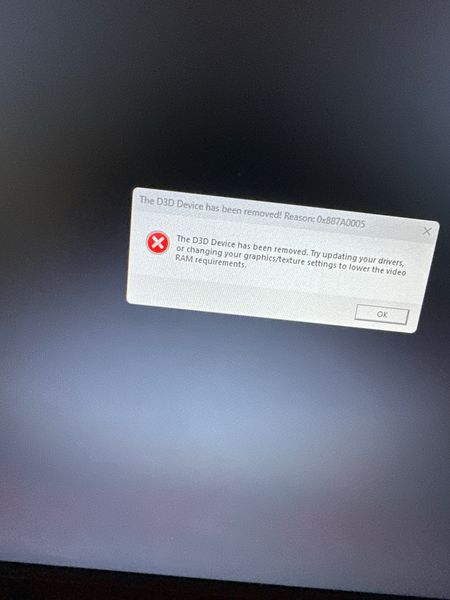
Product: F1 25 Platform: PC Which area is the bug/glitch in? Career Mode and Grand Prix How often does the bug occur? Every time (100%) Did you have cross-play enabled? Yes What happens when the bug occurs? The display on my monitors turns off and I have to restart my PC. Summarize your bug: Since F1 24 I’ve been facing this problem and now playing F1 25: after a flashback, or simply when going from the track back to the menu, or after a cutscene, the monitor goes black and shuts off, forcing me to restart the PC. I’ve tried everything: Undervolt Disabling overlays Lowering texture quality Turning off DLSS Running as administrator Verifying game files Smoke signals and everything else :) I see that this is happening to other users as well. Can any specialist help me? It’s horrible to deal with this — it always happens after game updates. I’ve even rolled back GPU drivers and still nothing. Please help!65Views0likes0Comments
F1 25 VR Quest 3 crash on launch (RTX 4060 Ti)
PC: RTX 4060 Ti, driver 591.44 DX11 forced Setup Quest 3 Link cable → SteamVR 2D: Perfect (menus, races 1440p) VR: Crashes on launch/menu even lowest graphics, RT/DLSS off Tried: Repair, DX11, SteamVR/Meta runtime, clean drivers EA App latest156Views0likes0CommentsF125 bugs
So I've been playing a ranked a lot more. This season and there are so many bugs with the ranked Game mode in silver. It's like every 2 races even if I win. I get 0 points and the penalty system is way off. I got teeboned by someone on purpose, and I received a 10 second penalty when I wasn't the one who caused the accident. Also I had made this issue known in a previous post, but nothing has come of it. It's kind of niche, but I care about it. I still can't remove the number one-off of my car and driver career. I don't like the number one. It's just a personal thing. I want to use my own number but no matter what I do. I can't take it off the car. And when are you guys going to fix the sponsors on the my team race suits? Why are they only white? We should be able to change the color at least to black? But being able to move them on the suit would be nice as well, because sometimes they're in awkward places.71Views0likes0CommentsF1 22 | Black screen
I bought the game on Steam and had played for 78 hours. Recently, when I tried to plat F1 22, a black screen is displayed on my laptop. I had played on my laptop for 78 hours when I first bought the game. Please help. Laptop configurations: Name: Acer Nitro 7 Graphics: Nvidia Gforce GTX 1650 RAM: 8GB42Views0likes0CommentsF1 2021 - Interview Glitch [SINGLE-PLAYER CAREER]
I'm on Season 9 of F1 2021 The Official Video Game's career mode, and I made it so that it would start with Portugal. After I finished OSQ, I was given an interview. I have an attachment here, one before the questions, and as you may be able to see in the clip, the camera, models and sound is completely frozen on the first frame, with the exception of a flag that's nearly out of frame and the shadow for said flag. I was able to press A to continue to the questions, but however, when I answered the last question, I was not able to continue. Does anyone know why this is?62Views0likes0Comments
RaceNet 'sync/clear' buttons unavailable? (PC version)
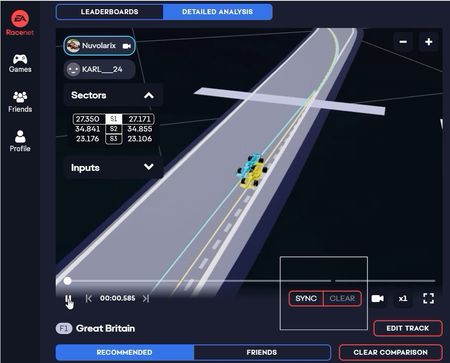
Something weird from RaceNet Time Trial comparison, this how it was surely till January (when I got the picture): while this is today: As you can see SYNC/CLEAR buttons are not available anymore (btw "sync" is very nice feature). What is weird is that I can still see them in my phone app. Could please have a look at the PC version and restore the buttons? Thanks in advance, Nuv104Views0likes1Comment