Environmental sounds are noisy even when set to 0
The most recent patch brought back environmental sounds even when ambience sound is set to 0. It looks as if you're in a walmart/departmental store with cashier sounds and people talking etc. Pretty annoying because I'm trying to film a montage with ZERO background noise. Other bugs I've noticed and probably mentioned here by others (skinny jeans clipping and board clipping through the foot with certain tricks).
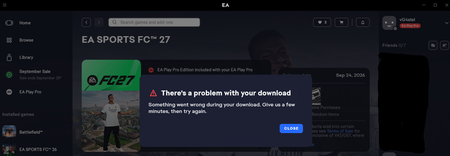
EA Play Pro bug that has been persisting since january
Yesterday i upgraded to EA Play Pro, some bug mustve taken place since of course EA was able to take my payment (the status on my app/account also changed to EA play Pro, my account says order completed) but i can't download any Pro titles. See attachments for extra info I've spoken to 4 customer service employees who all say the same thing: Reinstall the app, and post on the forums. I've personally tried everything from clearing cache registers to even making an ingame purchase ( which of course goes through) some on my end ive done everything to ensure the problem is not on my end but somewhere in EA's back-end entitlement The thing is, i posted this exact same problem in januari this year. Yesterday i tried again because i want early access to EA FC 27 which launches in about 12 hours and my account stays bugged. Below you can see that Madden 27 (which is already out now) does not even download, it does start the 'installing' process for a minute and then gives the 'you don't have access' message. Im at a loss for words, im a loyal customer since 2009 and customer service refuses to solve this issue. Now im not only unable to play some Madden 27 or college Football 27 on my days off but also about to miss the early release of FC 27 which i was hyped about. I need this fixed EA, at this point im sure some senior with technical proficiency can fix this but customer service keeps beating around the bush disrespecting my time. My patience is used up46Views1like3Comments
Welcome Dear dev team & players of PvZ: Replanted, please review below:
The following is an AI translation due to my limited English proficiency; some inaccuracies may exist.As a loyal Chinese player, I have had a lot of fun while playing the game. At the same time, I have also found some areas that can be optimized, and I hope to contribute my ideas to the further improvement of the game. Hello! Wishing you all the best, may we have a wonderful time together, and may you be free from worries and negative feelings! Happy New Year! Thank you for reading my feedback and for being willing to listen to the genuine thoughts of Chinese players about Plants vs. Zombies:Replanted Version. Due to my limited English, the following content is translated by AI and may have some minor inaccuracies. As a loyal Chinese player, I have really enjoyed playing the game. At the same time, I have identified some areas that could be optimized, and I hope to contribute to the game’s further improvement. Should any parts of this written feedback be ambiguous or hard to comprehend, you may head over to The link for Plants vs. Zombies Video Asset Library of Every Official Release has been updated and is now accessible! to watch the supporting feedback videos. Each feedback title strictly matches its corresponding video. This cloud disk link includes fan works related to Plants vs. Zombies, as well as thrilling and engaging exclusive background music from the Chinese version of Plants vs. Zombies 2 for international players to enjoy! I would be extremely grateful for your support and approval if you would like to leave a like or vote. Even if you don’t support it, that’s completely fine—please feel free to read my feedback or other players’ feedback as you wish. 😊😊😊🌹🌹🌹 We sincerely hope all proposed optimizations will be implemented gradually, with future updates always prioritizing player experience. Thank you for taking the time to read this proposal. We look forward to seeing the game keep improving and bringing a better experience to players worldwide. Thank you for listening to the genuine requests from Chinese players. The original Plants vs. Zombies is a timeless classic IP. The authentic core gameplay, control feel, and nostalgic atmosphere represent the bottom line for players and must be fully preserved. The original Plants vs. Zombies occupies an irreplaceable status in the hearts of hundreds of millions of global players, which no sequel can match, including the highly anticipated Plants vs. Zombies 3: Evolution. It is far more than merely a classic tower defense game, but also the youthful memory and emotional sustenance shared by generations of players worldwide. We earnestly beg your development team not to give up on Plants vs. Zombies: Replanted merely due to current mixed reviews and player divergences. Boasting a strong IP legacy and official authenticity, this game has great potential to turn public opinion around, gain greater popularity, and grow into a long-running classic that balances outstanding reputation and reasonable revenue. Taking into account project positioning, development costs and global player habits, we propose a solution: free core game updates + paid DLC for expanded content. The core dual-mode selection system, restored discontinued content and innovative gameplay are recommended to be released as a standalone paid DLC. This is the optimal approach to satisfy players, ensure long-term business sustainability and secure the future of the IP. I. Core Solution: Free Base Updates + Paid DLC Featuring Dual Game Modes Following the industry standards for premium games, development costs and global market acceptance, we suggest bundling the Classic Authentic Mode and Authentic & Creative Hybrid Mode, along with all expanded content, into a standalone paid DLC. The base game will continue receiving free updates focused on bug fixes and fundamental experience improvements. This dual-mode system can fully resolve existing divisions among players, catering to both nostalgia-driven fans and those who enjoy new creative content for players around the world. Mode A: Classic Authentic Mode (For Hardcore Nostalgic Players) This mode retains all content from the original game with strict rules: no new custom plants or zombies will be added. All stats, mechanics, controls, core gameplay and interface layouts remain completely unchanged to faithfully recreate the original gaming experience. Only classic features that do not alter the original core are kept here: Night Mode and Endless Mode, delivering a pure retro experience for long-time fans. Mode B: Authentic & Creative Hybrid Mode (For Casual Players & Creative Game Enthusiasts) All original plants, zombies, slot systems and stats are fully preserved. Classic plants retain the traditional white and purple card classifications and are displayed prominently. All new plants, zombies, China-exclusive content and innovative gameplay are placed in separate slots and dedicated menus. New and original content coexist independently without interfering with one another, and no core mechanics of the original game will be modified. Players may freely choose to try expanded content or stick to the classic version. Shared Features for Both Modes (Included in the Paid DLC) Cross-platform co-op and competitive multiplayer, supporting private room matchmaking and public server lobbies for playing with friends and other players. Access to classic official easter eggs, including exclusive skins for Kernel-pult, Crab Zombie, Retro Zombie and Retro Peashooter, alongside other hidden content. II. Rationale & Benefits of This Solution The current mixed reception stems from divided player expectations: nostalgic fans oppose any modifications, while other players find the pure remaster lacking in content and replay value. The dual-mode system in the paid DLC caters to both groups and eliminates disputes fundamentally. Positive word-of-mouth from players will further boost the game’s reputation and popularity. The original standalone game has limited content, so players tend to lose interest after completing the main campaign, resulting in a short lifespan. Additional gameplay, themed levels and lightweight creative content in the DLC can extend the game’s longevity. Meanwhile, revenue from the DLC will support the team in delivering continuous updates and polished content for long-term operation. Sticking solely to a pure remaster will gradually wear down the IP’s goodwill and dampen global players’ anticipation for Plants vs. Zombies 3: Evolution. In contrast, a well-polished Replant Edition with high-quality DLC will set a benchmark for classic remasters, boost the overall popularity of the franchise, build a loyal player base and revitalize the entire IP ecosystem. III. Key DLC Content Additions: Restoring Discontinued Content for an Official Authentic Experience The China-exclusive content, retired features and lightweight creative gameplay proposed here are highly sought after by players worldwide. For a long time, international fans have hoped to experience content from the Great Wall Edition, Journey to the West Edition, Kingdom Edition, classic Endless Mode and exclusive levels from discontinued mini-games. Many players have resorted to fan-made mods, as an official polished version has long been missing. All new gameplay, light progression systems and unique mechanics in this proposal follow these principles: no in-game purchases, no mandatory daily quests, no stamina limits and no pay-to-win elements. These additions only enrich fun without breaking the original game balance, fully fitting the playstyle of premium single-player game fans. Fan-made mods have gained massive popularity largely thanks to their diverse content and gameplay. As an official authentic title, Plants vs. Zombies: Replant Edition can surpass all fan creations in authenticity, visuals, controls and balance by implementing full optimizations, restoring discontinued content and adding refined original features in the DLC. It will become the top choice for all fans of the original game and drive a substantial rise in global popularity, sales and reviews. We kindly request the team to implement the following content restoration plan in the DLC: Fully restore content from the Great Wall Edition, Journey to the West Edition, Kingdom Edition, classic Endless Mode and exclusive levels, zombie designs and scene mechanics from discontinued mini-games. Recover scrapped content from the 2008 beta, including the cancelled sixth world, Propeller Zombie and Floating Cherry Bomb. Bring back the classic Zombie Photo Booth from the Game of the Year Edition. The DLC will also include comprehensive refinements: full bug fixes, UI upgrades, camera and cinematography improvements, revamped lighting and terrain, updated animations for plants and zombies, new sound effects and background music, optimized touch controls, enhanced Zen Garden, completed achievement systems and reworked multiplayer modes. All new content, regional exclusive features, creative gameplay and visual upgrades strictly abide by the rules: do not alter the original framework or core mechanics, and keep new content fully independent. We aim to expand content and elevate the experience while fully respecting the classic game. This expansion DLC is far more than simple content additions. It represents a new chapter for this classic IP and marks a long-term win-win starting point for EA and players across the globe. IV. Free Updates for the Base Game (Available to All Owners) To guarantee a solid baseline experience for everyone who purchased the base game, free ongoing updates will include: Universal bug fixes, Chinese translation revisions, text layout and interface visual improvements. Minor tweaks to basic animations, sound effects, lighting and terrain details. Restoration and bug fixes for original classic features and basic easter eggs. Optimized core controls, touchscreen adaptation and shortcut key settings. No large-scale expanded gameplay, multiplayer functions or original custom content will be added to the base game. It will remain a high-fidelity remaster to protect the core interests of purely nostalgic players. V. Final Appeal & Vision We fully understand the challenges in game development, content polishing and resource allocation, as well as the pressure and limitations faced by the development team. Given the deep nostalgia that the original Plants vs. Zombies holds for global players, we have gathered feedback from fans worldwide to create this well-rounded plan that balances sentiment, gameplay, global compatibility and sustainable business operations. A pure remaster with no new content will gradually harm the IP’s reputation and disappoint players. The model of free base updates + paid expansion DLC featuring dual modes, restored classic content and creative gameplay is the best path to turn public opinion around, unite the community and achieve healthy long-term development for the IP. We sincerely ask the development team to review this proposal and consider launching the dual-mode system, restored discontinued content, lightweight creative gameplay and comprehensive experience improvements as a standalone paid DLC. Players of the original Plants vs. Zombies around the world are watching every update of this title. We earnestly hope Plants vs. Zombies: Replant Edition can overcome current challenges, thrive anew and become an everlasting classic in the tower defense genre. Submitted by Global Nostalgic Players of Plants vs. Zombies (Joint Appeal from Chinese & International Fans) Bugs that need priority handling Chinese Text Display Issues In the latest version of Plants vs. Zombies: Replanted, there are obvious visual inconsistencies in Chinese text display. This issue has affected the player experience, so some Chinese players even install third-party patches to make the visual effect of Chinese text consistent. For example: When entering the game's initial interface, the font style of the title "Plants vs. Zombies: Replanted" is significantly inconsistent with that of Plants vs. Zombies (Chinese Original Version) and Plants vs. Zombies 2 (Chinese Server). For example: In the game's main interface, two problems exist with Chinese text. First, the text sizes are inconsistent. Second, there are unnecessary line breaks, which damage the overall visual integrity of the interface. For example: Several plant names are incorrectly translated: Fume-shroom is mistakenly rendered as “Poison Bubble Mushroom”, and Spikeweed as “Thorn Grass”. While other in-game text is technically accurate, it still does not match the wording used in the official original Chinese version. We recommend fully aligning all Chinese translations in this build with the classic original Chinese localization. 【If you don't quite understand the content of the description, you can refer to the attached photo!】 Display Issue in Mist Level Survival Mode In the mist level of Survival Mode, after completing the first round, zombies are completely obscured by the mist during the plant selection phase. Players cannot see which zombies will appear on the battlefield, and even if Clovers are used to disperse the mist, it quickly reappears. Display Issues of Plants Planted in Grid Front Within Levels Current Problems: When dragging a plant/zombie slot to plant, the texture of the plant/zombie in the slot remains static without a transition effect from transparent to fully opaque. If the static texture of the dragged plant/zombie is moved to an unplantable area, the texture will stay permanently. Even when moved to a plantable area, the static texture may still remain indefinitely. This is extremely tricky for touchscreen players. When selecting a plant/zombie slot, four 90-degree right angles do not appear around the slot—this causes significant discomfort for players with obsessive-compulsive tendencies. Under touchscreen operation, dragging a plant triggers a "cross" display, but dragging a shovel over grids does not activate the "cross" display. Optimization Suggestions: When dragging a plant/zombie slot to plant, add dynamic effects to the plant/zombie texture in the slot (i.e., maintain animation state). The farther the dynamic texture of the plant/zombie is from all slots, the higher its opacity. When the dynamic texture is moved to an unplantable area, it should disappear immediately after releasing the drag, without remaining. When the dynamic texture of the plant/zombie is moved to a plantable area, there should be no possibility of permanent retention. When clicking a plant/zombie slot, four 90-degree right angles should appear around the slot, consistent with the mobile version of Plants vs. Zombies (Original). Under touchscreen operation, dragging both plants and shovels over grids should trigger the "cross" display (no display required for non-touchscreen operation). Planting can only be completed after releasing the drag in both operation modes. 【Switch and some Windows PCs support touchscreen operations. It is recommended that the above features be applied across all platforms. For reference, this functionality can align with the design of Plants vs. Zombies 2.】 Display Issues with Item Usage Currently, under touchscreen controls, the shovel cannot remove plants by dragging within levels. In the Zen Garden, items such as the watering can, golden watering can, pesticide, fertilizer, phonograph, gardening glove, and wheelbarrow cannot be used on potted plants via swiping. In the Tree of Wisdom interface, tree fertilizer cannot be fed to the Tree of Wisdom via swiping. 【Switch and some Windows PCs support touchscreen operations; it is recommended that the above features be applied to all platforms.】 Display Issue in Cloudy Weather Mode Levels In the interface of cloudy weather levels without a swimming pool, there is an abnormality in the raindrop landing animation. According to the design logic, lanes 1, 2, and 5 should show the effect of raindrops falling on the ground, but currently lanes 3 and 4 display the water ripple effect as if raindrops are falling into a swimming pool. It is recommended to fix this display error so that the raindrop animation in pool-less scenes is consistent with the actual level environment. Fix the Issue of Darkened Colors When Shadows Overlap In the current version, when shadows of multiple zombies or plants overlap, the shadow color becomes darker, which affects the aesthetic quality and visual presentation of the game. It is recommended to fix this issue so that shadows maintain their normal color when overlapping, making the game interface clearer and more natural, and providing players with a better visual experience. Feasible Solutions: The shadows of plants and zombies are not limited to a single oval shape; instead, they appear as silhouettes that support real‑time changes. Set the shadow opacity to 50% and control the overall shadow transparency via layer opacity to prevent color darkening caused by overlapping semi‑transparent shadows. Fix the Visual Overlap Issue of Multiple Flame Effects Resolve the problem where the edge color of flames darkens when multiple flame projectiles or other forms of flames overlap. This ensures the normal visual effect of the game screen and enhances the player’s gaming experience. The fix can focus on optimizing the flame particle system: adjust the particle material’s blend mode to "Translucent" and properly set the opacity to avoid excessive occlusion . Enable depth testing and reasonable sorting modes (such as "View Depth") to ensure correct rendering of semi-transparent flame particles and prevent abnormal color mixing . Mini Zombie Level Sound Effect Residue Bug After completing the mini-game "Little Zombie Trouble" and the "Pool 3-5" level, when playing other levels, the zombie sound effects will be abnormally replaced by mini zombie sound effects, which affects the gameplay immersion. Abnormal Obstacle-Crossing Judgment of Dolphin Rider Zombie When a Tall-Nut is planted in Column 10 of the Pool, the Dolphin Rider Zombie can still jump over it, which violates the design logic of Tall-Nut's blocking function. "Zombie Nimble Zombie Quick" Level Speed Multiplier Function Fix It is recommended to limit the speed multiplier button in the "Zombie Nimble Zombie Quick" mini-game level to the range of 2x - 2.5x speed; currently, there is an abnormality where the actual running speed reaches 4x after adjusting to 2x speed, resulting in an imbalance in the level difficulty. Achievement "Enlightened" Difficulty Inconsistent with the Original Version The difficulty of completing the "Enlightened" achievement in the current version is seriously inconsistent with that of the original version. In the original version, players only needed to collect all plants across all scenes in the garden to unlock this achievement, even if the number of duplicate potted plants was controlled at no more than about 6 pairs. However, in this version, players are required not only to collect all plants across all garden scenes, but also to keep the number of duplicate potted plants at a minimum—an excessive number of duplicates will make this achievement unobtainable. It is recommended to lower the difficulty of unlocking the "Enlightened" achievement in this version and align it with the original version. Abnormal Display of Sun-shroom Size The size of Sun-shroom in the current version is displayed abnormally in both the Almanac and Zen Garden: In the Almanac, the size of Sun-shroom remains in its immature state at all times, which is inconsistent with the original version. In the Zen Garden, even if Sun-shroom is fully fertilized to its maximum growth stage, its size still stays in the immature state, which does not match the original version. Most of the following are suggestions for paid DLC. The team may decide which content to release as DLC. All these ideas can fully highlight the core value of this remastered version. I. System Adaptation and Interface Optimization Stand Painting Style It is recommended to upgrade the current high-resolution plant & zombie textures to a more three-dimensional and detailed Stand Painting Style based on the original textures, which is the classic art style used in the official posters and magazines of Plants vs. Zombies 1. This can highly restore the classic temperament of the original first-generation game and cater to the nostalgia of long-time players. It can also greatly improve the overall visual quality and grade of the HD version, making the characters more visually appealing, and making the overall art style more unified and official. 【The character art style from the beginning to the middle of the video is only for general reference. The character art style in subsequent versions must be highly consistent with the style shown at the end of the video — that is, the official character art style by PopCap. If you do not fully understand the description, please refer to the attached video!】 Optimization Suggestions for Dynamic Welcome Interface Upon launching the game, the "EA PopCap" logo is displayed with stunning, elaborate animations paired with background music that syncs perfectly with the animation’s rhythm, replacing the current lackluster static display of the logo alone. Additionally, the dynamic Plants vs. Zombies-themed artwork activates its animations in real time as the game loads, rather than only starting the dynamic effects after the green progress bar completes. The dynamic welcome interface supports custom positioning for all character sprites, with their animations expanded far beyond simple back-and-forth swaying. This revamp delivers a fresher, more vibrant visual experience for players and even helps attract new players to the game. 【Enhanced Dynamic Visual Proposals for Characters】: Running, flying, being knocked back, blinking, and a rich array of real-time facial expressions—character animations are no longer limited to basic swaying motions. Suggestions for Optimizing Level Camera Movements The camera switching logic for all levels in the current version is a direct pan from the left lawn to the zombie camp on the right. Despite the smooth transition curve of the camera animation, the overall presentation is rather monotonous and fails to deliver a more immersive visual experience for players. It is recommended that the subsequent versions retain the original basic camera path: after panning from the left lawn to the zombie camp on the right, the camera continues to extend a short distance to the right, presenting a broader scene view briefly to enhance the sense of space in the level. The card selection interface should pop up synchronously the moment the camera finishes panning right and starts panning back left immediately. Linking the card selection phase with the dynamic camera transition not only makes the interface pop-up more natural and smooth but also boosts players' operational immersion. The smooth transition curve of the camera animation in the current version should be retained. This is a better alternative to the current version, where the card selection interface only pops up after the camera movement is completely finished, resulting in a slow pacing. 【This feature can refer to Plants vs. Zombies 2 Chinese Server & International Server】 Level Camera Movement Optimization Suggestions In the current version, the camera switching logic for all levels directly pans from the left lawn to the zombie camp on the right. Although the camera animation features a smooth transition curve, its overall presentation is relatively monotonous and fails to deliver a more immersive visual experience for players. It is suggested that future versions retain the original basic camera path: after the camera pans from the left lawn to the zombie camp on the right, it should continue to extend a short distance to the right, briefly showing a wider scene view to enhance the sense of level space. A "whoosh" sound effect should be played synchronously during the camera movement to strengthen the visual impact. At the exact moment when the camera finishes moving right and starts to move back left, the card selection interface should pop up immediately with a sound effect similar to "Store". Connecting the card selection phase with dynamic camera transition makes the interface pop-up more natural and smooth, and improves players’ operational immersion. The smooth transition curve of the camera animation in the current version should still be retained, instead of popping up the card selection interface only after the camera movement is fully completed as in the current version, which results in slow pacing. 【This feature can refer to Plants vs. Zombies 2 (Chinese version & International version)】 "Choose Your Plants" Interface Function Expansion The "Choose Your Plants" interface is divided into two sections: Plants and Lineups. The Plants section allows normal plant selection, and also automatically supports reusing the previous round’s card slot lineup and clearing all currently selected plant card slots. The Lineups section supports customizing and saving card slot lineups, as well as setting custom lineup names. 【This feature can refer to Plants vs. Zombies 2 Chinese Version】 Optimization of Plant & Zombie Shadow Forms In the current version, when shadows of multiple zombies or plants overlap, the shadow color becomes darker, which affects the aesthetic quality and visual presentation of the game. It is recommended to fix this issue so that shadows maintain their normal color when overlapping, making the game interface clearer and more natural, and providing players with a better visual experience. Feasible Solutions: The shadows of plants and zombies are not limited to a single oval shape; instead, they appear as silhouettes that support real‑time changes. Set the shadow opacity to 50% and control the overall shadow transparency via layer opacity to prevent color darkening caused by overlapping semi‑transparent shadows. New Perspective Options It is recommended to provide three visual effect options for all game interfaces: "Ultra-high Perspective", "High Perspective", and "Low Perspective". Different players have different needs for the display of game screens: the high perspective allows players to obtain more comprehensive battlefield information, while the low perspective may focus more on local battles, meeting different strategic planning and visual preferences. Optimization of the "Achievements" Interface Each achievement icon is given a mirror effect covered by a glass window. Moreover, as the interface scrolls up and down, each achievement icon will realize real-time 3D changes in visual angle and real-time changes in the glass luster on the icon. In addition, the icon corresponding to each newly completed achievement will be endowed with a shining luster and then disappear, making it more vivid and interesting. Visual Optimization for Plants Transformed by the Transfiguration Eggplant Plants transformed by the Transfiguration Eggplant should not be given a gray appearance. Their visual effect should be consistent with other plants, as the inconsistent gray look can be disturbing for players with obsessive-compulsive tendencies. And I believe the current setting of inconsistent color schemes is already outdated. Plant/Zombie Slot Visual Optimization It is recommended to optimize the visual design of all plant slots and zombie slots. Instead of displaying the full-body appearance of plants or zombies, their partial facial close-ups should be used as the slot background. 【This feature can refer to the design of Plants vs. Zombies 2】 Plant Selection Interface Visual Optimization During the plant selection phase before a level starts, the following optimizations are suggested for the plant slot interface at the top of the screen: Always keep the original brown background removed. Design the empty, unselected slots into a thicker dashed line style. When a plant is selected, simultaneously display the plant’s attribute information and its corresponding animation effect. 【This feature can refer to the design of Plants vs. Zombies 2.】 Recommendations on Promoting Full-Platform Ecosystem Layout Currently, Huawei HarmonyOS Next boasts substantial market potential. It is recommended to advance the full-platform ecosystem layout in the following directions: Establish a cross-platform cloud data interconnection system to fully cover the following mainstream operating systems and devices, and achieve full-region availability on corresponding app stores: Apple Ecosystem: iOS, iPadOS, macOS, visionOS, tvOS – available on the Apple App Store in all regions; Huawei Ecosystem: HarmonyOS PC, HarmonyOS Mobile – available on Huawei AppGallery in all regions; Android Ecosystem: Android, Android TV – available on Android app stores such as Google Play and Amazon App Store in all regions; Microsoft Ecosystem: Windows x86, Windows x64, Windows Arm – available on platforms including but not limited to Microsoft Store and Steam. Core Value: By realizing real-time synchronization of data such as game progress, save files, and personalized settings, we eliminate barriers to device switching, create a seamless gaming experience for users, and further enhance user retention and brand competitiveness. Optimization of the "Achievements" Interface Each achievement icon is given a mirror effect covered by a glass window. Moreover, as the interface scrolls up and down, each achievement icon will realize real-time 3D changes in visual angle and real-time changes in the glass luster on the icon. In addition, the icon corresponding to each newly completed achievement will be endowed with a shining luster and then disappear, making it more vivid and interesting. Visual Optimization for Plants Transformed by the Transfiguration Eggplant Plants transformed by the Transfiguration Eggplant should not be given a gray appearance. Their visual effect should be consistent with other plants, as the inconsistent gray look can be disturbing for players with obsessive-compulsive tendencies. Level Victory Effects When all levels are cleared, all obstacles (such as tombstones, arcade machines, ice blocks, etc.) will automatically shatter and disappear. This keeps the game interface cleaner while bringing players a sense of victory achievement and visual satisfaction. At the moment of victory in regular levels, all plants on the field simultaneously enter a cheering mode. They convey the joy of victory through vivid gestures, allowing players to deeply immerse themselves in the scene and resonate emotionally. This effect is also adapted for the Versus Mode — the winning side celebrates enthusiastically, while the losing side shows a dejected and droopy look. The distinct emotional contrast enhances the immersive experience of the battle! Sunflower Visual Effect Optimization Adjust the orientation of the Sunflower's flower disc from facing forward to a slightly right-tilted style similar to the Marigold. This adjustment not only maintains visual coordination and unity between the two plants' flower disc orientations but also delivers a better overall visual experience. 【If you have trouble understanding the description, please refer to the attached images!】 Survival Mode Plant Visual Effect Optimization After completing the first round of battles in Survival Mode and Endless Mode, when the camera switches to the zombie camp on the right side of the lawn and the plant seed slot selection interface is active, plants must maintain dynamic effects at all times instead of appearing static. 【This feature can be referenced from Plants vs. Zombies 2.】 Optimization of Loading Interface Visual Effects The loading interface has been optimized to feature a dynamic effect in the original art style, where "the petals of the Marigold are plucked off one by one and then regenerated". The background remains pure white at all times, resulting in a more concise and unified visual experience. When entering the Zen Garden, 3 garden interfaces and 1 Wisdom Tree interface (a total of 4 interfaces) will be preloaded at one time. This can effectively avoid the problem of repeated interface loading in the current version and improve the entry efficiency and user experience. Optimization of Gold Coin Display Appearance In the current version, a money bag with a "US Dollar" icon is displayed next to the gold coins accumulated by the user. This may mislead users into thinking that these are real, withdrawable US Dollars. To prevent this situation, it is recommended to replace the money bag with the "US Dollar" icon with the stacked gold coins from the original mobile version of Plants vs. Zombies. Simplified operation logic of the main interface In the main interface, it is recommended to integrate “Mini Games", "Survival" and "Puzzle" into the "More Ways To Play" module, so that they can be accessed within this module. This will simplify the visual effect of the main interface. Additionally, there is a blinking regular zombie next to the tombstone and falling leaves. After clicking the "More Ways To Play" module, all level selection interfaces and dynamic effects should be consistent with those of the current version's "Adventure" and "Rest in Peace". 【This interface can refer to the mobile version of the original Plants vs. Zombies】 Optimization of the "Zombies" Module Display in the Almanac Currently, in the "Zombies" module of the almanac, the size and appearance of each zombie corresponding to the square button icons are uneven. Players with obsessive-compulsive tendencies find this quite uncomfortable. It is recommended to fully unify the size and appearance of each zombie corresponding to the square button icons, which can optimize the visual effect while eliminating the negative sense of disharmony. Optimization of Potted Plant Interaction Experience in Zen Garden In the Zen Garden, it is suggested that when watering a potted plant, the plant triggers a pleasant animation effect and immediately produces 6 Silver Coins the moment water is applied. Afterwards, you only need to use one of the following items on the potted plant: Fertilizer, Bug Spray, or Phonograph. Using any of these three items should also generate benefits instantly upon contact. In the current version, potted plants show no animation when watered, produce Silver Coins only after watering is completed, and require multiple watering sessions—this is quite cumbersome. Simplifying the operation not only saves time and effort but also makes the plants appear more lively and vivid! 【This feature can be referenced from Plants vs. Zombies 2 International Version】 Optimization Suggestions for Potted Plant Interaction in Zen Garden In the Zen Garden, for items such as the regular watering can, golden watering can, fertilizer, pesticide, and gramophone, no extra button clicks are required—simply move the item to the potted plant area to perform the corresponding action, streamlining the interaction steps. Optimize the display style of plant demand prompts: remove the white dialogue box and retain only the core demand icons, making the interface cleaner and demand information more intuitive. Add interactive animation effects for potted plants: triggering a pleasurable dynamic effect for the plant when watering it, applying fertilizer, using pesticide, or playing the gramophone. This enhances the interactive experience between players and potted plants, making the plants appear more vivid and lively. Adjust the watering reward mechanism: 6 silver coins are generated instantly upon watering, eliminating the need for repeated watering actions. After applying fertilizer, using pesticide, or playing the gramophone, the potted plant will brighten up to generate rewards while simultaneously triggering the pleasurable animation. This resolves the issues in the current version—no animation for watering, delayed silver coin generation, and tedious repeated operations—saving players' time and effort and optimizing the overall operational experience. 【This feature can refer to Plants vs. Zombies 2 International Version】 Expansion of Level Selection Interface Operation Logic in Adventure Mode It is suggested to add separate level selection interfaces for "First Playthrough" and "Second Playthrough" in the Adventure Mode level selection screen. Levels that have been successfully cleared should be permanently unlocked, instead of the current version where all levels except 1-1 are re-locked after completing Adventure Mode. The Rest in Peace mode can remain unchanged. However, we strongly dislike having the failure records of Rest in Peace mode saved, and we are even more worried about them being permanently stored! It is recommended to add an option to "Delete All Failed Clearance Records" in the "Clearance Records" section of Rest in Peace mode. Sun Falling Speed & Visual Appearance Optimization Currently in all custom mode levels, sunlight falls at a constant speed, resulting in a rather monotonous visual effect. It is recommended that in future updates, both normal sunlight and Far Future exploding sunlight be adjusted to a decelerating falling speed — speeding up first and then slowing down during descent — to enrich the layering of animation effects. When sunlight drops from the sky to the ground in levels, it currently casts a shadow. As sunlight itself is a luminous light source, casting a shadow is logically unrealistic and feels artificially designed. Instead of a shadow, sunlight should leave a glow halo at the landing spot. It is also recommended that nearby plants produce subtle light reflections from the sun halo. This will greatly enhance realism, immersion, and environmental interactivity. If this effect has high performance costs, it can be implemented in a future update. After the player collects sunlight into the sun meter, add a brief flashing animation to the sun meter. 【Reference inspiration: Plants vs. Zombies 3 (Chinese Server & Global Server)】 Overlapping Plant Animation Effects Whenever you plant a purple-tier card plant on top of a regular white-card plant, trigger a dedicated overlapping placement animation effect. 【Reference inspiration: Plants vs. Zombies 3 Global Server】 Optimization of Sun Drop Movement Speed In all custom mode levels at present, the movement speed of falling suns remains constant, resulting in a monotonous visual effect. It is recommended that in future versions, the falling movement speed of "Normal-form Suns" and "Future World Explosive Suns" be optimized to a non-streamlined curve—specifically, adjusting the speed from fast to slow—to enhance the layering of animation effects. When players collect suns and fill the sun meter, the meter will flash once. 【This feature can refer to Plants vs. Zombies 3 (Chinese Server & International Server)】 Customizable Sun Fall Speed Currently, the falling speed of sun is uniform in all optional mode levels, resulting in a relatively monotonous visual effect. It is suggested that in future versions, the falling speed of Regular Sun and Future World Explosive Sun can be independently optimized to a non‑linear speed—that is, the sun falls from fast to slow, enriching the layered animation effects. Of course, users shall have the right to keep the original sun fall speed unchanged. Optimization of All-Scene Interfaces Add exquisite and realistic lighting and shadow effects to all scenes, including the main interface, level selection interface, in-game interface, and achievements interface. The clouds in all scenes will float slowly with the wind to add dynamic vitality, and the visual appearance of these clouds will be highly consistent with that in the Plants vs. Zombies HD version for iPad. Lawn Terrain It has been optimized into a neat rectangular structure similar to the lawn in Plants vs. Zombies 2, composed of neatly arranged grids. The grids use green colors of different shades, forming an alternating pattern of light green and dark green, while maintaining the same color tone as the original version. The white fences beside the lawn maintain a uniform vertical shape, with evenly spaced gaps between each fence to avoid an uneven visual effect. Each white fence features a unique wood grain, preventing a "copy-pasted" appearance and creating an orderly and clean look overall. Pool Terrain The lawn part of the pool terrain is optimized into a neat rectangular structure similar to that in Plants vs. Zombies 2, made up of neatly arranged grids. These grids use green colors of different shades, forming an alternating pattern of light green and dark green, and retain the same color tone as the original version. The water in the pool part has a rippling effect as if blown by the wind. It is clear and transparent, allowing visibility of the水底 (bottom of the pool) which is composed of neatly arranged grids. These grids use blue colors of different shades, similar to the sea level in the "Big Wave Beach" scene from Plants vs. Zombies 2. Roof Terrain The left slope has a standard parallelogram structure, and the right flat part has a neat rectangular structure, both composed of neatly arranged tile grids. The grids are uniformly orange-red, with no cracks or other defects, and the overall color tone remains consistent with the original orange-red. Each tile grid is separated by dark orange-red lines. 【If you don't quite understand the content of the description, you can refer to the attached photo!】 II.Game Content Expansion Addition of "Daily Check-In" Mechanic to It is recommended that this version add a reward mechanism via daily check-in. For users who forget to check in, they may complete a specific level or a designated task to retroactively claim the missed check-in rewards. Rewards include: Coins, Diamonds, and the following items: 500 Sun Refill 1000 Sun Refill 2000 Sun Refill Wooden Mallet Missing Lawnmower Supply Limited-Time Obstacle Attack Access Auto-Pickup Resources Addition of "Cumulative Login Days" Mechanic to It is recommended that this version introduce a cumulative login day reward system, where players can claim corresponding rewards based on the total number of days logged in. Rewards include coins, diamonds, and various items, achieving a win-win situation of entertainment + rewards. Examples: 100 cumulative login days: 20,000 Coins + 20 Chocolates + 50 Insecticides + 30 Auto-Pickup Resources uses + 30 Wooden Mallet uses + 15 500 Sun Refill uses… 200 cumulative login days: 50,000 Coins + 30 Chocolates + 60 Insecticides + 50 Auto-Pickup Resources uses + 50 Wooden Mallet uses + 10 1000 Sun Refill uses… 300 cumulative login days: 80,000 Coins + 40 Chocolates + 70 Insecticides + 60 Auto-Pickup Resources uses + 60 Wooden Mallet uses + 20 1000 Sun Refill uses… 500 cumulative login days: 100,000 Coins + 50 Chocolates + 80 Insecticides + 80 Auto-Pickup Resources uses + 80 Wooden Mallet uses + 25 1000 Sun Refill uses… 1000 cumulative login days: 500,000 Coins + 100 Chocolates + 180 Insecticides + 100 Auto-Pickup Resources uses + 100 Wooden Mallet uses + 30 2000 Sun Refill uses… Expansion of Coin Collection Methods in the Zen Garden After feeding Stinky the Snail in the Zen Garden chocolate, Stinky the Snail will continue to collect coins produced by the potted plants even if you exit the Zen Garden. When you return to the Zen Garden again, a line of text will appear: "While you were away, Stinky the Snail collected XXX coins!" This allows you to gain benefits without staying on the Zen Garden interface continuously. We also hope that chocolate can be obtained by watching ads and completing various tasks—each ad watched grants 1 chocolate. We strongly recommend implementing this suggestion! 【This feature can refer to Plants vs. Zombies (Original Mobile Version)】 Due to the word count limit, the following feedback content can be referred to in the comment section. Thank you for your support!Solved4.3KViews8likes7CommentsWelcome Dear dev team & players of PvZ: International, please review below:
The following is an AI translation due to my limited English proficiency; some inaccuracies may exist.As a loyal Chinese player, I have had a lot of fun while playing the game. At the same time, I have also found some areas that can be optimized, and I hope to contribute my ideas to the further improvement of the game. Hello! Wishing you all the best, may we have a wonderful time together, and may you be free from worries and negative feelings! Happy New Year! Thank you for reading my feedback and for being willing to listen to the genuine thoughts of Chinese players about Plants vs. Zombies International Version. Due to my limited English, the following content is translated by AI and may have some minor inaccuracies. As a loyal Chinese player, I have really enjoyed playing the game. At the same time, I have identified some areas that could be optimized, and I hope to contribute to the game’s further improvement. Should any parts of this written feedback be ambiguous or hard to comprehend, you may head over to The link for Plants vs. Zombies Video Asset Library of Every Official Release has been updated and is now accessible! to watch the supporting feedback videos. Each feedback title strictly matches its corresponding video. This cloud disk link includes fan works related to Plants vs. Zombies, as well as thrilling and engaging exclusive background music from the Chinese version of Plants vs. Zombies 2 for international players to enjoy! I would be extremely grateful for your support and approval if you would like to leave a like or vote. Even if you don’t support it, that’s completely fine—please feel free to read my feedback or other players’ feedback as you wish. 😊😊😊🌹🌹🌹 【We really, really need these optimizations! It should be appropriately centered on users. Thank you very much for taking the time to read my feedback. I look forward to continuous improvements in the future to bring a more excellent experience to users. Thank you!】 Bugs that need priority handling In Plants vs. Zombies 1 HD for iPadOS, I encountered such an issue: when entering the game with an internet connection, it crashes and fails to launch. I have to disconnect from the network first to enter the game, then reconnect to the internet to play. In the iPadOS version of Plants vs. Zombies 1 HD, I encountered another problem: under a stable network connection, the data of the unlocked "Diamond Beghouler" achievement and "Smashin" achievement are saved locally, but they can never be automatically synced to the Apple server. As a result, these two achievements are shown as unlocked in the local game but remain in the "unlocked" state in the achievement list of this game in Apple Game Center. I have tried two solutions: first, recreating the game account; second, uninstalling the game, reinstalling it, and playing from the beginning. However, even if I unlock these two achievements again in a stable network environment, the relevant data still cannot be synced to the Apple server. I have contacted Apple customer service before, and they said they couldn't solve the problem and suggested that I contact the game developer. It's worth noting that all achievements in the iPhone version of PvZ 1 can be synced to the Apple server normally, and in the iPad version of PvZ 1 HD, all other achievements except the two mentioned above can also be synced normally. Therefore, I judge that this problem may be caused by the software itself, not by Apple. 【If you don't quite understand the content of the description, you can refer to the attached photo!】 In the Android and iOS versions of Plants vs. Zombies 1, issues such as lag, frame drops may occur after connecting to the Internet, and problems like missing music and sound effects may appear after watching ads. In the iOS version of Plants vs. Zombies 1, there is an error in the display of an achievement icon on Apple's server: Apple's server incorrectly displays the icon of "The Stuff Of Legends" achievement as that of the "Smashing" achievement. 【If you don't quite understand the content of the description, you can refer to the attached photo!】 I. System Adaptation and Interface Optimization Full-range Tablet Native Adaptation + Texture Optimization & Art Refinement + Cross-platform Ecosystem Layout We earnestly request the globally available international version of *Plants vs. Zombies*, currently published across regional app marketplaces, to deliver native compatibility for all mainstream tablet devices including iPad, Android Pad and HarmonyOS Pad, eliminating forced mobile compatibility emulation and filling the market gap left by the previously delisted international HD edition. Based on original asset textures, upgrade in-game graphics toward the refined, dimensional and ultra-high-definition **Stand Painting Style** — the iconic art featured on official PVZ1 posters and printed publications. This adjustment faithfully preserves the original classic aesthetic to satisfy veteran players’ nostalgia, substantially elevates overall HD visual fidelity and presentation, enhances character appeal, and unifies the in-game artwork under authentic official styling. Meanwhile, construct a cross-platform cloud sync framework to support full-device coverage and worldwide distribution on corresponding app stores across four major ecosystems: Apple ecosystem (iOS, iPadOS, macOS, visionOS, tvOS): global rollout on Apple App Store; Huawei ecosystem (HarmonyOS mobile & desktop OS, including HarmonyOS tablets): worldwide release on Huawei AppGallery; Android ecosystem (Android, Android TV, all-brand Android tablets): global distribution on Google Play, Amazon Appstore and alternative Android marketplaces; Microsoft ecosystem (Windows x86/x64/Arm, including Windows tablets): launch via Microsoft Store, Steam and additional eligible platforms without channel limitations. The cloud infrastructure enables real-time cross-device synchronization of game progress, save files and custom preferences, erasing data barriers between tablets and other hardware, delivering seamless cross-platform gameplay and improving user retention as well as core brand competitiveness. New Perspective Options It is recommended to provide three visual effect options for all game interfaces: "Ultra-high Perspective", "High Perspective", and "Low Perspective". Different players have different needs for the display of game screens: the high perspective allows players to obtain more comprehensive battlefield information, while the low perspective may focus more on local battles, meeting different strategic planning and visual preferences. Multi-language Adaptation Currently, there are a large number of players from different countries and regions in the international version, especially a huge Chinese player group. To meet the needs of global players, it is recommended to add support for multiple languages, such as Chinese, Japanese, Korean, Russian, Hindi, Malay, etc. This can not only eliminate language barriers, enable players to better understand the game content and instructions, but also significantly enhance the game's attractiveness and competitiveness in the international market and promote the globalization development of the game. Choose Your Plants" Interface Function Expansion The "Choose Your Plants" interface is divided into two sections: Plants and Lineups. The Plants section allows normal plant selection, and also automatically supports reusing the previous round’s card slot lineup and clearing all currently selected plant card slots. The Lineups section supports customizing and saving card slot lineups, as well as setting custom lineup names. 【This feature can refer to Plants vs. Zombies 2 Chinese Version】 Optimization of the "Zombies" Module Display in the Almanac Currently, in the "Zombies" module of the almanac, the size and appearance of each zombie corresponding to the square button icons are uneven. Players with obsessive-compulsive tendencies find this quite uncomfortable. It is recommended to fully unify the size and appearance of each zombie corresponding to the square button icons, which can optimize the visual effect while eliminating the negative sense of disharmony. II. Visual Effect Optimization Solve the Problem of Darkened Color When Shadows Overlap When the shadows of multiple zombies or plants overlap, the color of the shadows will be darkened, which affects the beauty and visual effect of the game screen. It is recommended to fix this problem so that the shadows maintain a normal color display when overlapping, making the game screen clearer and more natural, and presenting a better visual experience for players. Handling of Obstacles After Level Victory When the level is won, all obstacles, such as tombstones, arcade game machines, ice blocks, etc., should automatically break and disappear. This can make the game interface cleaner, highlight the players' sense of achievement after victory, and also make more clear preparations for the next game, improving the players' gaming experience and feelings. Display an indicator before planting a plant Before planting a plant, a red or green indicator showing the plant's effective range will appear. If the plant is to be planted on an unplantable tile, the indicator for its effective range will be red; if it is to be planted on a plantable tile, the indicator for its effective range will be green. For example: When planting a Cherry Bomb on a plantable tile, a 3x3 green range indicator will be displayed beforehand; when planting a Cherry Bomb on an unplantable tile, a 3x3 red range indicator will be displayed beforehand. For example: When planting a Peashooter on a plantable tile, a green range indicator covering 1 row ahead will be displayed beforehand. If there is a slope in front of the planting tile, the green range indicator for the 1 row ahead will be shortened. When planting a Peashooter on an unplantable tile, a red range indicator covering 1 row ahead will be displayed beforehand. For example: When planting a Puff-shroom on a plantable tile, a green range indicator covering 5 tiles within 1 row ahead will be displayed beforehand; when planting a Puff-shroom on an unplantable tile, a red range indicator covering 5 tiles within 1 row ahead will be displayed beforehand. Additionally, when dragging a plant card slot onto the grid, a white "cross" marker will appear on the interface. Currently, although this marker can cross normally, the grid cell at the intersection has a significantly darker white tone. It is recommended to adjust the white tone of the grid cell at the intersection to match that of the non-intersecting grid cells, so as to enhance visual comfort. 【This feature can be referenced from Plants vs. Zombies 3】 Display an indicator before planting a plant Before planting a plant, a red or green indicator showing the plant's effective range will appear. If the plant is to be planted on an unplantable tile, the indicator for its effective range will be red; if it is to be planted on a plantable tile, the indicator for its effective range will be green. For example: When planting a Cherry Bomb on a plantable tile, a 3x3 green range indicator will be displayed beforehand; when planting a Cherry Bomb on an unplantable tile, a 3x3 red range indicator will be displayed beforehand. For example: When planting a Peashooter on a plantable tile, a green range indicator covering 1 row ahead will be displayed beforehand. If there is a slope in front of the planting tile, the green range indicator for the 1 row ahead will be shortened. When planting a Peashooter on an unplantable tile, a red range indicator covering 1 row ahead will be displayed beforehand. For example: When planting a Puff-shroom on a plantable tile, a green range indicator covering 5 tiles within 1 row ahead will be displayed beforehand; when planting a Puff-shroom on an unplantable tile, a red range indicator covering 5 tiles within 1 row ahead will be displayed beforehand. Additionally, when dragging a plant card slot onto the grid, a white "cross" marker will appear on the interface. Currently, although this marker can cross normally, the grid cell at the intersection has a significantly darker white tone. It is recommended to adjust the white tone of the grid cell at the intersection to match that of the non-intersecting grid cells, so as to enhance visual comfort. 【This feature can be referenced from Plants vs. Zombies 3】 III. Optimization of Game Operation and Functions Addition of "Daily Check-In" Mechanic to It is recommended that this version add a reward mechanism via daily check-in. For users who forget to check in, they may complete a specific level or a designated task to retroactively claim the missed check-in rewards. Rewards include: Coins, Diamonds, and the following items: 500 Sun Refill 1000 Sun Refill 2000 Sun Refill Wooden Mallet Missing Lawnmower Supply Limited-Time Obstacle Attack Access Auto-Pickup Resources Addition of "Cumulative Login Days" Mechanic to It is recommended that this version introduce a cumulative login day reward system, where players can claim corresponding rewards based on the total number of days logged in. Rewards include coins, diamonds, and various items, achieving a win-win situation of entertainment + rewards. Examples: 100 cumulative login days: 20,000 Coins + 20 Chocolates + 50 Insecticides + 30 Auto-Pickup Resources uses + 30 Wooden Mallet uses + 15 500 Sun Refill uses… 200 cumulative login days: 50,000 Coins + 30 Chocolates + 60 Insecticides + 50 Auto-Pickup Resources uses + 50 Wooden Mallet uses + 10 1000 Sun Refill uses… 300 cumulative login days: 80,000 Coins + 40 Chocolates + 70 Insecticides + 60 Auto-Pickup Resources uses + 60 Wooden Mallet uses + 20 1000 Sun Refill uses… 500 cumulative login days: 100,000 Coins + 50 Chocolates + 80 Insecticides + 80 Auto-Pickup Resources uses + 80 Wooden Mallet uses + 25 1000 Sun Refill uses… 1000 cumulative login days: 500,000 Coins + 100 Chocolates + 180 Insecticides + 100 Auto-Pickup Resources uses + 100 Wooden Mallet uses + 30 2000 Sun Refill uses… Expansion of Coin Collection Methods in the Zen Garden After feeding Stinky the Snail in the Zen Garden chocolate, Stinky the Snail will continue to collect coins produced by the potted plants even if you exit the Zen Garden. When you return to the Zen Garden again, a line of text will appear: "While you were away, Stinky the Snail collected XXX coins!" This allows you to gain benefits without staying on the Zen Garden interface continuously. We also hope that chocolate can be obtained by watching ads and completing various tasks—each ad watched grants 1 chocolate. We strongly recommend implementing this suggestion! 【This feature can refer to Plants vs. Zombies (Original Mobile Version)】 Reinstate All Version-Exclusive Mini-Games from the Original Game We earnestly hope that this version will integrate all version-exclusive mini-games from Plants vs. Zombies: Original Version, such as: HD version-exclusive mini-game: Buttered Popcorn NDS version-exclusive mini-games: Air Raid, Heavy Weapon, Bomb All Together, Zombie Trap, Heat Wave, Heat Wave 2, Home Run Derby Mini-games exclusive to the mini-program version (now removed from availability in mainland China): Big Eater, Column Like You See 'Em 2, Dr. Zomboss's Revenge 2 Mini-games exclusive to other unknown versions: Seeing Stars 2, Zombie Nimble Zombie Quick 2, Slot Machine 2 In-level Sun Purchase Feature Addition During a level, players are allowed to turn the tide of the battle by purchasing sun through watching ads or using coins. The purchase button will appear as a "plus sign" icon next to the sun value, enabling players to reverse the situation in critical moments. Below is the sun price list: 1st ad watched: Grants 500 sun 2nd ad watched: Grants an additional 700 sun (on top of the 1st ad’s reward) 3rd ad watched: Grants an additional 1,200 sun (on top of the 2nd ad’s reward) 3,000 sun: Costs 1,000 coins 7,000 sun: Costs 2,000 coins 12,000 sun: Costs 3,000 coins "Mallets" Function Optimization During a level, the method to obtain "Mallets" (for turning the tide of battle) is not limited to coin purchases—players can also gain Mallet uses by watching ads. A purchase button in the form of a "plus sign" icon will appear next to the "Mallets" button, allowing players to reverse the situation in critical moments. Additionally, Mallet uses can be acquired in the in-game shop either by watching ads or using coins. Below is the Mallet price list: Each ad watched: Grants 1 Mallet use (players can select the desired Mallet type); a maximum of 10 ads can be watched daily to obtain this reward. Discount rules for bulk Mallet purchases: Purchasing 2 Mallets uses: 15% overall discount Purchasing 3 Mallets uses: 25% overall discount Purchasing 4 Mallets uses: 30% overall discount Purchasing 5 Mallets uses: 40% overall discount Note: There is an inconsistency in the original text (stating both "2 uses = 15% discount" and "2 uses = 50% discount"). If following the original intent strictly, retain the 50% discount for 2 uses and adjust other tiers accordingly to avoid contradictions. Under the acceleration state within the level, the duration of using the "Mallet" will not decrease due to the acceleration effect, which makes the player's experience of using the "Mallet" during acceleration more in line with reasonable logic. When the "Mallet" is used, all zombies are in a static state, while plants can still attack zombies normally until the effect ends. Experience Optimization of the "Speed Up" Button When tapping the 「Speed Up」 button, add the same interface animations and audio feedback as in the international version of Plants vs. Zombies 2 to make the level experience more engaging and eliminate monotony. When zombies approach the house, nearby zombies will trigger a red flashing alert visual effect, and the 「Speed Up」 button will automatically reset to 1x speed, further amplifying the tension! Mechanism for obtaining Lawn Mowers by watching advertisements After the user finishes watching the advertisement for the supply Lawn Mower, the Lawn Mower for the corresponding row will be replenished and placed back in its original position in that row. This ensures that the Lawn Mower is only activated when a zombie comes into contact with it, rather than being activated directly in the row. Achievement Function Expansion By completing and activating the corresponding achievements, you can unlock exclusive rewards, adding a stronger sense of ritual to every accomplishment. The above are some of my suggestions and feedback on Plants vs. Zombies International Version. I hope the development team can seriously consider them. I believe that through continuous optimization and improvement, the game will become more exciting, attract more players, and bring a better gaming experience to everyone. Optimization of Hypnotic Mushroom Tactics After a zombie finishes eating the Hypnotic Mushroom, the zombie will be healed to full health. Return of Next Wave Button & Shortcut Keys In levels, the Next Wave button is designed with the head of a regular zombie grinning widely and eyes slightly rolled upward. It features a semi-transparent pure white background and an octagonal shape, preferably with a liquid glass effect. A curved countdown progress bar runs along the octagonal border. The next zombie wave will be triggered automatically once the progress bar is fully filled, delivering a more eye-catching, vivid and intuitive visual experience. Players can advance zombie waves ahead of schedule. Tapping the Next Wave button or using shortcut keys allows players to complete levels more quickly and effortlessly for a smoother gaming experience. 【This feature can refer to Plants vs. Zombies 2 (Chinese version & International version) However, the rapid repeated tapping of the Next Wave button for excessive farming, which breaks the core tower defense strategy of the original game, will not be implemented here.】 Plant & Zombie Mechanic Optimizations Squash Tactics Optimization In the current version, if a Squash is planted to the right of a Pole Vaulting Zombie or Pogo Zombie, these zombies may be ignored by the Squash, allowing them to reach the house. It is recommended to increase Squash’s attack range in future updates so that it can target all zombies within a 1×3 tile area around itself and on the edges of those tiles. Cattail Projectile Homing Optimization After Cattail defeats a zombie, any remaining projectiles should automatically target the next enemy instead of flying off the field. This will fully utilize Cattail’s attack resources, improve its efficiency, make its performance more reliable, and meet player expectations for a high-efficiency attacker. 【This feature can reference Plants vs. Zombies 2 Chinese version】 Hypno-shroom Tactics Optimization Once a zombie has fully eaten a Hypno-shroom, its health will be fully restored to maximum. The above are some of my suggestions and feedback on Plants vs. Zombies International Version. I hope the development team can seriously consider them. I believe that through continuous optimization and improvement, the game will become more exciting, attract more players, and bring a better gaming experience to everyone. Thank you, the development team, for bringing us such an interesting game. I look forward to the game getting better and better! The above are some of my suggestions and feedback on Plants vs. Zombies International Version. I hope the development team can seriously consider them. I believe that through continuous optimization and improvement, the game will become more exciting, attract more players, and bring a better gaming experience to everyone. Thank you, the development team, for bringing us such an interesting game. I look forward to the game getting better and better!SolvedWelcome Dear dev team & players of PvZ 2: International, please review below:
The following is an AI translation due to my limited English proficiency; some inaccuracies may exist.As a loyal Chinese player, I have had a lot of fun while playing the game. At the same time, I have also found some areas that can be optimized, and I hope to contribute my ideas to the further improvement of the game. Hello! Wishing you all the best, may we have a wonderful time together, and may you be free from worries and negative feelings! Happy New Year! Thank you for reading my feedback and for being willing to listen to the genuine thoughts of Chinese players about Plants vs. Zombies 2 International Version. Due to my limited English, the following content is translated by AI and may have some minor inaccuracies. As a loyal Chinese player, I have really enjoyed playing the game. At the same time, I have identified some areas that could be optimized, and I hope to contribute to the game’s further improvement. Should any parts of this written feedback be ambiguous or hard to comprehend, you may head over to The link for Plants vs. Zombies Video Asset Library of Every Official Release has been updated and is now accessible! to watch the supporting feedback videos. Each feedback title strictly matches its corresponding video. This cloud disk link includes fan works related to Plants vs. Zombies, as well as thrilling and engaging exclusive background music from the Chinese version of Plants vs. Zombies 2 for international players to enjoy! I would be extremely grateful for your support and approval if you would like to leave a like or vote. Even if you don’t support it, that’s completely fine—please feel free to read my feedback or other players’ feedback as you wish. 😊😊😊🌹🌹🌹 【We really, really need these optimizations! It should be appropriately centered on users. Thank you very much for taking the time to read my feedback. I look forward to continuous improvements in the future to bring a more excellent experience to users. Thank you!】 Priority Issues & Bugs Requiring Immediate Attention As loyal fans of the Plants vs. Zombies franchise, we have witnessed the growth and glory of this classic tower defense game, and we firmly believe in its potential for long-term sustainability. This feedback is not a complaint, but an effort to assist your team in identifying the core issues of the current version, and to guide the game back to its original design philosophy centered on player experience. Below are critical systemic flaws and targeted optimization suggestions for version 13.0.1, all based on the genuine gameplay experiences of legitimate players worldwide. We hope this provides valuable insights for the healthy development of the game. I. Severe Flaws in the Progression System Severely Damage Legitimate Player Experience In version 13.0.1, there are 297 unique plants in the game. Maxing out a single plant from Level 1 to Mastery Level 200 requires: 972,750 Coins + 30,000 Seed Packets for that specific plant. Fully upgrading all plants demands an astronomical: ~289 million Coins + 8.91 million Seed Packets. This cost is far beyond reasonable standards for any title in the franchise, and creates an extreme imbalance with daily resource acquisition: Players grind diligently through levels, complete all daily quests, and participate in limited-time events, yet rewards remain pitifully low—only a few thousand Coins and a negligible number of Seed Packets. Even with intensive daily farming, earnings are insufficient for basic upgrades of a single plant, resulting in a catastrophic imbalance between effort and reward. This "astronomical cost + meager rewards" structure renders every legitimate player's effort meaningless, with progression difficulty bordering on inhumane, completely shattering player expectations. Free-to-play (F2P) players earn only thousands of Coins daily. At this rate, maxing one plant requires ~300 hours of non-stop farming; casually, this takes over six months. Fully upgrading all plants would take nearly a century, making it practically impossible—effectively denying F2P players the right to "complete" the game. Seed Packets have no targeted acquisition method, only random drops from limited game modes with no pity system. Players often wait months or over a year to upgrade their desired plants, making progression entirely unpredictable. This flawed design creates an unbreakable loop: Insufficient plant levels → Cannot beat high-difficulty content (Endless Zone, Challenges) → Cannot earn core upgrade resources → Levels remain low → Even harder to beat high-difficulty content. Ultimately, the core of tower defense—strategy and formation design—is completely overshadowed by a massive power gap. Even the most optimal formations with low-level plants cannot defeat high-level zombies. The game devolves into a endless, unfun grind, betraying the very essence of tower defense. Worse still, this inhumane progression barrier is the direct and primary cause of the global epidemic of cheating, modding, and save-editing. A heartbreaking consensus has formed across global player communities: The vast majority of long-term legitimate players are ultimately forced to use mods to enjoy the game. Countless players state that PvZ 2 (International) is the only game they have ever cheated on, while every other title in the franchise—including PvZ Remastered, PvZ Heroes, PvZ 3 (CN/Global), PvZ 2 (Chinese Version), and all fan-made editions—does not suffer from such widespread cheating. The actual cheating rate in the International Version is several times higher than the Chinese Version and continues to surge. This is not a moral failing of players, but the only option when legitimate progression is blocked. Legitimate players spend years struggling to max one plant, while mods grant infinite resources and full upgrades in seconds. This extreme injustice leaves legitimate players with only three bleak options: quit, spend a fortune, or cheat out of necessity. If this continues, the game's legitimate ecosystem will completely collapse. II. Cross-Franchise Comparison: International Version Progression Is Catastrophically Inferior Comparing to PvZ Remastered, PvZ Heroes, PvZ 3 (CN/Global), PvZ 2 (Chinese Version), and all other franchise titles reveals a stark contrast: All other versions uphold the principle of player experience first, providing F2P players with clear, controllable, pity-guaranteed progression paths. Costs are reasonable, time and effort are rewarded fairly, preserving the strategic core of tower defense while maintaining a healthy ecosystem. Cheating rates remain permanently low, achieving a win-win for player experience and revenue. Only PvZ 2 (International) fails catastrophically in cost, grind, and resource scarcity. It is the only title in the entire franchise where: Legitimate players cannot max even one plant through normal play, nor fully experience core game modes. F2P players can only unlock basic plants, barely beat normal levels, and cannot access high-difficulty content or the full game. This massive experience gap not only kills player enthusiasm but also betrays the core design philosophy of PvZ: casual fun, strategy, and enjoyment above all else. Criticism of this progression system is universal and unprecedented across the global player base: Chinese communities (Bilibili, Tieba, QQ groups): Over 90% of veteran players publicly condemn the system as unreasonable. Global communities (Reddit, EA Forums, YouTube): Over 95% of core players call the Level/Mastery system absurd and inhumane. Players worldwide unanimously agree: The International Version's progression is the worst, most grind-heavy, and most pay-to-win design in the entire franchise. Such widespread, sustained, and unified negative feedback is unprecedented in the history of the PvZ IP. III. Irreversible Long-Term Risks of Maintaining the Status Quo Continuing to ignore this catastrophic progression system, dismissing legitimate player feedback, and allowing these flaws to persist will lead to irreversible commercial failure and ecosystem destruction, with these specific risks: Accelerated exodus of legitimate active users Veteran players quit in despair; new players are deterred by the prohibitive barrier. The active user base shrinks, and the game's lifespan rapidly ends. Cheating epidemic destroys the monetization system F2P players don't stay; low spenders refuse to pay due to unfair rewards; high spenders stop paying as cheating eliminates fairness. Revenue collapses in a vicious cycle. Permanent damage to the global PvZ IP reputation The International Version's terrible reputation is deeply ingrained among core players. Many state they have **lost trust in the entire IP due to PvZ 2 (International). This negative perception will ruin reception for future releases, crossovers, and spin-offs, permanently devaluing the IP. Game becomes a "dead server" for cheaters only Legitimate players vanish entirely; the game loses all purpose for运营. Even drastic fixes will be too late, with the final chance to salvage the game lost. Most alarmingly, this flawed system has persisted for years, and player patience is at its breaking point. The players still speaking up are the last loyal fans holding out hope. Without meaningful change now, your team will permanently lose these players—and the final window to repair the ecosystem. IV. Optimizations Will Create a Win-Win for Experience & Commercial Value Conversely, if your team addresses these issues and implements core fixes, it will completely reverse the International Version's decline, creating massive gains for both player experience and revenue, and injecting long-term vitality: Eliminate the root cause of cheating, rebuild a fair environment, reward legitimate effort, and drastically boost retention and activity. Improve F2P experience, unlock spending willingness from low/mid-tier players, expand the paying user base, and drive stable revenue growth. Repair IP reputation, rebuild global player trust, and lay the groundwork for future plants, modes, and collaborations. Break the dead cycle of "content updates → unplayable due to barriers → wasted updates", making new content truly valuable. Reasonable reductions in grind are not sacrificing profits—they are rebuilding a healthy ecosystem for sustainable long-term revenue. V. Core Optimization Suggestions (Balancing Experience & Commercial Sustainability) Add a targeted Seed Packet exchange system (via Event Tokens, Endless Coins, etc.) to fix random, non-pity drops and provide predictable progression. Drastically increase Coin & Seed Packet rewards from regular levels, Endless Zone, and events to ensure effort yields meaningful returns. Slash upgrade costs for Level 20+ and Mastery 1–200 across the board, removing the astronomical barrier. Allow F2P players to max core plants and low spenders to progress efficiently. Add 1-Tap Upgrade/Level-Up functions to streamline repetitive tasks and improve quality of life. Shorten plant re-run cycles and establish a fixed schedule to reduce the gap between new and veteran players. Boost daily F2P resource income to eliminate the core motivation for cheating, encouraging legitimate players to return and stay. We sincerely hope the development team will acknowledge the fatal flaws in the current progression system, abandon the unreasonable grind, return to the strategic roots of tower defense, and listen to the core demands of legitimate players worldwide. This request is not about sacrificing commercial interests—it is about achieving a true win-win for player experience, revenue, and long-term health through balanced adjustments. It will save the collapsing legitimate ecosystem, unlock the game's full long-term commercial potential, and let loyal PvZ fans worldwide rediscover the joy and hope this classic franchise deserves. Let Plants vs. Zombies 2 (International) once again become a beloved, fair, and well-designed tower defense masterpiece for players around the globe. Issues with Username Management in the New Version On the game's initial welcome screen, many users are unable to delete extra usernames and cannot edit any username at all. This is a tricky core issue, and it is recommended to fix it immediately. Issue of Background Music Repeating Across All Scenes The background music in all scenes of the client (including the game's initial interface, in-level gameplay, illustration gallery, map, etc.) will start repeating when the user returns to the client after triggering actions such as exiting the game, switching to the device background, or locking the screen, resulting in two overlapping audio tracks. Animation display issues When plants or zombies are affected by slowdown effects, it causes frame drops. Issue of attacks by Photinia Explorer and zombies summoned by Dr. Zomboss Address the problem that Photinia Explorer cannot attack ice blocks, as well as the issue that incompletely emerged zombies summoned by Dr. Zomboss cannot be attacked. This will improve the game's attack mechanics and avoid unreasonable immunity situations. Problem of the Excessively High Attack Delay of the Melon-Pult and the Winter Melon-Pult Currently, the delay from the moment when the Melon-Pult and the Winter Melon-Pult raise their heads to the moment when they throw bullets is too high, which seriously affects the efficiency of defeating zombies. It is recommended to reduce the delay by referring to the first generation of the game. At the same time, the action of raising their heads before throwing should be retained to maintain the rhythm and predictability of the attacks. Overlapping Shadow Problem of Zombies and Plants Fix the problem that when the shadows of multiple zombies or plants overlap, the shadow color will be deepened, ensuring the normal visual effect of the game screen and improving players' gaming experience. Visual Overlapping Problem of Multiple Fire Effects Fix the problem that when multiple fire bullets or other forms of fire overlap, the color of the fire edge will be deepened, ensuring the normal visual effect of the game screen and improving players' gaming experience. Level Music Problems in Different Worlds Previously, in the Chinese version, each world only had the standard level music, without special level music and mini-level music; now it is the opposite. The Chinese version has fixed this problem, but in the international version, each world only has the standard level music, without special level music and mini-level music. It is recommended to fix this bug immediately. Pausing Unable to Be Used Continuously When the pause button is clicked in a level, in the current version, it is not possible to click the same pause button again to continue the game like in the old version. Problem of the Disappearance of the Treasure Yeti Even after connecting to the Internet, the Treasure Yeti still cannot appear in any level, so it is impossible to obtain the rewards and achievements for defeating the Treasure Yeti. Problem with the Display of the Plant Selection Interface For example: In the Rock Age, the Lily Pad should not be recommended for use, but the Lily Pad can still be selected and planted on terrain that is not suitable for the Lily Pad itself. For example: In the Pirate Seas, the Grave Buster should not be recommended for use, but the Grave Buster can still be selected… Abnormal situations that may occur after watching an advertisement The Android & iOS versions of Plants vs. Zombies 1 may have problems such as stuttering, frame drops, or missing music and sound effects after watching an advertisement. Issues with Username Management in the New Version On the game's initial welcome screen, many users are unable to delete extra usernames and cannot edit any username at all. This is a tricky core issue, and it is recommended to fix it immediately. Issue of Background Music Repeating Across All Scenes The background music in all scenes of the client (including the game's initial interface, in-level gameplay, illustration gallery, map, etc.) will start repeating when the user returns to the client after triggering actions such as exiting the game, switching to the device background, or locking the screen, resulting in two overlapping audio tracks. Animation display issues When plants or zombies are affected by slowdown effects, it causes frame drops. Issue of attacks by Photinia Explorer and zombies summoned by Dr. Zomboss Address the problem that Photinia Explorer cannot attack ice blocks, as well as the issue that incompletely emerged zombies summoned by Dr. Zomboss cannot be attacked. This will improve the game's attack mechanics and avoid unreasonable immunity situations. Problem of the Excessively High Attack Delay of the Melon-Pult and the Winter Melon-Pult Currently, the delay from the moment when the Melon-Pult and the Winter Melon-Pult raise their heads to the moment when they throw bullets is too high, which seriously affects the efficiency of defeating zombies. It is recommended to reduce the delay by referring to the first generation of the game. At the same time, the action of raising their heads before throwing should be retained to maintain the rhythm and predictability of the attacks. Overlapping Shadow Problem of Zombies and Plants Fix the problem that when the shadows of multiple zombies or plants overlap, the shadow color will be deepened, ensuring the normal visual effect of the game screen and improving players' gaming experience. Visual Overlapping Problem of Multiple Fire Effects Fix the problem that when multiple fire bullets or other forms of fire overlap, the color of the fire edge will be deepened, ensuring the normal visual effect of the game screen and improving players' gaming experience. Level Music Problems in Different Worlds Previously, in the Chinese version, each world only had the standard level music, without special level music and mini-level music; now it is the opposite. The Chinese version has fixed this problem, but in the international version, each world only has the standard level music, without special level music and mini-level music. It is recommended to fix this bug immediately. Pausing Unable to Be Used Continuously When the pause button is clicked in a level, in the current version, it is not possible to click the same pause button again to continue the game like in the old version. Problem of the Disappearance of the Treasure Yeti Even after connecting to the Internet, the Treasure Yeti still cannot appear in any level, so it is impossible to obtain the rewards and achievements for defeating the Treasure Yeti. Problem with the Display of the Plant Selection Interface For example: In the Rock Age, the Lily Pad should not be recommended for use, but the Lily Pad can still be selected and planted on terrain that is not suitable for the Lily Pad itself. For example: In the Pirate Seas, the Grave Buster should not be recommended for use, but the Grave Buster can still be selected... Abnormal situations that may occur after watching an advertisement The Android & iOS versions of Plants vs. Zombies 1 may have problems such as stuttering, frame drops, or missing music and sound effects after watching an advertisement. I. Language and System Adaptation Multilingual Support It is recommended to add more language adaptations, such as Chinese, Japanese, Korean, Russian, Hindi, Malay, etc. Currently, there are a large number of Chinese players in the international version. Adapting to Chinese can significantly enhance their gaming experience and also attract more players from different regions. Recommendations on Promoting Full-Platform Ecosystem Layout Currently, Huawei HarmonyOS Next boasts substantial market potential. It is recommended to advance the full-platform ecosystem layout in the following directions: Establish a cross-platform cloud data interconnection system to fully cover the following mainstream operating systems and devices, and achieve full-region availability on corresponding app stores: Apple Ecosystem: iOS, iPadOS, macOS, visionOS, tvOS – available on the Apple App Store in all regions; Huawei Ecosystem: HarmonyOS PC, HarmonyOS Mobile – available on Huawei AppGallery in all regions; Android Ecosystem: Android, Android TV – available on Android app stores such as Google Play and Amazon App Store in all regions; Microsoft Ecosystem: Windows x86, Windows x64, Windows Arm – available on platforms including but not limited to Microsoft Store and Steam. Core Value: By realizing real-time synchronization of data such as game progress, save files, and personalized settings, we eliminate barriers to device switching, create a seamless gaming experience for users, and further enhance user retention and brand competitiveness. II. Interface and Visual Optimization New Perspective Options It is recommended to provide three visual effect options for all game interfaces: "Ultra-high Perspective", "High Perspective", and "Low Perspective". Different players have different needs for the display of game screens: the high perspective allows players to obtain more comprehensive battlefield information, while the low perspective may focus more on local battles, meeting different strategic planning and visual preferences. Optimization Suggestions for Dynamic Welcome Interface Upon launching the game, the "EA PopCap" logo is displayed with stunning, elaborate animations paired with background music that syncs perfectly with the animation’s rhythm, replacing the current lackluster static display of the logo alone. Additionally, the dynamic Plants vs. Zombies-themed artwork activates its animations in real time as the game loads, rather than only starting the dynamic effects after the green progress bar completes. The dynamic welcome interface supports custom positioning for all character sprites, with their animations expanded far beyond simple back-and-forth swaying. This revamp delivers a fresher, more vibrant visual experience for players and even helps attract new players to the game. 【Enhanced Dynamic Visual Proposals for Characters】: Running, flying, being knocked back, blinking, and a rich array of real-time facial expressions—character animations are no longer limited to basic swaying motions. Customizable Sun Fall Speed Currently, the falling speed of sun is uniform in all optional mode levels, resulting in a relatively monotonous visual effect. It is suggested that in future versions, the falling speed of Regular Sun and Future World Explosive Sun can be independently optimized to a non‑linear speed—that is, the sun falls from fast to slow, enriching the layered animation effects. Of course, users shall have the right to keep the original sun fall speed unchanged. Suggestions for Optimizing Level Camera Movements The camera switching logic for all levels in the current version is a direct pan from the left lawn to the zombie camp on the right. Despite the smooth transition curve of the camera animation, the overall presentation is rather monotonous and fails to deliver a more immersive visual experience for players. It is recommended that the subsequent versions retain the original basic camera path: after panning from the left lawn to the zombie camp on the right, the camera continues to extend a short distance to the right, presenting a broader scene view briefly to enhance the sense of space in the level. The card selection interface should pop up synchronously the moment the camera finishes panning right and starts panning back left immediately. Linking the card selection phase with the dynamic camera transition not only makes the interface pop-up more natural and smooth but also boosts players' operational immersion. The smooth transition curve of the camera animation in the current version should be retained. This is a better alternative to the current version, where the card selection interface only pops up after the camera movement is completely finished, resulting in a slow pacing. 【This feature can refer to Plants vs. Zombies 2 Chinese Server & International Server】 Optimization of Plant & Zombie Shadow Forms The shadows of plants and zombies are not only no longer simple oval shapes, but also presented in the form of silhouettes, supporting real-time dynamic changes. Sun Falling Speed & Visual Appearance Optimization Currently in all custom mode levels, sunlight falls at a constant speed, resulting in a rather monotonous visual effect. It is recommended that in future updates, both normal sunlight and Far Future exploding sunlight be adjusted to a decelerating falling speed — speeding up first and then slowing down during descent — to enrich the layering of animation effects. When sunlight drops from the sky to the ground in levels, it currently casts a shadow. As sunlight itself is a luminous light source, casting a shadow is logically unrealistic and feels artificially designed. Instead of a shadow, sunlight should leave a glow halo at the landing spot. It is also recommended that nearby plants produce subtle light reflections from the sun halo. This will greatly enhance realism, immersion, and environmental interactivity. If this effect has high performance costs, it can be implemented in a future update. After the player collects sunlight into the sun meter, add a brief flashing animation to the sun meter. 【Reference inspiration: Plants vs. Zombies 3 (Chinese Server & Global Server)】 Display an indicator before planting a plant Before planting a plant, a red or green indicator showing the plant's effective range will appear. If the plant is to be planted on an unplantable tile, the indicator for its effective range will be red; if it is to be planted on a plantable tile, the indicator for its effective range will be green. For example: When planting a Cherry Bomb on a plantable tile, a 3x3 green range indicator will be displayed beforehand; when planting a Cherry Bomb on an unplantable tile, a 3x3 red range indicator will be displayed beforehand. For example: When planting a Peashooter on a plantable tile, a green range indicator covering 1 row ahead will be displayed beforehand. If there is a slope in front of the planting tile, the green range indicator for the 1 row ahead will be shortened. When planting a Peashooter on an unplantable tile, a red range indicator covering 1 row ahead will be displayed beforehand. For example: When planting a Puff-shroom on a plantable tile, a green range indicator covering 5 tiles within 1 row ahead will be displayed beforehand; when planting a Puff-shroom on an unplantable tile, a red range indicator covering 5 tiles within 1 row ahead will be displayed beforehand. Additionally, when dragging a plant card slot onto the grid, a white "cross" marker will appear on the interface. Currently, although this marker can cross normally, the grid cell at the intersection has a significantly darker white tone. It is recommended to adjust the white tone of the grid cell at the intersection to match that of the non-intersecting grid cells, so as to enhance visual comfort. 【This feature can be referenced from Plants vs. Zombies 3】 Expansion and Optimization of the "Acceleration" Button within the Level It is recommended that the "Acceleration" button within the level supports enabling and disabling even when the level is paused, making it more user-friendly. Innovative Dynamic Visual Solutions Each time the game is launched, the dynamic welcome interface is always loaded before "EA PopCap". It features animations such as running, flying, being knocked into the air, opening/closing eyes, and a variety of real-time changing expressions. Character animations should not be limited to swaying back and forth; instead, they should move and change their positions to avoid monotony. Optimization of Obstacle Appearance It is recommended that all tombstones appear simultaneously when entering the level to achieve a more unified and coordinated visual effect. It is suggested that when all tombstones and other obstacles are attacked, the flickering white light should be changed back to the fade-in and fade-out visual effect. Level Victory Special Effects When any level is won, all obstacles (such as tombstones, arcade machines, ice blocks, etc.) will automatically shatter and disappear, making the game interface cleaner. At the same time, it brings players a sense of victory accomplishment and visual satisfaction. At the moment of winning a regular level, all plants on the field simultaneously enter a cheering mode. They convey the joy of victory with vivid gestures, allowing players to deeply immerse themselves in the scene and generate emotional resonance. In the battle mode, this effect is adaptively synchronized — plants on the winning side cheer enthusiastically in celebration, while those on the losing side show a dejected and droopy look. The distinct emotional contrast enhances the immersive experience of the battle! "Choose Your Plants" Interface Function Expansion The "Choose Your Plants" interface is divided into two sections: Plants and Lineups. The Plants section allows normal plant selection, and also automatically supports reusing the previous round’s card slot lineup and clearing all currently selected plant card slots. The Lineups section supports customizing and saving card slot lineups, as well as setting custom lineup names. 【This feature can refer to Plants vs. Zombies 2 Chinese Version】 Visual Optimization of Scaredy-shroom The current appearance of Scaredy-shroom in Plants vs. Zombies 2 International Version does not align with the general aesthetic preferences of players. It has even been criticized on social platforms unique to China. It is suggested that the appearance of Scaredy-shroom in the International Version be adjusted to be more in line with its design in the Chinese Version: optimize its eyes to a more lively black style, make the thickness of its stipe uniform, refine the design of its mouth, and retain its original eyebrow details. 【If you don't quite understand the content of the description, you can refer to the attached video!】 Doom-shroom Appearance Optimization It is recommended to enhance the appearance layering of the Doom-shroom. For example, keep the color of its stipe lighter at all times. In the 3rd stage (i.e., the largest size form), the stipe can be slimmer while the cap remains unchanged to improve visual expressiveness. 【This appearance can refer to the Doom-shroom in Plants vs. Zombies 1】 Optimization of Animation Effects for Wall-Nut & Explode-O-Nut In the old version, the animation effects of Wall-Nut were more vivid than those in the current version, featuring a pseudo-3D effect — it would occasionally turn around actively to observe the situation behind it. However, the current version has simplified this animation to only eye-rolling for observation. It is recommended to optimize and adjust this: enable both Wall-Nut and Explode-O-Nut to not only roll their eyes but also turn around synchronously with the direction of their gaze, restoring a more lively animation performance. Optimization of "Z Corp" Terrain Textures In the current version, there is a meaningless pile of feces on the far right of the terrain texture in the "Z Corp" level; failing to remove it is likely to severely negatively impact the player experience. It is also recommended to repair the broken glass on the far right of the terrain texture in the "Z Corp" level to intact glass. III. Optimization of Plant and Zombie Mechanisms Enhanced Abilities of Sun-producing Plants We are well aware that in the older versions of Plants vs. Zombies 2, each medium sun is worth 25 sun points, and plants can generate 6 medium suns (equaling 150 sun points) with their Plant Food ability. However, after subsequent version updates, each medium sun was adjusted to 50 sun points. Though the total sun output of 150 points remains unchanged, it is now condensed into only 3 suns. We propose that all sun-producing plants shall generate 6 sun pieces when activating their Plant Food ability. Examples: At Level 1, Sunflower produces 6 medium suns via Plant Food, totaling 300 sun points. At Level 1, Sun-shroom instantly matures upon using Plant Food, then spawns 6 large suns, totaling 450 sun points. At Level 1, Twin Sunflower generates 7 medium suns with Plant Food, totaling 350 sun points. Sound Effect Optimization for Pea-type Plants’ Projectile Firing When any pea-type plant (e.g., Peashooter & Gatling Pea & Threepeater & Fire Peashooter…) is planted in a level and fires pea projectiles, it will trigger a “pop!” sound effect instead of the “fwoosh!” sound effect used in the current version. This adjustment will unify the sound effects for both normal attacks and ultimate skills of pea-type plants! 【This feature can refer to Plants vs. Zombies 3 (Chinese Server & International Server)】 Optimization of the Linkage of Tile Turnip When the Tile Turnip triggers a joint special move, if some tiles are empty (without plants), when a plant is planted in this state, the plant should automatically obtain the special move effect to avoid the waste of special move resources; at the same time, ensure that there is no delay in the joint special move of the Tile Turnip, so that the player's operation can take effect in a timely manner, improving the smoothness and strategic nature of the game. Gatling Pea: Element Fusion & Performance Enhancement Gatling Pea can permanently fuse with other elemental pea plants via stacked planting, with no restrictions on planting order (it works whether you plant Gatling Pea first or the elemental pea first). Fusable pea types: Fire Pea, Ice Pea, Electric Pea, Poison Pea, Shadow Pea, Primal Pea, Snap Pea, Triple Pea. The game design team can expand fusion compatibility later by introducing new elemental pea variants. Players can repeatedly stack different elemental peas to switch Gatling Pea’s elemental form. Stacking two Gatling Peas together will fuse them into an Ultimate Gatling Pea, which boasts drastically higher tactical value than a regular unfused Gatling Pea. Players may also re-stack various elemental peas to alter the Gatling Pea’s elemental form as needed. When Gatling Pea activates its Ultimate Ability, it fires a massive fan-shaped volley of peas. Unlike its original Ultimate, the number of peas covering its lane will not drop, significantly raising its tactical effectiveness! 【This mechanic references Super Gatling Pea from Plants vs. Zombies 2 Chinese Version】 Tactical Adjustment for Pumpkin When Pumpkin is smashed and destroyed by a Gargantuar, it can absorb one hit of damage on behalf of the plant it shields. Tactical Adjustment for Hypno-shroom After a zombie finishes eating Hypno-shroom, the zombie’s health will be restored to full. If Hypno-shroom is smashed and destroyed by a Gargantuar, an explosion effect will trigger immediately, and the Gargantuar will be hypnotized. While the explosion animation plays, Hypno-shroom’s spores scatter and dissipate. Optimization of Hypnotic Mushroom Tactics After a zombie finishes eating the Hypnotic Mushroom, the zombie will be healed to full health. Coconut Cannon Tactical Optimization The Coconut Cannon can be as tough as the Nut & Peashooter. Moreover, the cannonballs it fires can knock back zombies, but there is a prerequisite: the cannonball will only explode after pushing the zombies a short distance to the right. It will not explode immediately upon contact with the zombies, which would otherwise cause the zombies to be knocked back right away. Compatibility of Garlic & Chard Guard with Nut Bind Currently, there are certain limitations to the combined use of Garlic & Chard Guard and Nut Bind, which prevents their synergistic effects from being fully utilized. To further enrich the strategic dimensions within the game, enhance the diversity and fun of gameplay combinations, it is recommended to optimize the mechanism to allow Garlic to be applied in "Nut Bind," thereby creating more tactical matching space for players. Optimization of Palm Tree of Doom & Sweet Potato's Special Ability Effects When the special ability is activated, both Palm Tree of Doom and Sweet Potato will be covered with a layer of armor, which significantly enhances their resistance to being gnawed. This effectively extends their on-field crowd-control duration and creates more opportunities for other plants to deal damage. As a unique advantage of Palm Tree of Doom, when its armor is completely gnawed away by zombies, it will additionally trigger a Jalapeno-style area burning effect. This is similar to the mechanism of the "Armor-equipped Explode-O-Nut" — while the protection fails, it completes secondary crowd control and damage supplementation, further enhancing its combat value. Optimization of Explorer Zombie's Mechanism After the torch of an Explorer Zombie is extinguished, it cannot be re-ignited in any form. Otherwise, fire-element plants would be forced to become "traitors"—and they certainly don’t want to be "traitors"! This optimization (preventing the torch from being re-ignited in any way) allows plants to avoid becoming traitors as they wish; instead, they can serve as reliable helpers in defeating the evil zombies! Adjustments to Flame Projectile Effects Regarding the issue that flame projectiles (such as the fireballs launched by Peashooters or Meteor Flowers) have no effect on Hot Date Imp Zombies, it is proposed that flame projectiles should deal the same damage to Hot Date Imp Zombies as their non-flame counterparts, while their burning effects will be nullified. This change eliminates the unreasonable immunity mechanism while maintaining the balance of gameplay. Improvements to the Effects of Iceberg Lettuce and Tangle Kelp For Iceberg Lettuce, its freezing effect should be changed from single-target freezing to group freezing within a single grid. This enhancement to its crowd control ability would make it more effective against hordes of zombies. For Tangle Kelp, its damage effect should be adjusted from single-target damage to area damage within a single grid, similar to that of the Squash. This change would improve its practicality and value in the game. The armor mechanisms of Parasol Zombie and Excavator Zombie The armor of both Parasol Zombie and Excavator Zombie can be shot down. Additionally, the shovel of Excavator Zombie can be absorbed by Magnet-shroom. These features enhance the strategic depth of the game, allowing players to reasonably select plants to counter these zombies based on their weaknesses. Expanded Functions of Torchwood When Torchwood is defeated or shoveled, it triggers the effect of a Jalapeno. It also has high health. When zombies approach, it can attack zombies within a close 1×3 area and can ignite more types of projectiles! For example: it can ignite projectiles from Puff-shroom, Fume-shroom, Sea-shroom, Scaredy-shroom, Laser Bean, Coconut Cannon, Magnifying Grass, Bowling Bulb, Rotobaga, Cactus, Starfruit, Goo Peashooter, Shadow Peashooter, and Heath Seeker with yellow flame, blue flame, or purple flame! As long as there is a Torchwood on the battlefield, Heath Seeker will automatically pass through the Torchwood with the highest damage flame first, then deal damage to zombies on the field! 【Purple flame is an exclusive element from the Chinese version of Plants vs. Zombies 2.】 Improved Effects for Explode-O-Nut, Date Palm and Torchwood When Explode-O-Nut or Date Palm is shoveled up, it will automatically trigger an explosion effect. The explosion effect will also be activated when the Nut Heal ability is used. Even if they are burned down by the flames of Flame Zombies, the explosion effect can still be triggered. These improvements enrich their usage methods and tactical value, allowing players to have more strategic choices in the game. Explode-O-Nut, Palm Tree of Doom, and Torchwood now feature enhanced explosion effects Automatic Explosion Trigger: When removed (either by zombies, player action, or other means), they will detonate, dealing damage to nearby zombies. Bandage Bomb Bonus: Applying the "Nut Bandage Technique" (or similar healing/boosting abilities) triggers an additional explosion, providing tactical opportunities for area damage. Fire-Resistant Detonation: Even if burned by a Torch Zombie's flames, these plants will still explode upon destruction, ensuring their defensive value is maintained. Improvement of Durian's Effect Considering that consuming durian may cause diarrhea, it is suggested to set zombies as a group allergic to durian pulp. When a zombie finishes eating the durian shell, 3 pieces of durian pulp with eyes and a mouth will be left. When each piece of durian pulp is completely eaten, it will trigger an effect similar to that of "Chili Bean". Adjustment to Potato Mine's Mechanism When the Potato Mine is unearthing, it will be ignored by zombies. Moreover, zombies will automatically stay on the grid where the Potato Mine is planted, waiting for it to fully emerge. Once the Potato Mine is unearthed, the zombies will show the frightened animation and sound effects similar to those of the Jack-in-the-Box Zombie. Finally, the Potato Mine will explode, turning the zombies into ashes. This adjustment will make the whole process more vivid and lively. Optimization of Citron's Projectiles After the complete plasma sphere launched by Citron eliminates zombies, remaining plasma spheres can stay on the field to damage subsequent zombies until they exit the 场外 (playing field) or are completely consumed. This fully utilizes projectile resources and enhances its attack effectiveness. If Citron is shoveled away or eliminated midway through charging, it can still launch the remaining plasma spheres, accompanied by a death animation similar to that of the Torchwood, making the game's operations and combat performance smoother and more natural. Comprehensive Performance Optimization of the Magnifying Grass When the bullets fired by the Magnifying Grass fly out of the field and do not cause any damage to any objects, each corresponding bullet supports the refund of 50 suns. And after the Magnifying Grass eliminates a zombie, the zombie will turn into ashes. Expansion of target range for various plants Threepeater, Applemortar: If placed in an edge lawn grid, they will fire 2 projectiles in the middle row of their own range, and 1 projectile in the 1st or 3rd row of the range. This optimization can effectively reduce resource waste. Lava Guava's damage is increased When zombies approach Lava Guava, it will immediately explode, causing 1,800 damage to a 3x3 area (similar to the effect of Cherry Bomb), and leave lava that inflicts secondary damage on zombies. 【This feature can refer to the Intensive Carrot in Plants vs. Zombies 2 Chinese version.】 Expansion of the Function of Intensive Carrot Intensive Carrot can revive plants that have been uprooted, plants carried away by parrots, and one-time-use plants that have been used. If Intensive Carrot is used to revive a plant with a sun cost lower than its own, the sun cost for reviving via Intensive Carrot shall be equal to the sun cost of that plant (the plant with a sun cost lower than Intensive Carrot). If Intensive Carrot is used to revive a plant with a sun cost higher than its own, the sun cost for reviving via Intensive Carrot shall be based on its own sun cost. For example: When reviving Gold Bloom, the sun cost is 0. For example: When reviving Gatling Pea, the sun cost is Intensive Carrot’s own sun cost. 【This feature can refer to the Intensive Carrot in Plants vs. Zombies 2 Chinese version.】 Optimization of the bullet tracking of the Homing Thistle After the Homing Thistle eliminates a zombie, the remaining bullets should automatically attack the next target instead of flying out of the field. This can make full use of the Homing Thistle's attack resources, improve its attack efficiency, enhance its in-game performance, and meet players' expectations for high-efficiency attacking plants. 【This feature can refer to the Homing Thistle and Cattail in Plants vs. Zombies 2 Chinese version.】 Tactical Optimization After Zombie Elimination Once a zombie’s head is blown off, its body should collapse immediately. This not only reduces the waste of already-fired projectiles, but also allows pitcher-type plants to target the next zombie, helping to improve combat efficiency. When a zombie is eliminated by the projectiles of a Fire Peashooter, its body should turn to ashes instead of losing its head. Standardize the animation duration for all zombies turning to ashes simultaneously to ensure more coordinated and comfortable visual effects. When any zombie carrying Chlorophyll turns to ashes, the Chlorophyll should drop immediately—there is no need to wait until the zombie has fully turned to ashes and the ashes have disappeared before the Chlorophyll is dropped. Optimization of actions after eliminating zombies Once the zombie's head is knocked off, its body should immediately fall down. This can not only reduce the waste of fired bullets, but also enable pitcher-type plants to attack the next target instead of attacking the zombie's body, which is beneficial for improving efficiency. After a zombie is eliminated by the bullets of Fire Peashooter, its body should turn into ashes instead of losing its head. Standardize the animation time period for each zombie that turns into ashes simultaneously, making the visual effects more coordinated and comfortable. Behavior Expansion of Controlling the Boos When the aiming reticle of the Boos' upcoming cannonball throw appears on the grid, by using the aiming reticle of chlorophyll acting on the plant, or the aiming reticle of the shovel placed on the plant, or the aiming reticle of the shovel and chlorophyll placed on an empty grid, this aiming reticle can be immediately eliminated, thus preventing the plants from being damaged. In addition, when the shovel eliminates the aiming reticle, it will not uproot the plant. After eliminating the aiming reticle through the above two methods, you can control the Boos and make it stunned. After the symptoms of being stunned subside, the Boos can continue to engage in the battle. Optimization of the Functions of Sun-producing Plants It is hoped that Twin Sunflower and Gold Bloom can have no cooldown time at the start of a level, just like Sun-shroom and Sunflower, allowing immediate use. It is also hoped that, similar to the Chinese version, in levels of the "Endless Siege" type, a large number of Gold Blooms can be used as sun sources before clicking "Start Battle". After "Start Battle" is activated, the planted Gold Blooms can release a large amount of sun, with no limit on the number of Gold Blooms planted. This feature has been highly praised by many players of the Chinese version! In levels of the "Endless Siege" type, a large number of sun-producing plants such as various types of Sunflowers, Sun-shrooms, and Solar Sages can also be used as sun sources before "Start Battle". There is no need for any waiting after all plants are planted — once "Start Battle" is clicked immediately, all Sunflowers on the battlefield will produce sun right away, while Sun-shrooms will first produce 25 sun and then grow up instantly afterward. This feature is also sure to be loved by players and will improve gameplay efficiency! 【If you don't quite understand the content of the description, you can refer to the attached video!】 Optimization of the Functions of Sun-producing Plants It is hoped that Twin Sunflower and Gold Bloom can be exempt from the cooldown time at the start of a level, just like Sun-shroom and Sunflower, and can be used directly. It is hoped that, similar to the Chinese server, a large number of Gold Blooms can be used as a sun source before "Starting Battle" in "Indestructible"-type levels. After "Starting Battle," the planted Gold Blooms can release a large amount of sun, and there is no limit on the number of plantings. This feature has received a lot of praise from many Chinese server players! 【If you don't quite understand the content of the description, you can refer to the attached video!】 IV. Addition of New Game Modes and Content Cumulative Login Days Reward Mechanism It is recommended to add a permanent cumulative login reward mechanism to the game, realizing a win-win situation of entertainment and reward benefits. Examples: 100 total login days: 20,000 Coins + 20 Chocolates + 50 Insecticides 200 total login days: 50,000 Coins + 30 Chocolates + 60 Insecticides 300 total login days: 80,000 Coins + 40 Chocolates + 70 Insecticides 500 total login days: 100,000 Coins + 50 Chocolates + 80 Insecticides 1000 total login days: 500,000 Coins + 100 Chocolates + 180 Insecticides... 【Independent of the existing daily check-in mechanism in the current version】 Return of Chlorophyll Ultimate & Auto Mini-Ultimate Mechanics Definition of Chlorophyll Ultimate Upgrade a designated plant slot to Gold Tier within the Zen Garden. Planting the plant from this slot in battle triggers its Ultimate Ability every time. Feed Chlorophyll to a plant already placed on the battlefield to activate its Ultimate. Drag Chlorophyll onto a plant slot: the slot gains one Ultimate charge, and its cooldown is fully reset instantly. 【This mechanic applies to both Plant and Zombie factions in 1v1 Duels and 2v2 Duels. Reference: Plants vs. Zombies 2 International Version】 Definition of Auto Mini-Ultimate Once a plant slot is upgraded to Mastery Tier, the plant will automatically cast a Mini-Ultimate at fixed intervals during combat. This system is separate from the Chlorophyll Ultimate featured in Plants vs. Zombies 2. Examples: Mastery Sunflower: Generates 100 Sun at regular intervals Mastery Peashooter: Fires a burst of six peas at regular intervals Mastery Wall-nut: Restores 10% of its maximum health at regular intervals Mastery Bonk Choy: Deals moderate damage to all targets within its 3×3 radius at regular intervals Mastery Laser Bean: Deals moderate damage across its entire lane at regular intervals Mastery Snapdragon: Deals moderate damage to the 3×3 area directly in front of it at regular intervals Mastery Ghost Pepper: Deals moderate damage within its own 3×3 radius at regular intervals Mastery Oak Archer (China-Exclusive Plant): Launches upward attacks periodically, dealing moderate damage to all zombies and obstacles across the map 【This mechanic works for Plant and Zombie sides in 1v1 Duels and 2v2 Duels. Reference sources: discontinued Plants vs. Zombies Mini Program Edition, Endless Edition, and polished fan-made mods. None of these builds feature paywalled plant progression, which is our target design. We must strictly avoid the overpriced, grind-heavy plant upgrade system from Plants vs. Zombies 2 International Version.】 Introduction of In-Game Menu Preference Settings and Next Wave Button When players tap the Pause button during a level, the in-game preference settings menu will pop up. The available options include Single-Run Auto Next Wave, Full-Run Auto Next Wave, Skip Result Animations,Skip Speed-Up Flash Effects, and Off-Screen Zombie Acceleration. The Next Wave button features an exclusive custom visual design. It displays a cheerful, grinning basic zombie head with slightly upturned eyes, set against a semi-transparent pure white background. The button adopts an octagonal shape with a liquid glass texture. A non-linear countdown progress bar runs along the octagonal border; once the progress bar finishes counting down, the next zombie wave is triggered automatically, delivering a more striking, vivid and intuitive visual experience. By quickly tapping or long-pressing the Next Wave button while plants activate theirPlant Food abilities, players can efficiently eliminate large numbers of zombies both on and off-screen. The interface also displays the number of refreshed waves in real time. This mechanism eliminates the tedious repetitive tapping required in traditional gameplay and reduces operational fatigue, allowing for faster level completion. It provides players with an exciting gaming experience and a strong sense of accomplishment. Officially verified as a legitimate native gameplay mechanic, it does not disrupt game balance. Since its launch, this feature has received widespread praise and high recognition from Chinese players. The Auto Next Wave feature fully adapts to the game’s fast-clear system. Detailed sub-settings are placed directly below the main toggle, with specific rules as follows: Single-Run Auto Next Wave: Players only need to manually trigger the first Next Wave button at the start of the level and tap Next Wave before each flag wave to activate the staged fast-clear system. Full-Run Auto Next Wave: When enabled, the manual Next Wave button will no longer appear throughout the level. The system automatically refreshes all zombie waves for the entire stage, enabling an extreme fast-clear gameplay experience. If players prefer not to use fast-clear mechanics including quick taps, long presses, single-run auto refresh and full-run auto refresh to eliminate massive zombies during Plant Food activation, they can disable the Fast-Clear System option in the pause menu. This restores the original casual tower-defense experience and preserves the core gameplay essence. This mechanic greatly enhances gameplay fun and strategic diversity. Therefore, it is highly recommended to introduce this exclusive feature set to Plants vs. Zombies 2 International Version. The addition of these functions will bring brand-new gameplay enjoyment to international players, improve overall game attractiveness and global player activity, and further enrich the diversified in-game ecosystem of Plants vs. Zombies 2. Skip Result Animations: After collecting all level rewards upon stage completion, the system automatically skips all ending animations, including lawnmower coin conversion, coin pickup and other closing sequences, enabling instant level settlement. Skip Speed-Up Flash Effects: Tapping the speed-up button in-level removes harsh flash visual effects while retaining the original speed-up sound effects. This eliminates unnecessary visual distractions and optimizes long-session gaming experience. Off-Screen Zombie Acceleration: This feature increases the movement speed of off-screen incoming zombies, shortens their entry waiting time, further reduces level completion duration and assists players with fast clears. 【This exclusive mechanic originates from the official fast-clear system of Plants vs. Zombies 2 Chinese Version. It serves as a core mainstream method for players to maintain high rankings and obtain rewards in competitive leaderboard modes such as Endless Challenge, Z-League, and Penny’s Pursuit. Officially confirmed, this fast-clear system is a built-in native game mechanic that requires no third-party tools such as cheats or auto-clickers. It is fully compliant and does not impair game balance. Players may refer to the attached demonstration video for further clarification on the mechanism.】 Chinese Version Exclusive Feature: Relics In the Chinese Version of Plants vs. Zombies 2, the Relics system provides abundant tactical choices and greatly changes battlefield situations. Higher-level Relics deliver more powerful effects. We suggest adding the Relics system to the International Version. Please provide all players with tutorials on how to use Relics, as well as guides on using Relics to perform Fast Rush. Refer to the attached video for more details if needed. Due to the word count limit, the following feedback content can be referred to in the comment section. Thank you for your support!Solved4.7KViews11likes8Comments