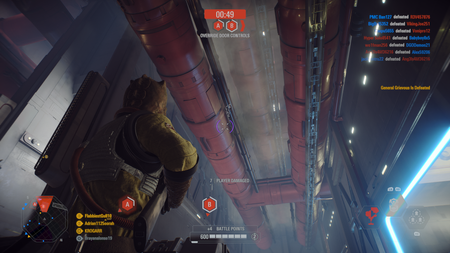
2026 Battlefront II Galactic Assult Phase Camera-Locking Bug
Issue: So I have been playing Battlefront II on PC for quite some time. Ever since January of 2026, there has been this very annoying bug that locks your screen in a direction (commonly up or down) that is impossible to fix unless you respawn which ruins the experience. This bug occurs when playing Galactic Assault and the next phase of the game begins. Solution: I have spoken to countless EA advisors about this and I always am getting the same answer. They claim they will note this issue to game developers and will update the issue on their pages. I am hoping this post gets some attention from a Battlefront II developer, team member, or any sort of people that has the power to do something. Please BF2, we need you!86Views0likes2CommentsAll classes, weapons, star cards etc set back to level 0 on Xbox
I logged on to Battlefront 2 the other day and saw that all my classes and what not were good to go. Jumped into a game and found out everything was reset to level 0. I have tried everything from hopping into a game or two to see if it fixes it, closed out the game, everything under the sun to see if it would fix it seeing as it could possibly be a server communication error but to no avail. Has anyone else run into this problem and know more work arounds?51Views0likes2CommentsMy TL-50
So ive beaten the mission to recieve my TL-50 on Battlefront II, however even though ive checked the missions list to double check its completed, and restarted my xbox, and replayed an entire Co-op and ensured i got at least one more kill, the crate still hasnt popped up and i still havent recieved my blaster, id really like that blaster as i have put hours into the game to kill 400 plus people, any help or can somebody direct me to the EA community service people so they can manually give me the blaster through my account, thank you17Views0likes1CommentBF II don't start
Hello, I am reaching out to support because Star Wars Battlefront II has not been working for several weeks and I have exhausted every solution I could find. Exact symptom: the game launches, the window opens for about 2 seconds, it attempts to go fullscreen, then silently closes and reopens the EA launcher. No error message, no error code, nothing. Sometimes it accepts to launch once or twice, then stops working entirely afterwards, without any changes made on my end between sessions. System configuration: - GPU: AMD Radeon RX 7700 XT - CPU: AMD Ryzen 7 9700X - Secure Boot: Enabled - BIOS Mode: UEFI - Game purchased via Steam, tested via both Steam AND the EA App Troubleshooting steps already attempted without success: - Full uninstall of the game (including system files) and reinstall - Clean AMD driver reinstall using DDU (Display Driver Uninstaller) - Disabled Radeon Anti-Lag - Installed Visual C++ Redistributable 2015-2022 x64 and x86 - Cleared the EA App cache - Verified game file integrity via Steam (no corrupted files detected) - Reinstalled EA AntiCheat via EAAntiCheat.Installer as administrator - Checked environment variables (no GAME_DATA_DIR present) - Disabled DirectX 12 in the game config files - Checked Windows Event Viewer (no error logged at the time of the crash) I suspect the issue is related to EA Javelin AntiCheat silently killing the process, as the behavior matches exactly: silent crash with no message, random between sessions, no trace in Windows logs. I saw that both: SWB2 crashes when the game starts. | EA Forums - 13430650 and SWB2 crashes when the game starts. | EA Forums - 13430650SWB2 crashes when the game starts. | EA Forums - 13430650 seems to have the same problem, I hope you're gonna find what is wrong with it Thank you for your help in resolving this issue.193Views0likes6CommentsData problem (level 148 but no skill points)
Level 148 but zero skill points and no Star Cards after switching Xbox profiles Platform: Xbox Series X Gamertag: Dograbbit77 My Battlefront II progress was originally on an older Xbox profile (gamertag started with “Blaster” followed by numbers). I switched over to my current profile, Dograbbit77, and the game showed a message confirming it was switching over from the Blaster profile. My levels came across fine — my career level and my class levels are all still intact. What did not come across is everything else. All my Star Cards are locked, and the skill points counter in the Collection screen is completely blank rather than showing a number. Attached is a screenshot of Collection / Assault, showing the class at level 148 with 0/3 cards selected, every Boost Card and Ability Card locked, and no value at all next to SKILL POINTS. At level 148 I should have a large number of skill points available, so the balance clearly hasn’t carried over even though the levels did. What I have tried: • Fully quitting the game and hard restarting the console • Signing out of my EA Account in-game and signing back in • Confirming in my EA Account settings that Dograbbit77 is correctly linked to the right EA Account I have deliberately not unlinked and relinked anything, as I understand that can make the loss permanent. I have also avoided playing any matches with my classes, since I’ve seen reports that playing a match causes the displayed level to drop back to 1. Could someone please look into restoring the skill points and card unlocks on this account? I’m happy to provide any further details or screenshots needed. Thanks.23Views0likes1CommentSplit screen bug
Every time I do arcade, coop, battle scenarios split screen, on both light and dark side when you get to the level with the starkiller base map, it crashes mid way through loaded and sends me back to the Xbox Home Screen, haven’t seen this happen anywhere else on this map, tried multiple things to fix it, and nothing worked. Please fix this bug because it makes it impossible to progress through the split screen43Views0likes1CommentSupremacy Ship; Holding point glitch
While in a game of Supremacy on the age of the republic game mode, I noticed that my team was unable to take one of the points on the Clone ship, because it remained contested. I was playing Bossk and I threw my Dioxis Grenade around the point multiple times to find where the enemy was to see who was contesting the point.(Bossk highlights enemies who are being affected by his Dioxis Grenade) Eventually I found an aerial clone trooper who was able to get to a spot on a pipe above the point. Even though he wasn't on point directly, he was still able to contest the point, and he was in a position where no one could shoot them. Hopefully this can be patched by either having the pathway to the pipe inaccessible or have the point unable to be contested if a player is not directly on the point.56Views0likes1Comment
Galactic Assault's Broke
This new update or whatever happened there's a bug that makes it so each phase, all blaster units; special units and blaster heroes, sans jedi and vehicles, the camera locks up making your unit unplayable as it's stuck with not way to move, it's broke! Your mouse doesn't work and the only real recourse is to respawn, the game is broken due to this feature. Capturing teams lose 10-20 per phase and now even more recently the objective is broke, so you can't even capture. It's broke. The bug affecting players needs to be fixed, it still allows hacks and cheaters through so if it was a go at an anti hack, it failed miserably and should revert and EA needs to reset its servers due to the virus that infected it if not. It's Broke, Fix it EA, you're slow at support. It's been a week now at least and now it's to the point where you can't even spawn. It's Broke.830Views4likes8Comments