missing expansion and game pack
To start I had installed both correctly. However, Dining out did not show up in my plots as a restaurant. So, I only went to uninstall Dining out, but I made a mistake by uninstalling both Business and Hobbies and Dining out. I should not have uninstalled Business and Hobbies. This created a problem with one of my saves. I made another mistake and tried to recover that save. It will not let me recover it again. When I reinstalled both of them, neither save can find them and build mode in lighted up like I have new items; I do not have any new items. So, it has affected my build mode. The EA app says they are installed and part of the in game recognizes them and doesn't connect correctly to full build mode. My laptop is a separate game and I have access to all features. I very much want my desktop to show me it also, I am not computer smart, by I know many other players might be able to reset using code. Please help me. I tried to compare the file from both computers but my desktop has further issues with copies of copies 1,2 and original updates or whatever those lines of things after sims 4 folders that start this game with.
Stuck at a half-loaded title screen...
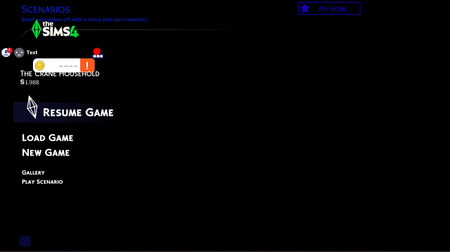
I just uploaded the newest update today, and now I am stuck at the title screen, which is suddenly mostly black with icons all over the place (see image). I tried removing and then deleting the one mod I had. Then I uninstalled and reinstalling Sims 4 from my computer, then totally uninstalled the EA app and reinstalled it with just the Sims 4 base game and no additional packs - and still I can't get past a broken loading screen. I've cleared my cache in the EA app, and have no cache file to delete in my Sims 4 folder. I have reset my graphics card, and I am at a total loss as to what I should try to get the game to load fully so I can actually play. Everything looks normal until the load screen, and the music and sounds associated with selecting different areas are as normal. But nothing loads past this point. In trying to troubleshoot, I was able to resume the game I had last been playing randomly on one attempt (don't ask me what I did that time; nothing seemingly different than any other time), and while my Sims autoplayed, I couldn't control anything. Every single time, once the game loads to the point below, I can't even close it without using Task Manager. Help!Sims 4 - Won't save any progress
Hi, my game will not save. When playing all progress is lost, I can add money to the household/delete sims and it will revert back to the original amount/family when I click "manage worlds". I removed mods/CC and repaired the game. Nothing has worked, OneDrive is also not installed. I went into old saved games and this issue is not happening. I just don't want to start over again.Game will not progress past first loading screen and shows black (see image)
I recently downloaded the newest update, which I assume would be the marketplace and broken .package file update and the patch update combined, and my game has completely stopped loading. I have tried everything from clearing both EA and Sims 4 cache to updating my drivers to making a new, clean game file (it does load and can only handle a portion of non-script cc without breaking) to uninstalling and reinstalling the game twice, which is when the partial cc had originally began to work. I've attempted siphoning my mods in and out to see what causes the issue but I can't even get that far without the "cannot run because EA app needs to be open" error appearing. I did move my save, mods and tray files from my original game and attempted putting them back into the new one, but that also causes the black screen. The one or two times I did get it to sort of work, my save files were not there, and I worry they might be corrupted and I don't have anything backed up. In the new game file I made, it was borderline unplayable due to the sheer amount of lag it had, and previous to the update I had no lag issues. Occasionally the game will boot to a completely white window then force close with the "ea needs to be running" error. I have deleted all script cc and tried to remove all duplicate or recently downloaded cc. I have repaired the game multiple times through EA and it hasn't helped much from what I can tell. I have tried running a dxdiag but it does not even show the ability to run. I have also tried running EA as administrator to no use. I have attached my most recent UIException file. If it is of any use, I am on Windows 10.My saved games are gone
Hi , so I finally managed to open up my game. But there is a problem. My households and everything are gone. I don't know if it's because of me or the game. But the game just says start a new game and all of my saved games are gone. Is it because of me? Did I forget to do something like saving the game? I'm confused right now:( I actually mentioned it when my game was crashing, the last time managed to open it up it was also gone but I thought it was because of the crashing. Yeah so I'm pretty lost right now Thanks97Views0likes3Comments
sim idling reset/loop
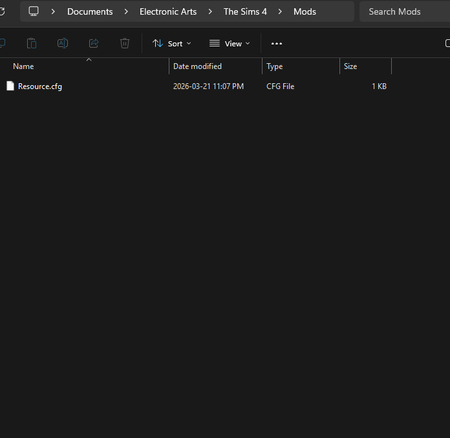
I don't know if this is a bug or a technical issue at this point. Issue: sim is standing stuck in an animation loop - no tasks/actions in queue. Troubleshooting steps taken: I thought it was mod related, so I did the 50/50 method however tonihgt I've fully removed ALL my mods [see attached image as proof] > uninstalled> reinstalled the game > started multiple new save files after launching the game after clearing my cache; the issue is still persisting. The only thing I have done was import my sims tray files on a back-up the night before the update (using the sims tray importer) so I can safely keep my sims safe; as I play only play this household and have for a long time. I'm really hoping this isn't a sign of corruption? Is this happening due to the EA launch error? I'm a steam user and did not experience error launches. Video attached so you can visibility see what it doing on and that there are no tasks in the sim's action bar. YOUTUBE VIDEO - > https://youtu.be/6swGqmXdOWo I'm on a new PC - this is a NEW PC I got last week so it shouldn't be a computer problem as I can run other more demanding games with ease and no issues. [I'm running the game on a Lenovo legion pro 5 Ryzen 9 8945HX GeForce RTX5070 windows 11] Thank you,